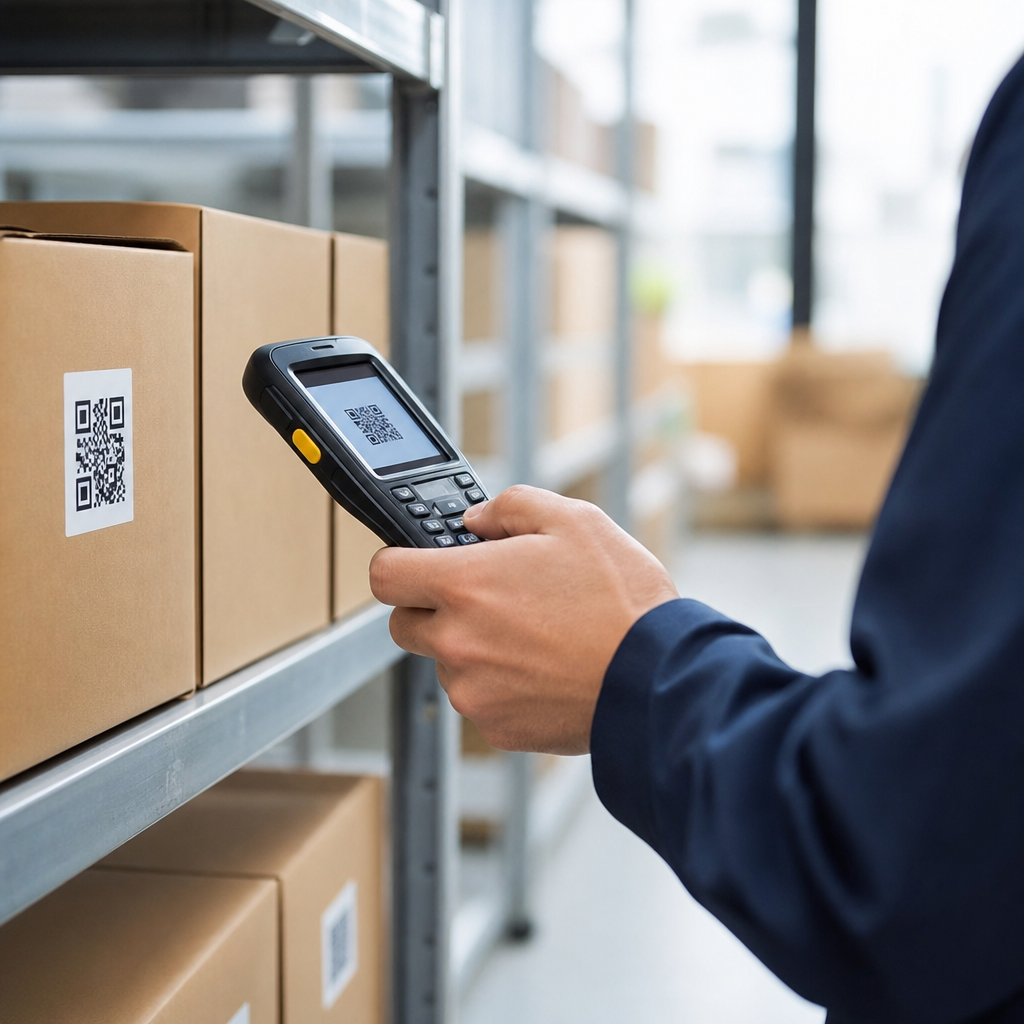
Using QR codes for inventory management gives retail and e-commerce teams a fast, low-cost way to identify products, track stock movement, reduce manual errors, and connect physical goods to digital records in real time. A QR code, or quick response code, is a two-dimensional barcode that stores more data than a traditional UPC barcode and can be scanned by smartphones, handheld scanners, tablets, and fixed warehouse devices. In inventory operations, that extra capacity matters because one code can link a stock keeping unit, batch number, serial number, location, supplier data, reorder threshold, and inspection history to a central system. I have implemented QR-based workflows for store backrooms, fulfillment shelves, returns cages, and receiving docks, and the practical benefit is always the same: staff find items faster and managers trust the inventory numbers more.
For retail and e-commerce, inventory accuracy is not a back-office metric. It directly affects stock availability, pick speed, shrink control, customer satisfaction, and cash flow. If a product shows as available online but is missing on the shelf, the business pays twice: once in a canceled sale and again in labor spent investigating the discrepancy. Industry studies from IHL Group and the National Retail Federation have repeatedly shown that stockouts, overstocks, and shrink cost retailers billions annually. QR codes help address those losses by making every stock touchpoint easier to record. They also fit modern omnichannel retail, where one item may move from supplier to distribution center, to store, to click-and-collect hold area, or directly into a parcel shipment. A simple scan creates the audit trail needed to manage that complexity without forcing every team to use expensive proprietary hardware.
This hub article explains how QR codes improve inventory management across retail stores, warehouses, and e-commerce fulfillment environments. It covers setup, workflows, benefits, limitations, tool choices, and measurement. It also acts as a foundation for related topics such as cycle counting, returns processing, shelf audits, buy online pick up in store operations, and small business inventory systems. If you need a direct answer, here it is: QR codes improve inventory management by making item identification, stock updates, location tracking, and exception handling faster and more accurate than manual entry, while remaining flexible enough for both high-volume retail chains and growing online sellers.
How QR codes work in retail and e-commerce inventory systems
At a technical level, a QR code is an optical label that encodes information in a square grid of black and white modules. In inventory management, the code usually contains either the data itself or, more commonly, a unique identifier that points to a record in software such as Shopify, NetSuite, Brightpearl, Cin7, Fishbowl, Odoo, Zoho Inventory, or a warehouse management system. The best practice is to store a short, stable ID in the code and keep changing data in the database. That approach avoids reprinting labels every time cost, stock level, or supplier lead time changes.
Retailers typically use QR codes in one of three ways. First, item-level labeling assigns a unique code to each unit or serial-controlled product, which is useful for electronics, rentals, repairs, and luxury goods. Second, bin-level labeling identifies storage locations in backrooms, stockrooms, and fulfillment shelves, allowing workers to confirm they picked or replenished from the correct place. Third, carton or pallet labeling supports receiving, transfers, and bulk movements. In practice, the strongest systems combine all three. For example, a fashion retailer can scan a receiving carton into a stockroom zone, then scan individual apparel units during cycle counts, then scan a tote QR code when transferring items to the sales floor.
Compared with one-dimensional barcodes, QR codes offer more flexibility. They can hold URLs, GS1 Digital Link structures, text strings, or serialized identifiers, and they remain readable even when partially damaged because of built-in error correction levels. That does not make them automatically better for every process. Standard UPC and EAN barcodes remain essential at point of sale, and many businesses run both formats side by side. The operational question is not whether QR codes replace all barcodes. It is where their greater data capacity and smartphone compatibility create measurable gains.
Core inventory workflows improved by QR code scanning
The highest-impact use cases appear where staff currently write notes, key data into forms, or rely on memory. Receiving is the first clear example. When inbound stock arrives, workers scan the shipment QR code, match it to the purchase order, record quantities, and flag discrepancies immediately. Instead of discovering a short shipment during the next stock count, the issue is captured at the dock. I have seen receiving time drop significantly after replacing paper checklists with scan-based verification because workers stop switching between labels, clipboards, and terminals.
Putaway is another strong fit. After receipt, products are assigned to a shelf, bin, rack, or backroom bay. Scanning the product and then the location confirms that inventory was placed correctly. This matters in e-commerce fulfillment, where one mis-slotted SKU can produce repeated picking delays and mis-shipments. Picking itself becomes more reliable when workers scan the location and item before packing. The scan acts as a validation step that catches wrong-color, wrong-size, or wrong-variant errors before they reach the customer.
Cycle counting benefits because QR codes make counts more granular and less disruptive. Instead of shutting down sections for annual wall-to-wall counts, retailers can count high-value or fast-moving items daily and slow movers weekly or monthly. Transfers between stores, stockroom replenishment, returns intake, damaged-goods segregation, and vendor-managed inventory all become easier to audit when every move creates a timestamped scan record. That audit trail is especially valuable for omnichannel operations, where an item reserved for pickup cannot also be treated as available for walk-in sale.
Implementation strategy, tools, and labeling standards
A good implementation starts with process mapping, not label printing. Document how inventory currently moves from supplier to sale, identify where errors occur, and define what each scan should confirm. Then select the data model. For most retailers, each QR code should resolve to at least SKU, variant, location, status, and quantity context. If products require traceability, include batch or serial tracking. If compliance matters, follow GS1 standards where possible, especially when integrating with suppliers or third-party logistics providers.
| Workflow | Recommended QR target | Primary benefit | Typical tool examples |
|---|---|---|---|
| Receiving | Purchase order or carton ID | Faster discrepancy detection | NetSuite WMS, Odoo Barcode |
| Putaway | SKU plus location ID | Accurate stock placement | Fishbowl, Zebra scanners |
| Picking | Pick task and bin location | Lower mis-pick rate | Shopify apps, Cin7 |
| Cycle counts | Item or shelf identifier | Better count accuracy | Zoho Inventory, Sortly |
| Returns | Order ID and disposition status | Quicker restocking decisions | Loop Returns, custom mobile forms |
Hardware and software choices should match volume and environment. Smartphone scanning works well for boutiques, pop-up operations, and growing e-commerce brands. Rugged handhelds from Zebra or Honeywell are better for larger warehouses because battery life, scan speed, and drop resistance matter on long shifts. For labels, use thermal printers from Zebra, Brother, or Rollo and choose materials suited to heat, moisture, abrasion, or freezer conditions. A glossy consumer sticker may fail quickly in a stockroom.
One practical lesson from deployments is to keep labels human-readable. Include a short product code or location name under the QR code so staff can still verify items if a scanner camera struggles. Establish reprint rules, scan permissions, and exception workflows before launch. If an item lacks a readable label, workers need a documented fallback that preserves data quality rather than encouraging unofficial shortcuts.
Benefits, limitations, and performance metrics that matter
The biggest benefits are accuracy, speed, traceability, and accessibility. Accuracy improves because scans replace manual typing. Speed improves because staff can identify products and locations instantly. Traceability improves because every movement can be logged with user, time, and status. Accessibility improves because QR systems can run on devices many teams already own. For small retailers, that lower adoption barrier is important; they can start with mobile phones and cloud inventory software, then upgrade hardware as order volume grows.
There are limitations. QR codes still depend on disciplined process design, clean master data, and staff compliance. A code that points to duplicate SKUs or an outdated location record will not fix the underlying data problem. Camera scanning can be slower than laser scanning in some environments, and damaged labels, poor lighting, or tiny print sizes can reduce read rates. Retailers with extreme throughput may still favor traditional linear barcodes for some conveyor or point-of-sale applications. The strongest programs use QR codes where they add operational value, not as a blanket replacement for every existing label.
Measure results with clear operational metrics. Track inventory accuracy percentage, receiving turnaround time, pick accuracy, cycle count completion rate, return-to-stock time, shrink by category, and labor minutes per order. Also monitor scan compliance: if workers bypass scans during peak periods, data quality erodes quickly. In my experience, the most successful retail and e-commerce teams review exception reports weekly, retrain on the exact failure points, and refine labels or workflows continuously. If you are building this capability, start with one process such as receiving or cycle counts, prove the gain, then expand. QR codes for inventory management work best when they become part of everyday retail discipline, not a side project.
For retail and e-commerce businesses, the case for using QR codes in inventory management is straightforward: better visibility, fewer errors, faster fulfillment, and a cleaner link between physical stock and digital systems. They support store operations, warehouse execution, omnichannel fulfillment, and returns without requiring a complete technology overhaul. When paired with sound data standards, practical labeling, and software that records every scan, QR codes turn routine stock handling into a controlled, measurable process.
The key takeaway is that QR codes are most valuable where inventory changes hands often and mistakes are expensive. Receiving, putaway, picking, cycle counting, transfers, and returns all benefit because scanning creates immediate confirmation and a permanent audit trail. Retailers gain more reliable stock availability, and e-commerce teams ship with greater confidence. Those outcomes improve customer experience as much as internal efficiency.
If this article is your starting point for the Retail & E-Commerce hub, use it to map the processes you need to tighten first, then explore related guidance on cycle counts, shelf audits, store transfers, and returns workflows. Choose one pilot area, define the scan rules, measure the before-and-after results, and expand from there. That is how QR codes become a practical inventory advantage.
Frequently Asked Questions
How do QR codes improve inventory management compared with manual tracking or traditional barcodes?
QR codes improve inventory management by making product identification, stock updates, and record access much faster and more accurate than manual methods. Instead of writing down SKU numbers, checking spreadsheets by hand, or relying on memory, staff can scan a code and instantly pull up the exact item record in an inventory system. That reduces common mistakes such as transposed numbers, duplicate entries, missed updates, and incorrect product lookups. In busy retail stores, stockrooms, and fulfillment operations, eliminating those small errors can make a major difference in overall inventory accuracy.
Compared with traditional one-dimensional barcodes, QR codes can hold more information and can link physical products directly to digital records in real time. A single QR code may be used to reference a product ID, batch number, location, supplier details, serial number, reorder data, or handling instructions, depending on how the business structures its system. They are also easy to scan from different angles and can be read by smartphones, tablets, handheld scanners, and warehouse devices, which gives businesses more flexibility without requiring expensive specialized hardware across every workflow.
In practical terms, QR codes help teams receive inventory faster, move stock more confidently, complete cycle counts with less effort, and trace item movement from arrival to sale or shipment. That visibility supports better demand planning, fewer stockouts, less overstock, and stronger accountability across the supply chain. For growing retail and e-commerce businesses, QR code inventory management is often a low-cost way to modernize operations without rebuilding the entire technology stack.
What information can a QR code store for inventory management?
A QR code can store or reference a wide range of inventory-related data, which is one of the main reasons it is so useful in warehouse and retail operations. At a basic level, a QR code can identify a product using an SKU, item number, or internal database ID. However, many businesses use QR codes to support much richer inventory records, including serial numbers, lot or batch numbers, expiration dates, warehouse bin locations, supplier information, manufacturing details, product variations such as size or color, and even links to digital documents.
In many inventory systems, the QR code itself does not need to contain every data point in full. Instead, it may contain a unique identifier or URL that connects the scanned item to a cloud-based inventory platform, ERP, WMS, or POS system. That approach is often more scalable because it keeps labels simpler while still giving employees access to complete, real-time records. Once scanned, staff can view availability, recent stock movement, return status, purchase history, handling instructions, or fulfillment requirements from the connected system.
The right structure depends on the business model. For example, a retailer might use QR codes mainly for fast stock counts and shelf replenishment, while an e-commerce warehouse may include data needed for picking, packing, and traceability. Businesses handling perishable, regulated, or serialized goods often benefit the most from QR codes because they can support detailed tracking without slowing down operations. The key is to standardize what each code represents and ensure the data format matches the inventory software and workflows already in use.
Can QR codes help reduce inventory errors and stock discrepancies?
Yes, QR codes can significantly reduce inventory errors and stock discrepancies when they are implemented as part of a consistent scanning workflow. Most inventory problems happen when stock movement is recorded late, entered manually, or missed entirely. For example, an item might be received but not logged correctly, transferred between locations without documentation, or picked for an order but not deducted from available stock. QR code scanning helps close those gaps by making it easier for employees to record each step at the moment it happens.
Because scanning is faster than typing, teams are more likely to follow the process consistently. That improves data quality across receiving, putaway, transfers, cycle counting, returns, and shipping. Instead of relying on handwritten notes or memory, staff scan the product and often the storage location as well, which creates a more reliable transaction trail. This not only lowers error rates but also makes discrepancies easier to investigate. Managers can see when an item was last scanned, where it moved, and which process may have caused a mismatch.
QR codes are especially effective when paired with inventory software that updates stock levels in real time. If a product is scanned during receiving, counted during an audit, and scanned again when picked for an order, the system can maintain a much more accurate on-hand quantity. Over time, that leads to fewer stockouts, fewer oversells, better replenishment decisions, and stronger customer trust. While QR codes are not a complete substitute for process discipline, they are one of the most practical tools for reducing the human error that drives many inventory inaccuracies.
What does a business need to start using QR codes for inventory management?
Getting started with QR codes for inventory management is usually straightforward, especially for businesses that already use some form of digital stock tracking. At a minimum, a company needs a system for assigning unique item identifiers, a way to generate and print QR codes, and devices that can scan them. Many businesses use inventory management software, warehouse management systems, or integrated e-commerce platforms that already support custom labels and mobile scanning. If not, there are third-party tools that can generate QR codes and connect them to existing databases or spreadsheets.
Hardware needs are flexible. Smartphones and tablets can work well for smaller operations or mobile retail teams, while larger warehouses may prefer rugged handheld scanners and fixed scanning stations for higher volume and durability. Businesses also need printers and label materials appropriate for the environment. For example, freezer storage, high-moisture areas, outdoor yards, or heavy handling zones may require more durable labels than a standard retail shelf. The physical quality and placement of labels matter because a damaged or poorly positioned code can slow down scanning and reduce adoption.
Just as important as the technology is the process design. A business should decide when items will be labeled, what each QR code will represent, which events require scanning, and how employees will be trained. A successful rollout typically starts with a limited use case, such as receiving or cycle counting, then expands once the team is comfortable. Clear naming conventions, standardized data fields, and integration with existing systems are essential. When setup is done thoughtfully, QR code inventory management can be introduced without major disruption and can begin delivering efficiency gains quickly.
Are QR codes a good fit for both retail stores and e-commerce warehouses?
Yes, QR codes are a strong fit for both retail stores and e-commerce warehouses because they support fast identification, flexible data access, and real-time stock visibility across different operating environments. In retail, QR codes can be used in backroom inventory, shelf replenishment, stock counts, receiving, and returns processing. Store associates can scan products with mobile devices to confirm item details, check on-hand quantities, locate alternate stock, and update counts without returning to a desktop workstation. That helps stores maintain better shelf availability and improve the customer experience.
In e-commerce warehouses, QR codes are especially valuable because fulfillment depends on accurate, high-speed workflows. They can help teams identify products during receiving, assign storage locations, verify picks, track packed orders, and monitor transfers between warehouse zones. For businesses managing large catalogs, product variants, kits, or serialized items, QR codes reduce the risk of shipping the wrong item and make traceability much easier. They also support scalable operations because the same code can connect workers to detailed digital records as order volume grows.
The exact implementation may differ by channel, but the core value is the same: QR codes connect physical inventory to digital systems with minimal friction. Omnichannel businesses often benefit the most because they need a unified view of stock across stores, warehouses, and online sales channels. With the right integration, a scanned item can update availability everywhere at once, helping prevent overselling and improving replenishment planning. For both retail and e-commerce teams, QR codes offer a practical balance of affordability, speed, and operational control.