
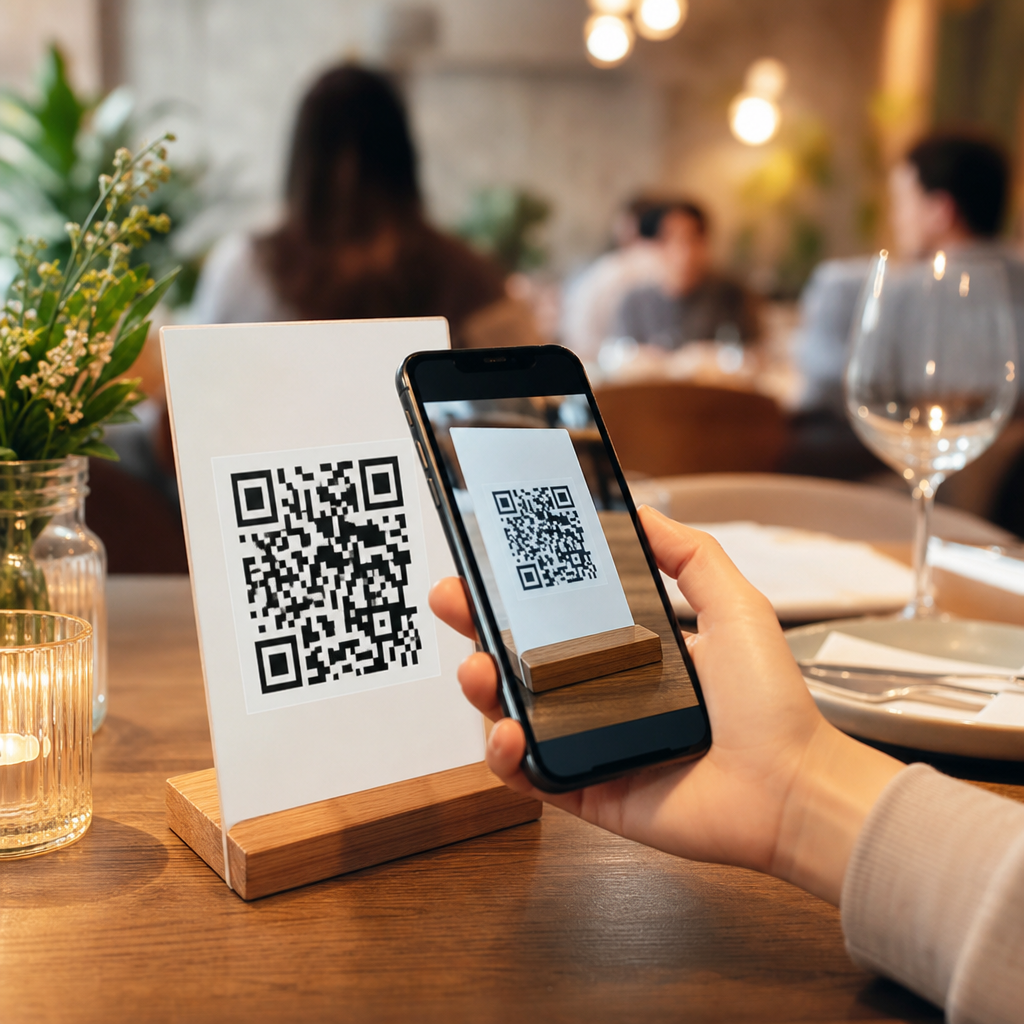
QR codes for restaurant reviews and feedback have become one of the simplest, highest-impact tools for improving guest experience, increasing public ratings, and collecting operational insight at the exact moment diners are ready to respond. In restaurants and hospitality, a QR code is a scannable image that opens a digital action, such as a Google review page, a private feedback form, a menu, a loyalty sign-up, or a post-visit survey. For review management, the value is straightforward: it reduces friction between a guest’s experience and their response. When I have implemented these systems for restaurant operators, the biggest lift has not come from flashy design; it has come from removing steps. If a guest can scan, tap, and submit in under a minute, response volume rises.
This matters because reviews now influence discovery, trust, and revenue. A restaurant’s average star rating, review count, recency, and owner responses all shape whether a potential customer books a table, places a delivery order, or walks in. Private feedback matters just as much. It surfaces service issues, wait-time frustration, food quality inconsistency, restroom cleanliness concerns, and staff recognition before those issues become public complaints. In hospitality, where margins are tight and repeat visits determine lifetime value, QR codes create a direct bridge between the dining room and the data needed to improve it. Used well, they support reputation management, guest recovery, staff coaching, and local visibility across the entire restaurant and hospitality category.
How QR codes improve restaurant reviews and feedback collection
The core advantage of QR codes for restaurant reviews and feedback is immediacy. A guest who just enjoyed dinner is far more likely to leave a positive review while still at the table than later at home. The same principle applies to complaints. If the route to private feedback is easy, guests often choose to report an issue directly instead of posting a one-star review. I have seen restaurants double review volume simply by moving from a printed “Find us online” message to a tabletop QR code linked directly to the preferred destination.
Restaurants typically use two response paths. The first is a public review path, usually Google Business Profile, though Tripadvisor, Yelp, OpenTable, Facebook, or Booking.com may matter depending on the venue type. The second is a private feedback path through Typeform, Jotform, Google Forms, or a hospitality CRM. Full-service restaurants often benefit from both: a landing page can ask whether the guest had a great experience or needs help, then route them accordingly. That approach does not guarantee positive public reviews, but it does reduce avoidable public complaints by giving dissatisfied guests an immediate service-recovery option.
Placement affects performance more than most operators expect. The best-performing placements are check presenters, table tents, receipts, takeaway packaging, host stands, and post-stay cards for hotel dining outlets. Fine-dining venues usually need subtler placement than quick-service restaurants, but discreet does not mean hidden. Staff prompting matters too. A server saying, “If you enjoyed everything tonight, the code on your check makes it easy to leave us a quick review,” consistently outperforms silent placement because it provides context and permission.
Best use cases across restaurants and hospitality
Different hospitality businesses need different QR code review strategies. Quick-service restaurants benefit from speed and volume. A code on the tray liner, kiosk screen, or takeaway bag can drive immediate ratings on Google after a fast, low-touch visit. Casual dining restaurants often use receipts and tabletop displays because guests remain seated long enough to scan. Fine-dining restaurants usually get better results when the invitation comes with the check folder or in a follow-up message linked to a reservation system, preserving the tone of the experience.
Hotels, resorts, bars, cafes, food halls, ghost kitchens, and catering businesses also fit within this hub topic. Hotel restaurants may need separate feedback flows for breakfast service, room service, lobby bar, and signature dining because guest expectations differ by outlet. Cafes often use QR codes to ask for short reviews centered on speed, coffee quality, and atmosphere. Catering businesses can place QR codes on event follow-up emails or packaging inserts to capture testimonial-style feedback. Delivery-first brands can use packaging stickers that ask about food condition, order accuracy, and courier handoff, information that often gets lost when relying only on marketplace reviews.
The hub-level lesson is that channel, timing, and context should match the service model. A brunch cafe wants broad review volume and social proof. A boutique hotel restaurant may care more about nuanced service feedback and reputation among high-intent travelers. A multi-location chain needs location-specific attribution so managers can compare branch performance. The QR code itself is simple; the system behind it must reflect the business type.
Implementation steps, tools, and measurement
Successful implementation starts with a clear objective. Decide whether the primary goal is more Google reviews, more private feedback, better complaint interception, or location-level reporting. Then create dynamic QR codes rather than static ones. Dynamic codes, available through tools such as QR Code Generator, Bitly, Beaconstac, Flowcode, and Uniqode, let you change the destination later, track scans, and create separate codes by table, shift, campaign, or location. That flexibility is essential for testing.
Next, build the destination experience. Do not send guests to a cluttered homepage. Send them directly to the Google review form, a mobile-friendly survey, or a simple landing page with two clear choices. Keep surveys short. In most restaurant environments, three to five questions is the practical limit unless the guest is completing the form after departure. Ask about food quality, service, cleanliness, value, and likelihood to return. Include one open-text question for details. If the business can act quickly, collect contact information for service recovery.
| Element | Best practice | Why it works |
|---|---|---|
| QR code type | Dynamic, trackable | Allows edits, scan analytics, and location-level testing |
| Destination | Direct review link or short mobile form | Reduces drop-off caused by extra clicks |
| Placement | Check presenter, receipt, packaging, table tent | Reaches guests at the decision moment |
| Prompt | Brief staff invitation | Raises scan rates through human context |
| Metrics | Scans, submissions, star rating, response time | Connects activity to reputation outcomes |
Measurement should go beyond scan count. Track scans-to-submissions, review growth by platform, average star rating, negative-feedback themes, manager response time, and recovered guests. If possible, compare locations with and without prompts, lunch versus dinner scans, and dine-in versus takeaway packaging. Operators using Google Business Profile should monitor review recency because fresh reviews improve credibility more than old review totals alone. The system becomes valuable when it produces patterns managers can act on, not just vanity metrics.
Compliance, guest trust, and common mistakes
Restaurant review collection must be ethical and platform-compliant. Google, Yelp, and Tripadvisor generally prohibit review gating if it means selectively asking only happy customers to post public reviews while suppressing unhappy ones. The safer approach is to invite all guests to share feedback and provide a legitimate private support route without manipulating who can review publicly. Incentivized reviews are also risky. Offering discounts, freebies, or sweepstakes entries in exchange for positive reviews can violate platform policies and undermine credibility.
Trust depends on presentation and data handling. Guests should know where the code leads before they scan. Brand the card or receipt clearly, use a readable call to action, and avoid shortened links that look suspicious when printed alongside the code. If a survey collects personal information, state how it will be used and who will follow up. In hotel and restaurant groups, feedback workflows should also define who owns response time, escalation, and closure. A code that captures complaints but leaves them unanswered damages trust faster than having no survey at all.
The most common mistakes are operational, not technical. Restaurants print static QR codes and later discover the linked page changed. They place codes where guests never notice them. They ask for ten-question surveys during a rushed lunch service. They fail to test the scan experience on older phones, dim lighting, or glossy receipt paper. They do not train staff, so the request feels random. In my experience, the best results come from simple execution: clear destination, visible placement, short form, and disciplined follow-up.
Building a scalable hub strategy for Restaurants and Hospitality
As a sub-pillar hub within Industry-Specific Applications, this topic should connect review collection to the broader restaurant and hospitality ecosystem. That includes QR codes for digital menus, table ordering, reservations, loyalty enrollment, Wi-Fi login, event feedback, room-service surveys, and franchise reporting. Reviews are not a standalone tactic. They sit inside the guest journey, from discovery to booking to dining to return visit. A strong hub page helps operators understand that each touchpoint can feed data, reputation, and revenue when designed as one system.
For multi-location brands, standardization is critical. Create approved templates for table tents, receipts, window decals, and packaging inserts, but localize the destination links by branch. Use naming conventions that identify market, location, and channel so analytics remain clean. Franchise and regional operators should also set response policies: who answers reviews, what turnaround time is required, when to escalate complaints, and how recurring themes are reported to operations. This turns QR codes from a marketing accessory into a measurable guest-experience program.
Restaurants and hospitality businesses use QR codes for reviews and feedback because they make response easier, faster, and more actionable at the moment experience is freshest. The strongest programs match the code placement to the service model, send guests to a direct mobile-friendly destination, and track outcomes beyond simple scans. They also respect platform rules, avoid manipulative review practices, and treat private feedback as an operational asset rather than a box-checking exercise.
As this hub expands, it should guide readers into related restaurant and hospitality applications, from menu access and ordering to loyalty and post-stay communication. The main benefit stays the same: better feedback loops create better guest experiences, stronger public reputation, and clearer decisions for managers. If you run a restaurant, cafe, bar, hotel outlet, or multi-unit hospitality brand, start with one location, one review destination, and one measurable workflow. Test it, refine it, and scale what works.
Frequently Asked Questions
1. How do QR codes help restaurants get more reviews and better guest feedback?
QR codes make the review and feedback process immediate, simple, and highly convenient for diners. Instead of expecting guests to search for a restaurant later, remember the business name, find the correct review profile, and complete the process on their own time, a QR code removes nearly all friction. A guest can scan the code with their phone and be taken directly to a Google review page, a private feedback form, or a short post-meal survey in seconds. That ease of access matters because response rates are often highest at the exact moment the dining experience is still fresh.
For restaurants, this creates two major advantages. First, it increases the likelihood of capturing positive public reviews from satisfied guests who may not have taken the extra step on their own. Second, it creates a reliable channel for collecting operational insight, including comments about food quality, service speed, cleanliness, staff friendliness, wait times, and overall satisfaction. Because the interaction happens so close to the guest experience, the feedback is usually more accurate, specific, and useful.
QR codes also support a more strategic reputation management process. Restaurants can place one code on receipts, another on table tents, and another in follow-up messages, each linked to a different destination or campaign. This allows operators to test what placement and messaging produce the most scans and conversions. Over time, that data can help improve not just review volume, but also the quality of feedback and the restaurant’s ability to respond to guest needs quickly.
2. Where should a restaurant place QR codes to get the best response from guests?
The best placement for a QR code depends on when a guest is most likely to engage, but in most restaurants, high-performing locations are those that naturally align with the end of the dining experience. Receipts are one of the strongest options because they reach nearly every paying customer and appear at a moment when the guest is already wrapping up their visit. Table tents are also effective, especially when the message is short, clear, and tied to a simple action such as “Leave us a quick review” or “Tell us how we did today.”
Other useful placements include takeout packaging, menus, exit signage, front-desk displays, loyalty cards, and post-visit email or SMS follow-ups. For quick-service and fast-casual restaurants, placing QR codes near pickup stations, drink counters, or packaging labels can work especially well. For full-service restaurants, check presenters and tabletop displays tend to perform better because they fit more naturally into the guest journey.
The key is to avoid overloading guests with too many codes and too many choices. Each QR code should have a specific purpose, a clear call to action, and a destination that matches guest intent. If the goal is public reviews, link directly to the review platform. If the goal is service recovery, link to a private feedback form. It is also important to make the code easy to scan by using sufficient size, strong contrast, and enough surrounding white space. Good placement is not just about visibility; it is about presenting the right request at the right moment in a way that feels helpful rather than intrusive.
3. Should a restaurant send guests to a public review page or a private feedback form first?
The best approach depends on the restaurant’s goals, its current reputation strategy, and how it handles guest service issues. Sending guests directly to a public review page can be very effective when the primary objective is increasing the volume of online reviews on platforms like Google. This approach is straightforward and reduces steps, which usually improves completion rates. If a guest had a great experience, a direct path to the review page gives them the easiest possible way to share that satisfaction publicly.
On the other hand, a private feedback form can be extremely valuable for identifying issues before they become negative reviews. It gives guests a place to mention concerns about slow service, missing items, food temperature, staff interactions, or cleanliness in a lower-pressure setting. That kind of insight can help restaurant managers spot trends, coach staff, fix process problems, and follow up with dissatisfied guests when appropriate. In many cases, private feedback is operationally more useful than a star rating alone because it provides context and specifics.
Many restaurants benefit from using both, but in different situations. For example, one QR code might invite guests to “Leave a Google Review,” while another says “Share Private Feedback with Our Team.” This creates a balanced system that supports both reputation growth and service improvement. The important part is to avoid deceptive gating practices that pressure only happy customers toward public platforms while blocking others. A better long-term strategy is to be transparent, make both options accessible, and use the information responsibly. Restaurants that listen consistently and respond well often improve both their public ratings and their internal operations over time.
4. What should a restaurant include on the page or form that opens after scanning the QR code?
The destination experience matters just as much as the QR code itself. Once a guest scans, the page should load quickly, work perfectly on mobile devices, and make the next step obvious. If the QR code leads to a public review page, the user should arrive as close as possible to the actual review action with minimal extra navigation. If it leads to a private survey or feedback form, the form should be short enough to complete easily while still capturing useful detail.
At a minimum, a good feedback page should include a clear headline, a brief explanation of why the restaurant is asking for input, and a small number of well-designed questions. These might cover overall satisfaction, food quality, service, cleanliness, speed, and whether the guest would return. Optional open-text fields are especially helpful because they allow diners to explain what stood out, whether positively or negatively. It is often wise to ask for location, visit date, or order type as well, especially for restaurant groups or multi-unit operations that need actionable location-specific insight.
The page should also reflect the restaurant’s brand and tone. A polished, trustworthy experience reassures guests that their input matters. Avoid long, complicated forms that ask for too much personal information or take several minutes to finish, as these can sharply reduce completion rates. If appropriate, include a thank-you message after submission and, for private feedback, a way for the guest to request follow-up. The goal is to make the experience feel easy, respectful, and worthwhile so that diners are more likely to complete it and provide meaningful responses.
5. Are QR codes for restaurant reviews and feedback useful for both small restaurants and multi-location hospitality brands?
Yes, QR codes are highly effective for both independent restaurants and larger hospitality groups, although the way they are used may differ. For a small restaurant, the biggest value often comes from simplicity and speed. A single QR code on receipts or tables can help generate more Google reviews, encourage repeat visits, and capture direct guest comments without investing in a complicated system. For owner-operators and small teams, this can be one of the most affordable ways to strengthen online reputation and better understand guest experience in real time.
For multi-location brands, QR codes become even more powerful because they can be tied to individual stores, campaigns, customer segments, or operational workflows. A restaurant group can assign unique QR codes by location, by dine-in versus takeout, or by specific touchpoints such as menus, kiosks, hotel concierge areas, or guest rooms in hospitality settings. This makes it possible to track where scans originate, compare response rates across locations, identify underperforming units, and spot recurring issues more accurately. In a larger organization, that kind of structured insight can support training, quality assurance, marketing optimization, and regional management decisions.
Another advantage for both small and large operators is flexibility. QR codes can link to review platforms, private surveys, digital menus, loyalty enrollment pages, or post-visit service recovery workflows. They can also be updated through dynamic QR code systems without replacing printed materials, which is especially helpful for seasonal campaigns or changing business needs. Whether the restaurant is a neighborhood cafe, a busy quick-service chain, or a full-scale hospitality brand, QR codes offer a practical and scalable way to collect timely feedback, improve guest satisfaction, and build a stronger public reputation.





