QR codes for medical equipment instructions solve a persistent healthcare problem: critical guidance is often hard to find at the exact moment staff need it. In hospitals, clinics, ambulatory surgery centers, and home care settings, devices move between rooms, packaging gets discarded, and printed manuals become outdated. A quick response code links the user directly to the latest approved content with a simple camera scan. For healthcare organizations, that means faster access to setup steps, cleaning procedures, troubleshooting, maintenance logs, and safety warnings without forcing clinicians or technicians to search shared drives or paper binders.
In this context, medical equipment includes everything from infusion pumps and patient monitors to autoclaves, portable ultrasound units, ventilators, CPAP devices, wheelchairs, and home glucose meters. Instructions can include manufacturer directions for use, local standard operating procedures, competency videos, service contacts, and multilingual patient education. I have seen QR workflows reduce avoidable delays during device turnover because staff no longer had to call biomedical engineering for routine questions like battery conditioning, accessory pairing, or approved disinfectant dwell times. The technology is simple, but the operational impact is significant when content governance is handled correctly.
This matters because healthcare depends on consistency, speed, and traceability. A missing cleaning step can compromise infection prevention. A skipped calibration check can affect accuracy. A patient sent home with incomplete instruction may misuse a device and return to the emergency department. QR codes improve access, but their value is not the square image itself; the value comes from connecting each asset to controlled, role-specific information at the point of use. For a healthcare organization building an industry-specific applications strategy, this hub explains where QR codes fit, which use cases deliver the best returns, and what governance is required to deploy them safely at scale.
How QR Codes Support Clinical Equipment Use
The most effective QR code programs start with a clear question: what does the user need in the next thirty seconds? For a nurse setting up sequential compression devices, the answer may be sizing and alarm reset instructions. For sterile processing staff, it may be reprocessing steps and inspection criteria. For a home health patient, it may be a short video showing cartridge insertion on a nebulizer. Linking directly to that answer reduces friction and lowers the chance of improvisation.
In practice, healthcare teams usually separate content by audience. Clinical users need concise operating guidance, alarm meanings, and escalation steps. Biomedical engineering needs preventive maintenance schedules, service manuals, software versions, and parts lists. Environmental services needs cleaning and disinfectant compatibility instructions. Patients and caregivers need plain-language setup, troubleshooting, and contact details. One code can route to a landing page that presents the right options rather than forcing every user through the same manual.
Dynamic QR codes are especially useful because the destination can change without replacing the label on the device. That matters when manufacturers update directions for use, when local policy changes, or when a hospital moves files from one document system to another. Static codes still have a place for fixed information such as asset IDs or offline serial references, but healthcare organizations benefit more from controlled, updateable links managed by compliance and equipment teams.
Core Healthcare Use Cases Across Care Settings
Hospitals use QR codes on mobile and shared devices where time pressure is highest. A code on an infusion pump can open quick-start instructions, approved tubing compatibility, and a local drug library support page. On a portable bladder scanner, it can show probe cleaning steps between patients and troubleshooting for image quality. In emergency departments, where devices circulate rapidly, that immediate access is more useful than a thick paper manual stored elsewhere.
Operating rooms and sterile processing departments benefit from codes that link to model-specific reprocessing instructions and accessory checks. This is important because instrument damage and sterilization failures often stem from using generic cleaning assumptions on specialized equipment. A code on a powered surgical handpiece case can direct staff to exact disassembly steps, lubrication points, and cycle limitations. That supports infection prevention and helps preserve expensive assets.
In outpatient and physician office settings, QR codes often support lower-complexity equipment with high turnover, such as ECG machines, spirometers, vaccine refrigerators, and exam table power systems. These environments may not have a full-time biomedical department immediately available, so quick access to approved guidance prevents downtime. Home healthcare is another major application. Patients using oxygen concentrators, breast pumps, CPAP devices, or enteral feeding pumps frequently need reminders outside business hours. A code placed on the device or welcome packet can open patient-safe videos, multilingual FAQs, replacement supply ordering links, and support contact information.
| Care setting | Typical equipment | Best QR-linked content | Primary benefit |
|---|---|---|---|
| Hospital inpatient unit | Infusion pumps, monitors, bladder scanners | Quick-start steps, alarm guides, cleaning instructions | Faster safe use during shift work |
| Operating room and sterile processing | Surgical handpieces, sterilizers, scopes | Reprocessing workflows, inspection criteria, IFU links | Reduced contamination and equipment damage |
| Outpatient clinic | ECG machines, spirometers, refrigerators | Troubleshooting, daily checks, contact details | Less downtime without onsite specialists |
| Home healthcare | CPAP, nebulizers, feeding pumps, oxygen devices | Patient videos, FAQs, resupply links, support numbers | Better adherence and fewer user errors |
Implementation Standards, Safety, and Compliance
Any article about QR codes in healthcare must address governance. Medical equipment instructions are controlled information, not casual marketing content. If a code points to the wrong version of a procedure or to nonapproved advice, the convenience becomes a safety risk. The right model is to store documents in a controlled repository with version history, owner assignment, review dates, and archival rules. Many organizations use platforms such as SharePoint, Confluence with restricted permissions, a learning management system, or a dedicated quality management system. The QR destination should be that controlled record or a managed landing page that only surfaces approved materials.
Label durability matters as much as software. In real deployments, low-quality stickers fail because disinfectants break down the print or because curved surfaces distort scanning. Use healthcare-grade labels resistant to quaternary ammonium compounds, hydrogen peroxide, and alcohol-based cleaning agents common in hospitals. Place the code where it remains visible during normal use but does not cover regulatory labels, vents, sensors, or cleaning seams. Every code should also have a human-readable backup such as a short URL or asset number in case a camera is unavailable.
Security and privacy should be designed in from the start. Equipment instruction codes should not expose protected health information, and they should not require clinicians to bypass security controls by logging into personal accounts on shared devices. When analytics are used, track scans, pages viewed, and device model interest, but avoid collecting unnecessary user identifiers. For connected device ecosystems, coordinate with information security, clinical engineering, infection prevention, and quality teams before launch. This cross-functional review prevents common failures, such as linking to unrestricted vendor content that conflicts with local policy.
Content Strategy for a Healthcare QR Code Hub
As a hub page under industry-specific applications, this healthcare topic should connect related articles around the full equipment lifecycle. The strongest supporting pages usually cover hospital asset tracking, preventive maintenance workflows, home healthcare patient education, device cleaning and sterilization instructions, medical inventory management, and biomedical engineering service response. Internal linking among those topics helps readers move from strategy to specific use cases while keeping the healthcare context intact.
Content quality determines whether a QR initiative succeeds. Instructions should be structured in layers: a brief summary for immediate action, a detailed procedural page, and supporting media such as diagrams or ninety-second videos. Use plain language for patients and more technical terminology for professional audiences. For example, a ventilator page for respiratory therapists can reference circuit checks, leak compensation, and alarm prioritization, while a patient page should focus on mask fit, humidifier water changes, and when to call for help.
Measure performance with operational metrics instead of vanity numbers. Useful indicators include reduced setup time, fewer repeat support calls, lower training variance across shifts, improved completion of daily equipment checks, and better patient adherence in home care. In one rollout pattern I recommend, start with ten high-use devices across two departments, validate scanning reliability after repeated cleaning cycles, review search and support data after thirty days, and only then expand. That phased approach catches content gaps early and builds trust among frontline users.
Best Practices for Long-Term Success
Successful programs assign ownership at the device-family level. Someone must approve content, verify links, retire obsolete pages, and coordinate updates with policy changes or manufacturer notices. Without ownership, QR labels remain on equipment long after the underlying files move or become inaccurate. A quarterly audit is a practical minimum, while high-risk devices may require review whenever software, accessories, or reprocessing guidance changes.
Training should explain not only how to scan but when to rely on the code and when to escalate. A QR code is ideal for standard instructions; it is not a replacement for competency assessment, lockout procedures, or emergency service support during a malfunction. Put another way, codes improve access to knowledge, but they do not replace clinical judgment or manufacturer service requirements. Organizations that set that expectation early avoid overreliance and use the system appropriately.
QR codes for medical equipment instructions work best when they are treated as part of healthcare operations, not as a side project. They bring approved guidance to the point of care, support safer device use, improve training consistency, and help patients manage equipment at home with less confusion. If you are building a healthcare equipment information strategy, start with high-impact devices, controlled content, durable labels, and clear ownership. Then expand methodically across departments so every scan leads to the right instruction at the right moment.
Frequently Asked Questions
How do QR codes improve access to medical equipment instructions in healthcare settings?
QR codes make equipment instructions available at the exact point of use, which is where many healthcare teams experience the most friction. In busy hospitals, clinics, ambulatory surgery centers, and home care environments, medical devices are often moved between rooms, shared across departments, or separated from their original packaging and printed manuals. A QR code placed directly on the device, storage cart, case, or nearby signage gives nurses, technicians, physicians, and support staff a fast way to reach the latest approved instructions with a simple smartphone or tablet scan.
This matters because timing and accuracy are critical when staff need setup guidance, operating steps, troubleshooting help, cleaning protocols, or maintenance information. Instead of searching through binders, internal file systems, or outdated printed sheets, users can immediately access digital content tailored to that exact model or asset. That can reduce delays, support proper use, and help standardize workflows across locations. It also improves confidence for less frequently used devices, temporary staff, and teams working in unfamiliar care areas.
Another major advantage is version control. Printed instructions can become obsolete when manufacturers update procedures, safety guidance, or compatibility details. A QR code can continue pointing to a centralized, current source, allowing organizations to update content without replacing every printed manual. In practice, that helps healthcare providers maintain more reliable access to approved information while reducing the risk that someone follows outdated directions at a critical moment.
What type of information should a QR code for medical equipment instructions link to?
The best QR code destinations are focused, practical, and designed for real-world clinical use. At a minimum, the linked content should include the most current setup instructions, operating guidance, shutdown steps, cleaning and disinfection procedures, routine inspection requirements, and troubleshooting support. If applicable, it should also provide warnings, contraindications, required accessories, battery or charging details, and directions for responding to common alarms or error messages.
Many healthcare organizations go beyond a digital copy of the manual and create role-specific resources that are easier to use under time pressure. For example, a QR code may open a quick-start guide, a short demonstration video, a visual checklist, or a decision tree for common issues. For biomedical teams or equipment managers, the same code or a related one may link to preventive maintenance schedules, service history, calibration records, or internal escalation procedures. The goal is not just to store information digitally, but to deliver the right information in the fastest and clearest format for the person scanning it.
It is also important to make sure the linked content is accurate, approved, and easy to navigate on mobile devices. Dense PDFs can still be useful, but many organizations see better adoption when they provide mobile-friendly pages with clear headings, step-by-step instructions, and prominent safety notes. In regulated environments, content governance is especially important. Every link should direct users to validated materials, with clear ownership, review dates, and update processes so staff can trust that what they are seeing is current and authorized.
Are QR codes for medical equipment instructions secure and compliant for healthcare use?
They can be, provided they are implemented thoughtfully. A QR code itself is simply a scannable bridge to digital content, so security and compliance depend on what it links to, how access is managed, and what data is collected during use. For equipment instructions, many organizations use QR codes to point to read-only materials such as setup guides, operating procedures, and cleaning instructions. When the linked resources do not contain protected health information, the compliance burden is typically lower. Even so, organizations should still use secure hosting, controlled publishing workflows, and clear ownership of content.
If a QR code connects users to internal systems, service logs, device status, or training platforms, then access controls become more important. Password protection, role-based permissions, mobile device management, audit logging, and encrypted connections may all be appropriate depending on the use case. Healthcare organizations should also consider whether scans are being tracked and, if so, what metadata is collected. Transparency around analytics, retention policies, and user privacy is a smart practice, especially in enterprise environments.
From a compliance standpoint, the key is to align the QR code program with existing policies for document control, medical device usage, and information security. That includes maintaining approved content, documenting revisions, verifying that links remain active, and ensuring instructions are available when needed. A well-managed QR code system can actually strengthen compliance by reducing reliance on outdated paper documents and making it easier to distribute the latest approved guidance consistently across departments and sites.
Where should QR codes be placed on medical equipment for the best results?
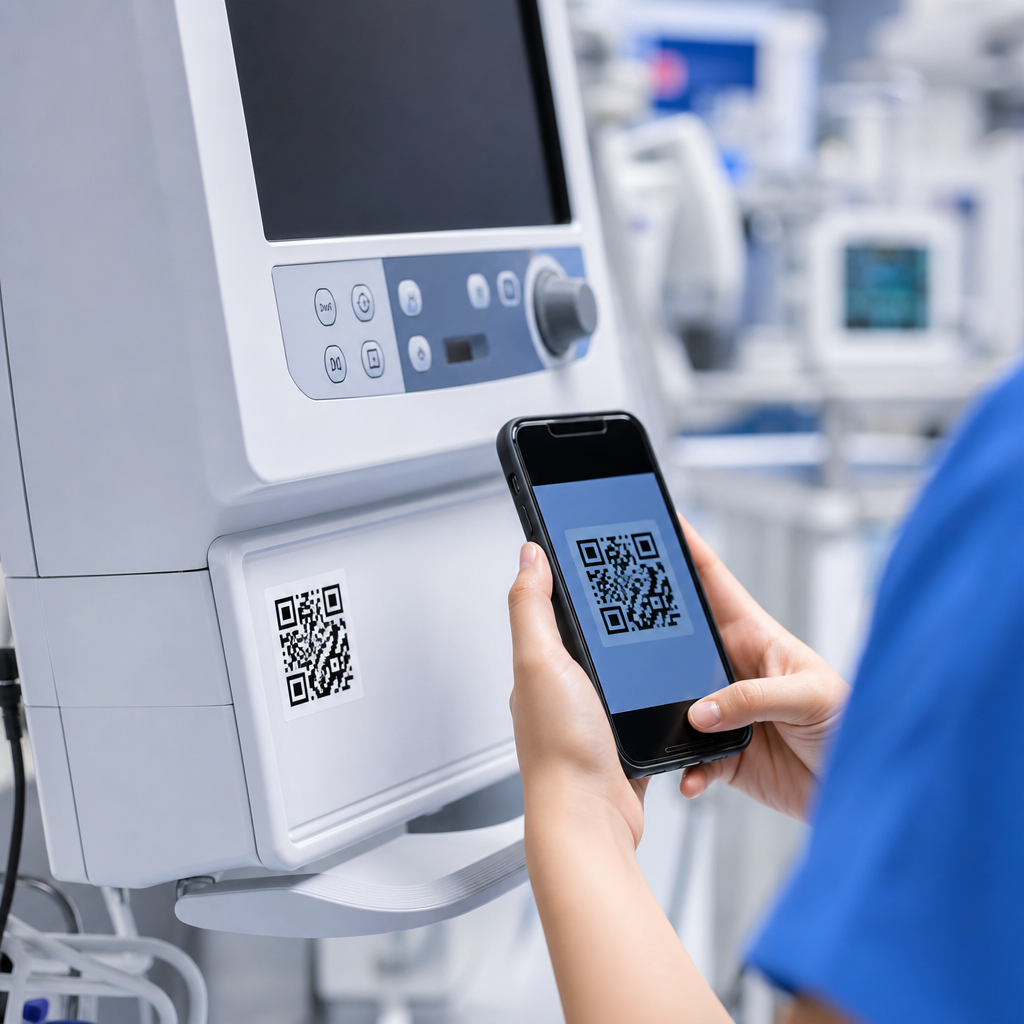
Placement should prioritize visibility, usability, and durability. In most cases, the best location is on or immediately next to the device, where the user naturally looks during setup or operation. That might mean a label on the equipment housing, an asset tag area, a protective case, a storage bin, a cart, or a mounting bracket. The code should be easy to find without interfering with controls, displays, ventilation, safety markings, or manufacturer labeling. If staff have to hunt for the code, adoption tends to drop quickly.
Environmental and workflow conditions matter as well. In healthcare settings, labels may be exposed to frequent cleaning, disinfectants, abrasion, moisture, and repeated handling. QR codes should therefore be printed or produced using materials that can withstand those conditions and remain scannable over time. Size and contrast are also important. A code that is too small, curved around a difficult surface, or placed in a poorly lit area can create frustration when staff are in a hurry. Testing with actual users in clinical settings is one of the best ways to confirm that placement works in practice, not just in theory.
Some organizations also use layered placement strategies. For example, one QR code may be placed directly on the device for immediate instructions, while another appears on a supply room shelf label or central equipment tracking system for pre-use review. In home care settings, placement near power supplies, accessory kits, or patient-facing instruction areas can also be effective. The right approach depends on how the equipment is stored, transported, cleaned, and used, but the guiding principle is consistent: make the code easy to spot and easy to scan at the moment help is needed.
Can QR codes help with training, troubleshooting, and maintenance beyond basic instructions?
Yes, and that is where many healthcare organizations see the greatest long-term value. While the most obvious use is linking to operating instructions, QR codes can support the full lifecycle of equipment use. For training, they can connect staff to short videos, competency checklists, refresher modules, and department-specific workflows. This is especially useful for devices that are used infrequently, require precise setup, or are handled by rotating staff, float teams, or new hires. Instead of relying solely on memory or searching a learning system later, users can access guidance at the exact point of care.
For troubleshooting, QR codes can reduce downtime by guiding users through common issues in a structured way. A scan can open alarm explanations, error code references, quick fixes, accessory checks, battery troubleshooting steps, or escalation instructions for when a problem requires biomedical engineering or vendor support. This can help staff resolve simple issues faster and avoid unnecessary service calls, while also making it easier to identify when a device should be removed from service for safety reasons.
Maintenance and asset management are also strong use cases. QR codes can link technicians to inspection forms, preventive maintenance records, calibration information, cleaning verification steps, or service documentation. In more advanced programs, they may connect to equipment management platforms that log scan activity, confirm location, or support work order creation. Used carefully, this creates a more connected and efficient system around each device. The result is not only easier access to instructions, but better support for training consistency, operational readiness, and safe, well-documented equipment use across the organization.