
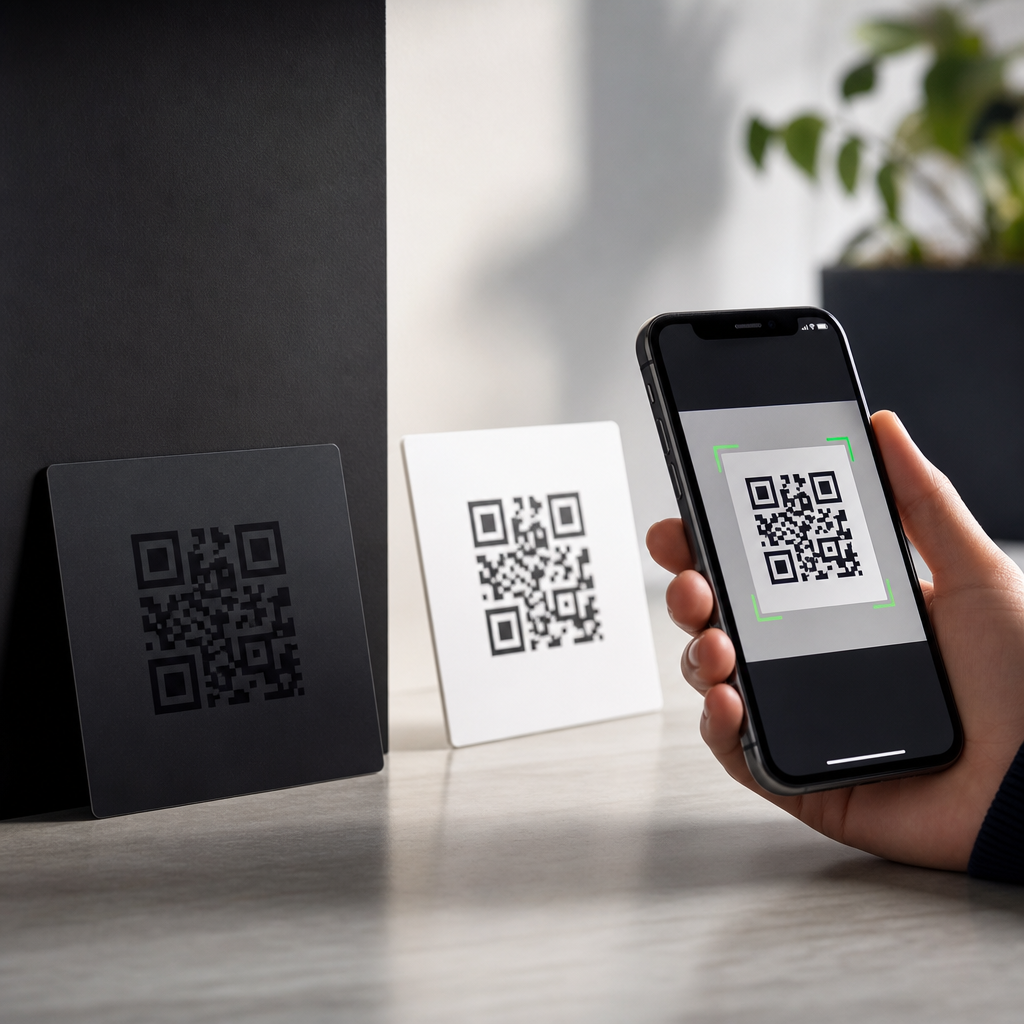
Contrast is the single most important visual factor in QR code scanability because scanners do not read meaning, branding, or aesthetics first; they read differences in light and dark modules. In practical terms, contrast is the measurable distinction between the foreground squares and the background they sit on, and that distinction determines whether a phone camera can separate data from noise. Within the broader work of creating mobile QR codes, designing effective QR codes starts with contrast because every later choice—size, error correction, logo placement, print method, and destination URL—depends on the code being detected quickly and decoded accurately. I have tested QR codes on retail packaging, restaurant menus, warehouse labels, direct mail, and outdoor signage, and the failures almost always trace back to poor contrast rather than to the QR format itself.
A QR code scanner looks for three finder patterns, aligns the symbol, samples the module grid, and applies error correction. Each of those steps becomes harder when colors are too similar in luminance, when gradients flatten edges, or when reflective materials create glare. This matters for mobile users because phone cameras vary widely. A flagship device in bright daylight can rescue a marginal design that an older Android phone in a dim hallway cannot. If a code is meant for real customers in real conditions, it must scan under average conditions, not only in a designer’s mockup. That is why contrast is not a cosmetic preference; it is a usability requirement tied directly to conversion rate, customer experience, and campaign performance.
Designing effective QR codes also means understanding that scanability is a systems problem. Contrast interacts with quiet zone width, module density, print sharpness, viewing distance, and surface texture. A dark navy code on a pale cream label may be fine when printed large on matte stock, yet fail when reduced onto glossy packaging with a curved bottle. The hub topic here is broader than one design rule, but contrast is the anchor principle because it influences every scan context. If you improve contrast first, you make every other optimization more valuable.
How QR scanners interpret contrast
QR scanners primarily rely on luminance contrast, not just color difference. Two colors can appear very different to the human eye yet still produce poor scanner performance if their brightness values are close. For example, saturated red on black often looks bold in brand guidelines, but cameras tend to record both as dark regions, collapsing the module pattern. By contrast, black on white remains the benchmark because it maximizes separability for autofocus, thresholding, and edge detection. ISO/IEC 18004, the core QR code specification, does not require black and white specifically, but high reflectance difference remains the safe standard in production work.
In real deployments, the scanner pipeline includes camera exposure, white balance, motion handling, perspective correction, and decoding. Low contrast introduces ambiguity early in that pipeline. Auto-exposure may brighten the background and wash out light modules. Compression from messaging apps or social platforms can blur module boundaries. Screen brightness on a phone displaying a QR code may drop in battery saver mode, making an already low-contrast palette fail on another phone attempting to scan it. This is why a code that scans on the designer’s monitor can still fail in the field.
The practical rule is simple: use a dark foreground on a light background, and maximize the difference in luminance. Reverse QR codes, such as white modules on black, can work with modern scanners, but they are less universally reliable, especially when logos, rounded modules, or low-end cameras are involved. If you need a brand-led design, test the actual color pair under the exact output conditions rather than assuming visual appeal equals technical readability.
Best contrast combinations for mobile QR codes
The safest combination is near-black foreground on white background. That is still the default I recommend for menus, payments, event check-in, packaging inserts, and shipping labels because it performs consistently across iPhone and Android devices, third-party scanner apps, and native camera apps. Dark blue, dark green, and deep brown can also scan well when the background is very light and the code has a generous quiet zone. Problems usually begin when teams try pastel foregrounds, metallic inks, transparent overlays, or photography behind the symbol.
When comparing options, think in terms of risk tolerance. A campaign with one chance to capture a scan from a bus shelter should use conservative colors. A QR code inside an app onboarding flow, where the user can enlarge the screen and retry, has more room for stylistic experimentation. In packaging work, I have seen dark charcoal on kraft paper perform well only after increasing symbol size and reducing data density. The color pair was acceptable, but the margin for error was smaller than with black on white.
| Color combination | Scan reliability | Typical use case | Main risk |
|---|---|---|---|
| Black on white | Excellent | General print, screens, labels | Minimal if quiet zone is preserved |
| Dark navy on pale cream | High | Branded packaging, menus | Can weaken under warm lighting |
| Dark green on white | High | Sustainability branding, signage | Some inks print lighter than expected |
| White on black | Medium | Digital-only branded layouts | Less consistent across scanner apps |
| Red on black | Poor | Decorative use only | Low luminance separation |
| Pastel on white | Poor | Minimalist design concepts | Foreground disappears in bright light |
A useful checkpoint is grayscale preview. If the QR code still reads clearly when converted to grayscale, the luminance contrast is usually strong enough to support scanning. This is not a complete test, but it quickly exposes risky palettes. Designers who work in Adobe Illustrator, Figma, or Canva can run this check before handing files to production.
Common design mistakes that reduce scanability
The most common mistake is placing a QR code over a busy image or textured background. Even when the background looks light overall, local variation creates false edges that interfere with module detection. The quiet zone—the blank margin around the symbol—must remain clear and high contrast. Another frequent mistake is using gradients inside modules. Gradients soften boundaries and produce inconsistent luminance across the grid, especially after printing or downsampling. Rounded modules and stylized finder patterns can work, but only when contrast remains strong and the underlying grid geometry is preserved.
Logo insertion is another area where design teams misjudge tolerance. Error correction allows some damage or obstruction, but it is not permission to occupy the center with a large low-contrast logo. I have had better results keeping logos modest, using error correction level Q or H only when necessary, and compensating with larger overall symbol size. A tiny, dense code with a big center logo and muted colors is a predictable failure, not an edge case.
Material choice also matters. Gloss lamination, foil stamping, embossing, transparent labels on curved containers, and window decals all alter perceived contrast. Reflections can make dark modules look pale or create hotspots that obscure the finder patterns. On screens, dark mode interfaces can reduce contrast if the code is not isolated on a white card. If a QR code is mission critical, avoid placing it directly on reflective or transparent substrates without prototype testing.
How to test contrast before publishing a QR code
Effective QR code design requires testing in the same conditions where the code will actually be scanned. Start with multiple devices, ideally a recent iPhone, a mid-range Android phone, and an older budget Android model. Test native camera apps first because that is how most users scan. Then test under bright daylight, indoor office lighting, low light, and at realistic distances. For printed pieces, check first-generation prints, not only vector files on a calibrated screen. Print gain, ink absorption, and material finish can shift contrast enough to matter.
I recommend a simple acceptance process. First, verify that the code scans within one to two seconds from the expected distance. Second, test at slight angles because users rarely hold phones perfectly square. Third, test after compressing or resizing any digital asset used in email, social media, or messaging. Fourth, confirm the destination URL loads quickly and matches user expectation, because scanability includes the full interaction, not just decoding. Tools such as QR Code Generator, Bitly, Beaconstac, and Scanova can create reliable symbols, but they cannot compensate for poor contrast choices made in layout.
If a design is borderline, fix contrast before changing more advanced variables. Increasing error correction or enlarging the code may help, but those are secondary adjustments. The cleanest solution is usually a darker foreground, a lighter background, and more quiet-zone protection.
Designing effective QR codes as a hub discipline
Contrast sits at the center of designing effective QR codes because it connects to every other best practice in this subtopic. Size determines how much visual information the camera can sample, but without contrast, larger symbols still fail. Error correction adds resilience, but too much data density can shrink modules and make low-contrast designs worse. Branding can improve trust and click-through intent, yet branding must sit inside technical constraints. The best-performing QR codes balance appearance and machine readability instead of sacrificing one for the other.
As a hub page for designing effective QR codes, the operational takeaway is clear. Start each project by choosing a high-contrast palette, preserving a clean quiet zone, and matching symbol size to scan distance. Then refine logo use, shape styling, print method, and placement. For mobile QR codes, especially, assume mixed devices, variable lighting, and impatient users. A code should work the first time, from a normal hand position, without zooming, tilting, or repeated attempts. That reliability is what turns a QR code from a decorative square into a dependable mobile entry point.
Strong contrast improves scan speed, reduces user friction, and protects campaign performance across print and digital environments. If you are building or reviewing QR assets, audit contrast first, test on real phones, and standardize what works. That one discipline will improve every other QR code design decision you make.
Frequently Asked Questions
Why is contrast so important for QR code scanability?
Contrast is critical because QR scanners detect structure, not intent. A phone camera and scanning algorithm do not care whether a code looks elegant, matches a brand palette, or fits a packaging design. They are looking for a clear visual difference between the dark modules and the lighter background. When that difference is strong, the camera can quickly identify the grid, locate the finder patterns, and separate meaningful data from surrounding visual noise. When the difference is weak, the code may appear attractive to people but ambiguous to machines.
In practical use, contrast affects every stage of scanning. It influences how easily the camera focuses, how well the code survives glare or shadows, and how reliably the software interprets the pattern under real-world conditions. A code that scans perfectly on a designer’s monitor may struggle on a glossy label, in dim restaurant lighting, or on a phone with a lower-quality camera. Strong contrast gives the scanner more margin for error, which is why it is widely considered the single most important visual factor in QR code performance.
What level of contrast works best for a QR code?
The safest approach is still the classic one: a very dark foreground on a very light background, with black on white remaining the strongest and most reliable combination. This works because it creates an unmistakable separation between data modules and empty space, making it easier for scanning software to detect the code quickly from different distances and angles. If a design calls for color, the same principle applies. The foreground should remain substantially darker than the background, and the background should stay clean, light, and consistent.
What matters most is not the specific color name but the luminance difference between the two areas. For example, dark navy on pale cream can work well, while medium gray on pastel blue may fail even if it looks visually pleasing. The more challenging the scanning environment, such as poor lighting, screen glare, curved surfaces, or motion, the more important high contrast becomes. If there is any doubt, increase the light-dark separation rather than relying on subtle or fashionable color choices. In QR design, readability almost always outperforms aesthetics when the two are in conflict.
Can colored or branded QR codes still scan well if the contrast is high enough?
Yes, branded and colored QR codes can scan very well, but only when contrast is preserved as the top priority. Many businesses customize QR codes with brand colors, embedded logos, or stylized shapes, and these can be effective if the underlying code remains easy for a scanner to interpret. The key is to make sure the foreground modules are still visibly darker than the background and that decorative choices do not reduce that separation. A beautifully branded code that lacks sufficient contrast may look professional but perform poorly in actual use.
It also helps to remember that contrast must survive real conditions, not just ideal mockups. A branded code printed on textured packaging, shown on a dim screen, or viewed in bright sunlight may lose effective contrast even if it looked acceptable during design. Gradients, patterned backgrounds, translucent overlays, and low-contrast palettes are common reasons customized QR codes underperform. If branding is important, test the code on multiple devices, in different lighting, and at realistic scanning distances. Customization is possible, but scanability should always be treated as the non-negotiable requirement.
What design mistakes reduce QR code contrast and make scanning harder?
Some of the most common mistakes are surprisingly simple: using light-colored modules, placing the code on a busy or patterned background, introducing gradients, reducing opacity, or choosing colors that are too similar in brightness. Designers sometimes focus on making the QR code feel integrated with the surrounding layout, but that often lowers visual separation right where the scanner needs clarity. Another frequent issue is reversing the code with a light foreground on a dark background. While some modern scanners can read reversed codes, they are generally less reliable than traditional dark-on-light designs.
Print and production choices can also undermine contrast. Ink spread, matte coatings, glossy reflections, low-resolution printing, and uneven surfaces can soften edges and reduce the effective distinction between modules and background. On screens, low brightness, reflections, and color shifts can create similar problems. Even if the original digital asset is technically correct, the final presentation can make the code harder to read. That is why effective QR design goes beyond file creation. It includes evaluating how the code will actually appear in the environment where people scan it.
How can I test whether a QR code has enough contrast before publishing it?
The best way to test contrast is to simulate real usage rather than relying only on how the code looks on your own screen. Start by scanning it with multiple phones, including older devices if possible, and test it under different conditions such as bright daylight, indoor lighting, low light, and slight glare. Try scanning from the expected user distance, not just from a few inches away. A code that only works when held close under ideal conditions does not have the reliability most real-world applications need.
It is also smart to test the code in its final format, whether that means printed on packaging, displayed on a menu board, shown in an email, or presented on a mobile screen. Check whether the background remains consistently light, whether shadows interfere with readability, and whether any branding elements compete with the code itself. If scan performance is inconsistent, increase the contrast before adjusting more secondary design details. In most cases, improving the light-dark separation between modules and background delivers the fastest and most meaningful gain in scan reliability.





