
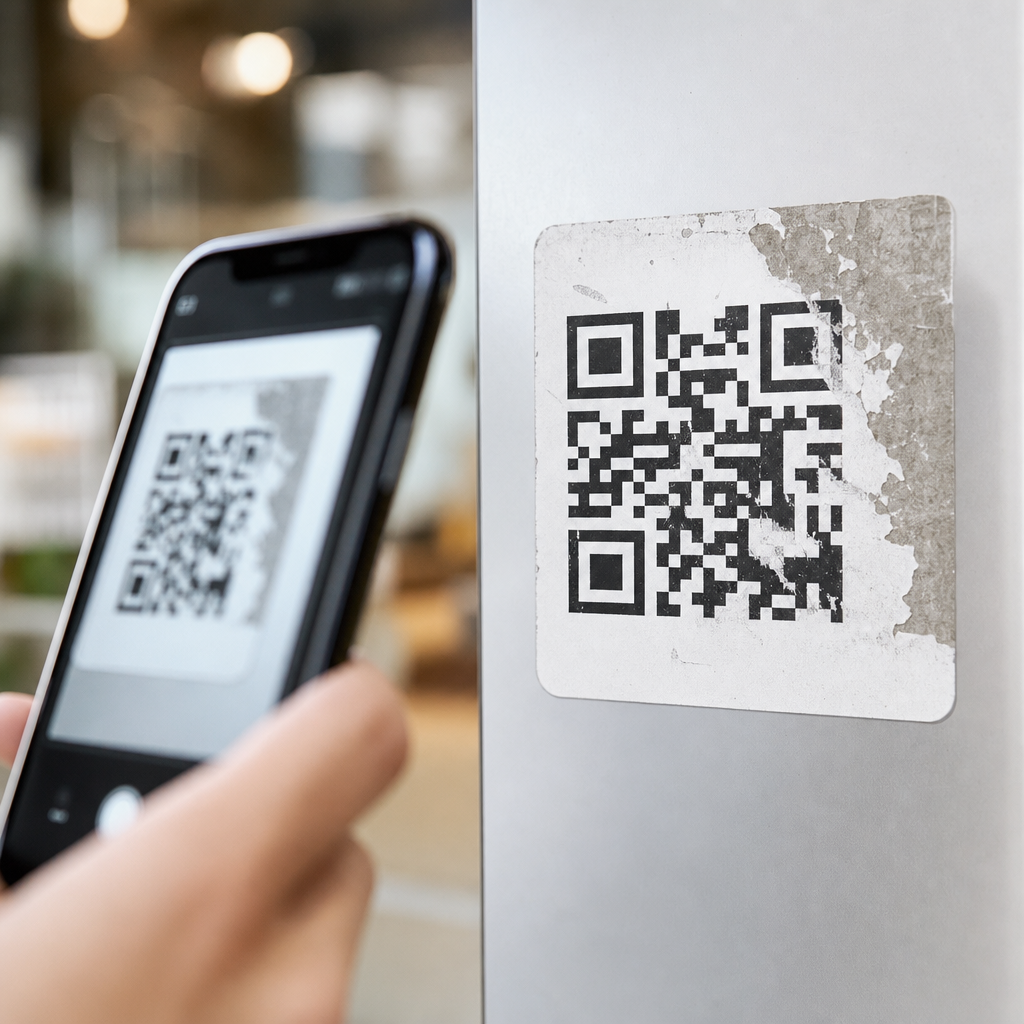
QR codes still work when partially damaged because they were engineered with built-in redundancy, structured data placement, and error correction methods that let scanners recover missing information. In mobile use, that resilience matters every day: codes get scratched on packaging, blurred on posters, creased on receipts, or partly covered by labels, yet people still expect a fast scan. Understanding how mobile QR codes work explains why that reliability is possible and helps marketers, product teams, and operations staff create codes that perform well in real conditions.
A QR code, short for Quick Response code, is a two-dimensional matrix barcode made of black and white modules arranged in a square grid. Unlike a traditional one-dimensional barcode, which stores data in a single line, a QR code stores information horizontally and vertically. That design allows more capacity and better fault tolerance. Mobile QR codes are simply QR codes intended to be scanned by smartphone cameras and decoding software, whether through a native camera app, a payments app, a ticketing platform, or an industrial scanning tool.
This matters because mobile scanning is now a routine bridge between physical and digital experiences. Restaurants use QR codes for menus, retailers use them for product details, logistics teams use them for tracking, and event operators use them for ticket validation. In my own work reviewing campaign performance, the biggest difference between a code that gets used and one that fails is rarely the destination URL. It is usually print quality, contrast, placement, quiet zone spacing, and choosing the right error correction level for the environment.
When people ask why a damaged QR code still scans, the short answer is error correction. The full answer is broader. A smartphone first has to detect the code’s position, orientation, timing pattern, and module grid. Then the decoder has to reconstruct the encoded data, compensate for perspective distortion, and repair missing bits where possible. Each of those stages contributes to resilience. This hub article explains the complete process so you can understand not only why partial damage is survivable, but also how to design mobile QR codes that remain scannable under pressure.
How a mobile phone reads a QR code
Mobile QR code scanning starts with image capture. The camera gathers a frame, and the scanning software looks for the three large finder patterns placed in three corners of the symbol. These squares help the decoder identify that the image contains a QR code rather than random shapes. Once those patterns are found, the software estimates orientation, scale, and perspective. That is why a code can often be scanned from an angle, on a curved bottle, or under imperfect lighting.
After locating the finder patterns, the decoder uses timing patterns, smaller alignment patterns, and the quiet zone around the code to map the symbol into a logical grid. The quiet zone is the clear margin around the code, and it is essential. If designers crowd a QR code with text, borders, or background graphics, scanners lose the clean edge they need for detection. Most scanning failures I have diagnosed in packaging proofs came from insufficient quiet zones or low contrast, not from the data itself.
Once the grid is mapped, the software reads the modules and interprets the encoded mode, character count, payload data, and error correction data. Common mobile decoders include ZXing-based libraries, Apple’s native camera detection, and Google ML Kit integrations. These systems are fast because QR code standards define exactly where metadata and recovery information are placed. The result is practical reliability: users point a phone, the code is recognized in fractions of a second, and the intended action opens immediately.
Why partial damage does not always stop a scan
The main reason damaged QR codes still work is Reed-Solomon error correction, the mathematical system built into the QR specification defined by ISO/IEC 18004. Error correction adds redundant codewords so a decoder can reconstruct lost or corrupted data. QR codes commonly use one of four levels: L, M, Q, and H. Higher levels tolerate more damage but reduce available data capacity because more space is reserved for recovery information.
| Error correction level | Typical recoverable damage | Best use case |
|---|---|---|
| L | About 7% | Clean digital displays, simple short URLs |
| M | About 15% | General marketing print and packaging |
| Q | About 25% | Outdoor posters, labels with moderate wear |
| H | About 30% | Harsh environments, stylized codes, industrial use |
Damage is survivable because the missing area is rarely the only factor. What matters is where the damage occurs and how severe it is. If a tear removes part of the payload area but leaves finder patterns, timing patterns, and enough codewords intact, the scanner can often recover the message. If the damage destroys key structural patterns or blends modules together through smearing, recovery becomes much harder. A code with 20 percent surface loss may scan, while a code with only 5 percent damage may fail if that damage hits a critical area.
Real-world examples make this clear. A shipping label scraped across one side often still scans because modern handhelds and phone cameras recover the missing data. A coffee cup sleeve with a wrinkled promotional QR code may still open a coupon because the warp affects only a small part of the matrix. By contrast, glossy laminate glare can prevent scanning even when the code is physically perfect. Physical damage is only one threat; optical interference matters just as much.
Core design features that make QR codes resilient
Three structural elements do most of the heavy lifting: finder patterns, alignment patterns, and timing patterns. Finder patterns are the three large corner squares. They allow quick localization and orientation. Alignment patterns, which appear in larger versions, help the decoder correct distortion, especially when the code is printed on curved surfaces or viewed at an angle. Timing patterns are alternating modules between finder patterns that help define the grid spacing precisely.
Data interleaving is another overlooked reason QR codes survive damage. The encoded data is not stored in one simple block. It is distributed across the matrix in a defined pattern and interleaved with error correction codewords. That means a scratch or stain usually affects multiple parts of the message in small fragments rather than erasing one entire section beyond repair. Spreading risk across the symbol improves the odds that the decoder can rebuild the original payload.
Mask patterns also improve reliability. During generation, the encoder applies one of several mask patterns to avoid problematic visual structures such as large blank areas or long runs of identical modules. This helps scanners distinguish the grid more accurately under uneven lighting or lower-resolution capture. In practice, reputable generators choose the lowest-penalty mask automatically, which is one reason standards-compliant tools outperform random design plugins that prioritize aesthetics over machine readability.
What affects mobile QR code performance in the real world
Camera quality matters, but it is not the only variable. Focus speed, sensor noise, exposure handling, and software decoding all influence scan success. Newer phones generally perform better because they combine sharper optics with stronger image processing. Still, even older devices scan well when the code follows basic production rules: high contrast, sufficient size, clean margins, and a destination encoded efficiently, usually through a short URL or dynamic redirect.
Print production is where many failures begin. Minimum size depends on scan distance, but a common field rule is a 10:1 ratio: for every ten units of distance, provide one unit of code width. A 2 centimeter code is comfortable at roughly 20 centimeters away, while posters viewed from farther away need substantially larger symbols. Dot gain, ink spread, low-resolution export, and transparent backgrounds can all soften module edges until adjacent squares bleed together.
Surface conditions also matter. Curved cans, textured cardboard, reflective windows, and fabric tags all introduce distortion or glare. I have seen codes fail on high-end retail displays simply because a spotlight created a white hotspot over the center. The fix was not a different URL or a more complex generator. It was matte finish stock, stronger contrast, and moving the code to a flatter area. Good QR performance is usually a production discipline problem, not a mystery.
Best practices for creating durable mobile QR codes
Use a standards-compliant generator, choose an error correction level that matches the environment, and test on multiple phones before release. For everyday packaging and posters, level M or Q is often the best balance. For labels exposed to abrasion, moisture, or custom logo overlays, level H is safer. Keep payloads short where possible. A shorter payload allows a less dense symbol, and lower density gives mobile cameras more tolerance when focus or lighting is imperfect.
Maintain strong contrast, ideally dark modules on a light background, and preserve the quiet zone on all sides. Avoid reversing colors unless you have tested carefully, and do not place codes over busy photography. If branding requires a logo in the center, keep it modest and compensate with higher error correction. This works because central overlays can consume recoverable area, but only within the limits of the selected correction level and symbol version.
Finally, test the code in its final context, not just on a desktop monitor. Print it at actual size, place it on the real material, and scan it under expected lighting with both iPhone and Android devices. Track destination behavior with dynamic QR platforms when appropriate so you can update links without reprinting. If this article is your starting point in Mobile QR Code Basics, the next step is to apply these principles to sizing, placement, dynamic versus static codes, and scan analytics. Durable mobile QR codes work because their structure anticipates damage. Build with that logic in mind, and your scans will hold up where it counts.
Frequently Asked Questions
Why can a QR code still scan even if part of it is damaged?
A QR code can often still scan because it was designed with fault tolerance built in from the beginning. Unlike a simple barcode that depends on a mostly uninterrupted pattern, a QR code stores information in a two-dimensional grid and includes redundant data that helps a scanner reconstruct missing portions. This means if part of the code is scratched, smudged, torn, creased, or covered, the scanner may still have enough usable information to identify the code, detect what is missing, and recover the original data.
Several design elements work together to make that possible. QR codes include fixed positioning patterns that help a camera recognize orientation and alignment, even when the image is imperfect. The data itself is distributed across the symbol rather than concentrated in one fragile strip, so localized damage does not automatically destroy the whole message. Most importantly, QR codes use error correction, which allows the scanner to rebuild data when a portion cannot be read directly. In real-world mobile use, that resilience is critical because printed codes are rarely kept in perfect condition. Packaging gets scuffed, posters fade, receipts wrinkle, and labels shift. QR codes still perform well in those environments because reliability under imperfect conditions is part of their engineering, not an accident.
What role does error correction play in damaged QR codes still working?
Error correction is the main reason a partially damaged QR code can continue to function. When a QR code is generated, it does not store only the raw destination data, such as a URL or text string. It also adds extra recovery information using error correction algorithms, most commonly Reed-Solomon error correction. That added information gives scanners a way to detect missing or corrupted portions and mathematically reconstruct them, as long as the damage stays within the code’s recovery limits.
QR codes can be created with different error correction levels, typically referred to as L, M, Q, and H. These levels represent how much of the code can be restored if damaged, with higher levels allowing more recovery but using more space in the symbol. In practical terms, a code with a higher error correction setting can tolerate a greater amount of missing or obscured area. That is why many marketers, product teams, and print designers choose stronger correction when codes may appear on materials exposed to wear, weather, folds, or handling.
For mobile scanning, this matters a great deal. Smartphone cameras are dealing with real conditions, not lab-perfect ones: glare, motion, poor lighting, low ink contrast, angled shots, and physical damage. Error correction helps bridge that gap between theory and everyday use. It is one of the core reasons people can still scan codes that look less than perfect and still reach the intended destination quickly.
Does the location of the damage matter, or can any part of the QR code be missing?
Yes, the location of the damage matters. A QR code is resilient, but not every area is equally expendable. Some parts of the code are structural and help the scanner understand what it is looking at before it even reads the stored content. For example, the large square finder patterns in the corners are essential for detection, orientation, and alignment. If those areas are severely damaged, the scanner may struggle to recognize the symbol at all, even if much of the underlying data is still present.
Other parts of the code contain the encoded data and error correction blocks. Damage in these regions may be more recoverable, especially if it is limited and scattered rather than concentrated in one critical zone. Because data is arranged methodically throughout the grid, and because recovery information is built in, scanners can often compensate for moderate loss. However, there is still a threshold. If too much information is missing, or if the damage covers vital functional patterns, the code may stop working.
This distinction is especially important for design and production decisions. Businesses sometimes place logos, branding, or decorative overlays inside QR codes. That can work safely when the code is generated with enough error correction and the overlay avoids critical patterns. But if branding blocks structural elements or too much of the data area, scan performance can drop sharply. In short, QR codes are durable, but they are not indestructible. Smart placement and thoughtful design still matter.
Why is QR code durability so important for mobile users and marketers?
QR code durability matters because mobile scanning happens in uncontrolled, everyday environments where perfection is rare. A consumer may scan from a bent product box, a sun-faded window sign, a glossy flyer under bright lights, or a crumpled receipt pulled from a pocket. In all of those moments, people expect the code to work immediately. If it fails, the experience feels broken, and the brand loses attention, trust, and often the conversion opportunity.
That is why the ability to withstand partial damage is more than a technical feature. It directly affects campaign performance, customer satisfaction, and operational reliability. For marketers, a durable QR code means fewer failed scans on posters, packaging, direct mail, event signage, restaurant tables, and retail displays. For producers and packaging teams, it means the printed code can survive shipping, handling, and shelf wear. For customers, it means less frustration and a faster path to the information, offer, download, menu, payment page, or support resource they were promised.
In a mobile-first environment, that reliability helps preserve momentum. Users often give a code only a second or two before moving on. Built-in resilience increases the odds that the first scan works, even when conditions are not ideal. That makes QR codes especially useful as a bridge between physical materials and digital actions, where convenience and speed are central to success.
How can businesses make sure their QR codes remain scannable even if they get worn or partially covered?
Businesses can improve QR code resilience by combining smart generation settings with practical design and print choices. First, select an appropriate error correction level based on how and where the code will be used. If the code will appear on packaging, outdoor signage, shipping materials, or anything likely to suffer wear, a higher error correction level is often worth using. That added tolerance can help preserve scan performance when the code is scratched, folded, or slightly obstructed.
Second, maintain strong visual contrast and sufficient size. A crisp dark code on a light background is still one of the best ways to support reliable scanning. Avoid low-contrast color combinations, busy backgrounds, excessive styling, or tiny print sizes that become unreadable when viewed through a phone camera. Leave adequate quiet space around the code so scanners can distinguish it from surrounding graphics. If adding a logo or branded center mark, keep it modest and test it carefully so it does not interfere with functional areas.
Third, test in realistic conditions, not just on a clean desktop proof. Scan the code from different phones, under varied lighting, at different distances, and after printing on the actual material. Try it on curved packaging, glossy surfaces, textured labels, and folded receipts if those reflect real use. If a code may be partly covered by seals, stickers, or handling labels, account for that during layout. The best-performing QR codes are usually the result of both technical understanding and production discipline. When teams respect how QR codes are engineered to recover from damage, they can create materials that stay usable longer and deliver a much more dependable mobile experience.





