
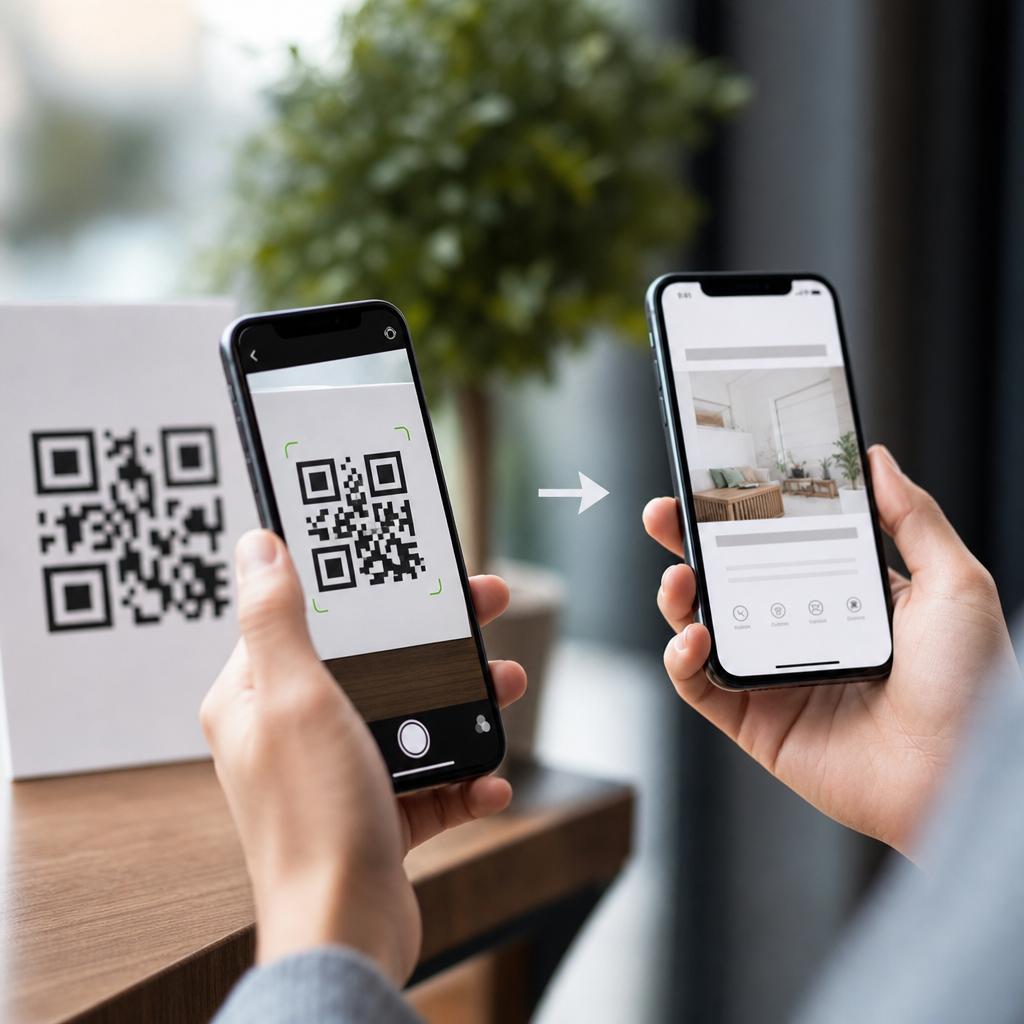
Scanning a QR code feels instantaneous, but several coordinated processes occur between your phone’s camera, operating system, browser, and the destination service before a page opens or an action completes. In mobile QR code basics, understanding how mobile QR codes work matters because it explains speed, security, tracking, compatibility, and why some scans fail. A QR code, short for Quick Response code, is a two-dimensional matrix barcode that stores data in black and white modules arranged on a square grid. Most consumer QR codes encode a URL, but they can also contain contact cards, Wi-Fi credentials, payment payloads, app links, SMS drafts, calendar events, and authentication tokens. I have implemented QR campaigns for retailers, event teams, and service businesses, and the most common misconception is that the code itself contains a whole website or app experience. It does not. In most cases, the code contains structured text, and the phone interprets that text, decides which app should handle it, and then requests additional content over a network. That sequence determines user experience, measurement quality, and risk exposure.
From a practical standpoint, this topic sits at the center of every broader QR code decision. If you know what happens after a scan, you can choose between static and dynamic codes, reduce broken links, improve landing page speed, and spot phishing attempts more reliably. Businesses rely on QR codes for menus, product packaging, login flows, payments, tickets, and customer support. Consumers use them for fast access and touch-free interactions. Both sides benefit when the scan path is predictable. The rest of this guide breaks down the mobile workflow step by step, using plain language and real examples, so this page can function as the main reference for how mobile QR codes work.
The scan begins with image capture and code detection
After you point your phone at a QR code, the camera preview continuously captures frames. The scanning system, either the native camera app or a dedicated scanner, runs image processing to detect the code’s finder patterns, the three large squares in the corners that tell the software it is looking at a QR symbol. The scanner corrects perspective distortion, estimates orientation, increases contrast, and separates dark modules from light ones. Modern phones do this quickly because Apple’s Vision framework, Android’s ML Kit, and similar libraries are optimized for real-time recognition.
Detection quality depends on lighting, distance, print sharpness, and the quiet zone, the white margin around the code. I have seen many failed scans caused not by the phone but by design decisions such as placing a code on a patterned background or trimming the quiet zone to fit packaging. Error correction helps, because QR codes use Reed-Solomon error correction to recover data even when part of the symbol is damaged, but it has limits. If glare covers a finder pattern or a logo obscures too many modules, the phone may not decode anything at all.
Decoding turns the pattern into usable data
Once the scanner isolates the symbol, it converts the pattern into binary data based on QR code specifications defined in ISO/IEC 18004. That data stream includes format information, version information for larger symbols, the encoded payload, and error-correction blocks. The payload is usually a string. For a website QR code, that string is a URL such as https://example.com/menu. For Wi-Fi onboarding, it may follow a schema like WIFI:T:WPA;S:CafeGuest;P:password123;;. For a digital business card, it may contain a vCard block.
This step is important because the phone is not “reading intent”; it is reading exact encoded data. If the payload includes a typo, the phone will faithfully pass along that typo. Static QR codes permanently contain that original data, which is why a misprinted destination cannot be fixed after distribution. Dynamic QR codes work differently: the printed code usually points to a short redirect URL controlled by a QR platform, and that platform can later send users to a new destination without changing the printed code.
Your phone decides what kind of action to offer
After decoding, the mobile operating system classifies the content type and suggests an action. If the payload is a web link, the camera typically shows an “Open link” banner. If it is a phone number using the tel: scheme, the device offers a call. If it is a mailto: link, the mail app opens a draft. For Wi-Fi credentials, compatible phones can prompt the user to join a network. This is why one QR code can launch very different behaviors depending on the data format and the device ecosystem.
Compatibility is generally good across iPhone and Android, but not perfect. Deep links into apps may behave differently if the target app is not installed. Some older devices need Google Lens or a third-party scanner. Managed enterprise devices may block certain intents for security reasons. In payment scenarios, the same code may open a banking app in one country and a general camera prompt in another because local standards differ. EMVCo payment payloads, Alipay formats, and India’s UPI ecosystem are all examples where the encoded structure matters as much as the visible code.
If the payload is a URL, the browser and network take over
When you tap the prompt for a web address, the phone hands the URL to a browser or an in-app web view. The browser then performs standard web retrieval steps: DNS lookup resolves the domain name to an IP address, a TCP connection is opened, TLS negotiates encryption for HTTPS, and the server returns the requested resource. If the URL redirects, which is common with dynamic QR codes and campaign links, the browser follows the redirect chain until it reaches the final page.
Here is where performance and analytics become visible. A simple static code to a fast page can open almost immediately. A dynamic code with multiple redirects, a tag manager, and a heavy landing page can feel sluggish. In audits, I usually look for redirect chains longer than one hop, oversized images, and scripts that block first render. Google PageSpeed Insights, Lighthouse, and WebPageTest are useful for diagnosing these issues. The QR code did its job in a fraction of a second; the delay users feel usually comes from the destination experience, not the scan itself.
| Stage after scan | What the phone or service does | Common problem | Best practice |
|---|---|---|---|
| Detection | Finds QR patterns and corrects angle | Low contrast or glare | Use strong contrast and clear quiet zone |
| Decoding | Extracts the encoded payload | Bad data or print damage | Proof payloads and use suitable error correction |
| Action selection | Matches payload to app or system intent | Unsupported format | Use standard URL or broadly supported schema |
| Request and redirect | Loads destination through browser or app | Slow chains or broken links | Minimize redirects and monitor uptime |
Dynamic QR codes add routing, editing, and measurement
Many businesses ask what happens after you scan a QR code when the code is “dynamic.” The answer is that the first destination is not the final content but a routing layer. The printed symbol contains a short URL from a QR management platform. That platform records the scan request, often logging timestamp, approximate location derived from IP, device type, and referrer context where available, then redirects the browser to the current destination URL. Because the platform controls the redirect, the destination can be edited later.
This flexibility is valuable for packaging, posters, and printed menus that cannot be reissued easily. A restaurant can update from a seasonal menu to a holiday menu without changing the code on the table tent. A manufacturer can route by language, geography, or product batch. The tradeoff is dependency. If the QR platform has downtime, expires the account, or mishandles redirects, every printed code can fail at once. For long-lived assets, choose vendors with export options, custom domains, and clear retention policies.
Security checks matter because QR codes hide the visible destination
One reason people ask how mobile QR codes work is concern about safety. The core risk is simple: users cannot inspect the destination at a glance the way they can with printed text links. Attackers exploit this by placing malicious stickers over legitimate codes, sending users to phishing pages, fake payment forms, or malware downloads. Phones help by previewing URLs before opening, but users often tap too quickly to notice suspicious domains.
The safest workflow is straightforward. Verify the domain before opening, prefer HTTPS, avoid entering credentials after scanning from untrusted physical locations, and use mobile threat protection in enterprise environments. Businesses should use branded domains, place codes where tampering is obvious, and monitor destination pages for compromise. In real deployments, the highest-value control is not the QR artwork; it is disciplined destination management, including HTTPS certificates, access controls, and regular link testing.
Why some QR code scans fail or produce a poor experience
When a QR code does not work, the failure usually falls into one of four categories: unreadable symbol, unsupported payload, broken destination, or bad mobile page. Unreadable symbols come from low contrast, tiny print, curved surfaces, poor quiet zones, or glossy materials that create reflections. Unsupported payloads appear when obscure schemas are used instead of standard links. Broken destinations happen when pages are removed, domains expire, or redirects loop. Bad pages load but frustrate users with cookie walls, intrusive pop-ups, or desktop layouts that do not fit mobile screens.
Testing should mirror real conditions. Scan from multiple phone models, under indoor and outdoor lighting, on cellular and Wi-Fi, and from realistic distances. Print a prototype before approving a full run. If the QR code points to a landing page, verify Core Web Vitals, form completion on mobile keyboards, and accessibility basics such as tap target size. In my experience, organizations spend too much time debating QR color and too little time testing the page that opens, even though that page determines conversion.
How this knowledge improves strategy across mobile QR code basics
Understanding what happens after you scan a QR code makes every other QR decision easier. You can choose static codes for permanent, simple destinations and dynamic codes for campaigns that need edits and analytics. You can write payloads in standard formats, reduce redirects, secure the destination, and optimize the mobile page users actually see. You can also brief designers more effectively by specifying quiet zone, contrast, and minimum print size instead of relying on guesswork.
As the hub for how mobile QR codes work, this page connects the full user journey: camera detection, decoding, action handling, network requests, redirects, security checks, and landing page performance. The main benefit is predictability. When you know each step, you can diagnose failures faster and build QR experiences that are quick, trustworthy, and measurable. Review your own codes with this workflow in mind, test them on real phones, and update any weak link before your next campaign goes live.
Frequently Asked Questions
What technically happens the moment you scan a QR code?
When you point your phone’s camera at a QR code, the process begins before you ever tap a notification or see a web page load. First, the camera captures the image and the device’s software identifies the square finder patterns that make QR codes easy to detect from different angles and distances. The phone then isolates the code from the background, corrects perspective if the image is tilted, sharpens contrast between the black and white modules, and decodes the encoded data. That data may be a website URL, contact card, payment request, app deep link, Wi-Fi credential, or other machine-readable instruction.
After decoding, your operating system decides how to handle the content. If the QR code contains a URL, the phone may show a preview banner, open the browser, or hand the link to a specific app if the link matches a supported app association. If the code contains a phone number, email address, calendar event, or wireless network information, the device may prompt an appropriate action instead of opening a web page. In other words, scanning does not automatically mean “go to a website.” It means the phone reads structured data and then routes that data to the right system component.
If the result is a web link, additional steps happen in the background. The browser or app checks the destination address, resolves the domain through DNS, establishes a network connection, negotiates security if the site uses HTTPS, follows any redirects, and requests the destination content from the server. That is why opening a QR code can feel instant even though several systems are working together in sequence: image recognition, decoding, operating system handling, network routing, and destination server response all happen within seconds.
Why do some QR codes open immediately while others ask for confirmation first?
The difference usually comes down to your phone’s operating system, the camera app you are using, and the type of data stored in the QR code. Many modern smartphones have native QR recognition built directly into the camera, but they do not all behave the same way. Some devices automatically display a tappable banner when a code is recognized, while others require you to confirm the action for safety. That confirmation step is especially common when the code leads to an external website, launches another app, or triggers a potentially sensitive action such as joining a network or initiating a payment flow.
Security is a major reason for this behavior. A QR code is simply a container for data, and the phone cannot always know whether that destination is trustworthy. By showing a preview or requiring a tap before opening the link, the device gives you a chance to inspect the domain or intended action. This is helpful because malicious QR codes can send users to fake login pages, phishing sites, or deceptive app download prompts. A confirmation step acts like a small but important checkpoint between decoding and execution.
Another factor is how the destination is configured. Some QR codes point directly to a final URL, while others use a short link or tracking redirect first. In certain cases, the phone may briefly hand the request to the browser, then the browser forwards it to an app through a universal link or deep link. That creates the impression of multiple steps, even though it is part of the normal routing process. So if one QR code opens a page instantly and another asks for permission or switches apps, that usually reflects differences in device behavior, safety rules, and link configuration rather than a problem with scanning itself.
Can a QR code track you after you scan it?
A QR code by itself does not actively track you in the way a GPS app or background process might. The printed pattern is static; it simply stores data such as a URL or other encoded information. However, what happens after you scan it can absolutely involve tracking, analytics, and data collection. If the code sends you to a website, the destination server may record standard web data such as your IP address, device type, browser version, approximate location, referral details, and time of visit. If the link includes campaign parameters or a shortened redirect, the scan can also be counted as part of a marketing or analytics system.
Dynamic QR codes are especially important here. Unlike static QR codes, which directly store the final destination, dynamic codes often point to a management URL that redirects you elsewhere. That redirect layer allows the code owner to measure scans, change the destination later, segment traffic by date or geography, and evaluate campaign performance. For businesses, this is useful because it turns a printed code into a measurable touchpoint. For users, it means the scan may be logged even before the final page opens.
That said, tracking after a scan is usually similar to tracking that happens when you click a normal link on the web. The degree of tracking depends on the destination website, whether cookies are set, whether you are logged in to an account, and what privacy protections your browser or device enforces. The safest assumption is that scanning a QR code can lead to the same kinds of analytics and tracking as visiting any online service. If privacy matters, preview the destination first, avoid unknown codes, and review browser privacy settings before interacting further.
Why do some QR code scans fail even when the code looks fine?
Failed scans can happen for several reasons, and not all of them are obvious from looking at the code. One common issue is image quality. A QR code may appear visually intact to a person but still be difficult for software to read if it is blurry, too small, low-contrast, poorly lit, distorted by glare, or printed on a curved surface. Since QR decoding depends on recognizing precise module patterns, even modest visual interference can reduce scan reliability. Damaged edges, logos that cover too much of the center, or overly stylized designs can also interfere with successful detection.
Another category of failure happens after the code is decoded correctly. In that case, the problem is not the scan but the destination. The QR code might contain an outdated URL, a broken redirect, an expired campaign link, or a deep link that requires an app the user does not have installed. Network conditions also matter. If your phone has a weak mobile or Wi-Fi connection, the device may read the code successfully but fail when trying to contact the destination service. To the user, this can look like “the QR code didn’t work,” even though the decoding step completed properly.
Compatibility can matter as well. Older devices, third-party camera apps, or restricted enterprise phones may not support certain QR content types in the same way newer systems do. Some phones are excellent at opening websites but less reliable with payment payloads, event data, or app-specific actions. In practical terms, a successful QR experience depends on the whole chain working together: a readable code, a capable camera, decoding software, operating system support, network access, and a live destination. When any link in that chain breaks, the scan may fail or appear inconsistent.
Is it safe to scan any QR code you find in public?
No, and treating public QR codes with healthy caution is the smart approach. A QR code hides its full destination until your device reads it, which makes it easy for bad actors to disguise malicious links in a format people tend to trust. In public spaces, attackers sometimes place sticker overlays on legitimate signs, menus, meters, or posters so that users scan a fake code instead of the original one. Once scanned, the code may lead to a phishing page, a fraudulent payment request, a fake customer support form, or a site designed to capture login credentials.
The good news is that you can reduce risk with a few simple habits. Use your phone’s native scanner or a reputable camera app that shows a link preview before opening it. Read the domain carefully and watch for misspellings, suspicious subdomains, or shortened links that hide the final destination. Be especially cautious if the page immediately asks for payment, passwords, one-time passcodes, or app downloads. Legitimate services typically use clear branding, secure HTTPS connections, and expected domain names. If something feels rushed, mismatched, or unusually aggressive, it is worth backing out.
It also helps to understand that the danger usually comes from the destination, not from the printed code itself. The scan initiates a process, but the real risk appears when the resulting website or app interaction tries to persuade you to take an unsafe action. In that sense, QR safety is very similar to link safety. Think before you tap, verify the destination, and avoid scanning codes from unknown or tampered-looking sources. With those habits in place, QR codes can be convenient and efficient without becoming a security blind spot.





