
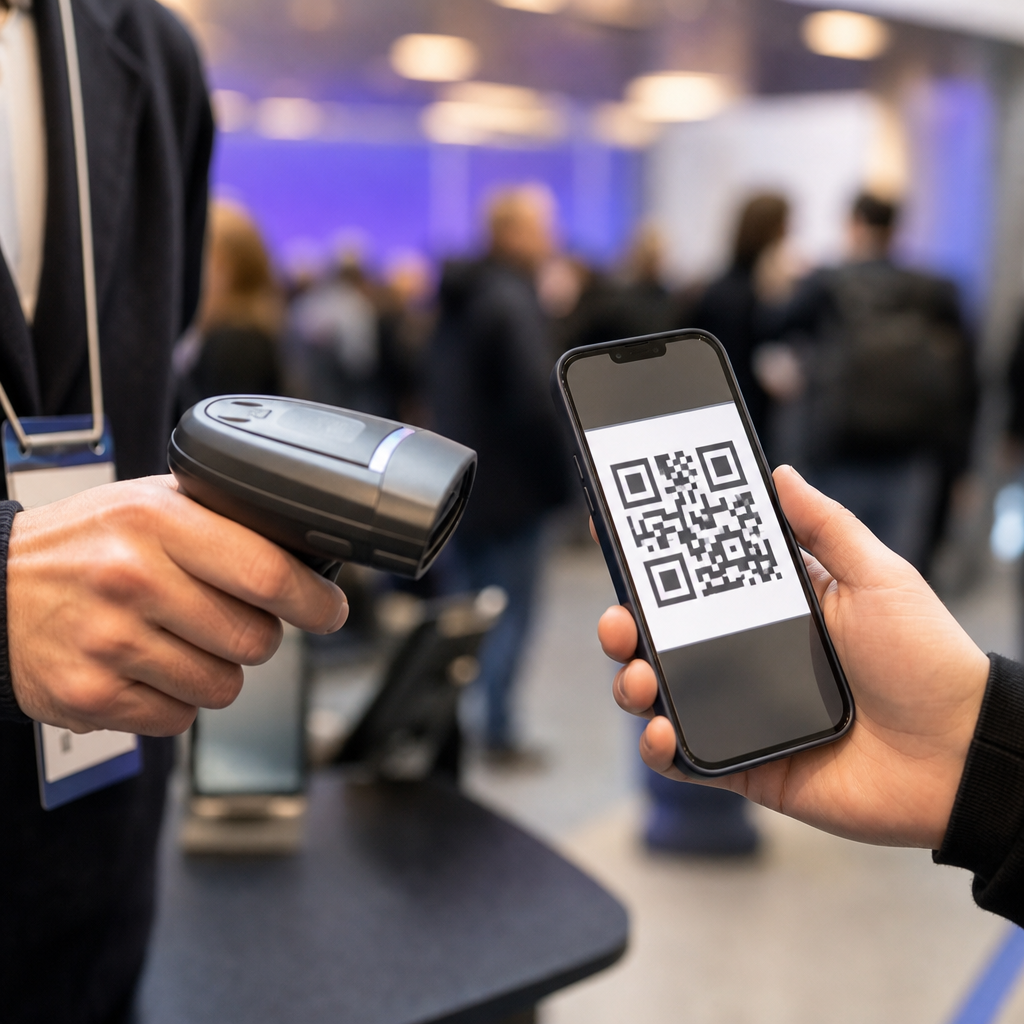
Event QR codes streamline check-in, ticket validation, venue access, cashless payments, lead capture, and attendee engagement, yet they also introduce failure points that can disrupt the entire event experience. In events and ticketing, a QR code is a machine-readable graphic that links to ticket data, registration records, session credentials, or action prompts such as downloading an app or joining a mailing list. I have worked on conferences, trade shows, and live entertainment deployments where a code scanned flawlessly in testing but failed under real conditions because of weak connectivity, poor screen brightness, duplicate tickets, or inconsistent staff procedures. That gap between lab success and venue reality is why this topic matters. When event QR codes break, lines grow, fraud risk rises, exhibitors lose leads, and attendees lose confidence in the organizer. A well-run event depends on understanding the most common issues with event QR codes, the operational causes behind them, and the practical fixes that reduce friction before doors open.
Scan failures at entry points
The most visible problem is simple: the scanner does not read the code. In practice, scan failures usually come from a handful of repeatable causes. Printed codes may be too small, distorted, low contrast, or placed on glossy badges that reflect overhead lighting. Mobile codes often fail because attendees arrive with cracked screens, dim brightness, dark mode email settings, or screenshots compressed by messaging apps. I have also seen organizers embed QR codes inside crowded confirmation emails where inbox apps shrink the image and make it harder for laser or camera-based readers to lock on quickly.
Venue conditions amplify those weaknesses. Outdoor festivals introduce glare and rain. Night events reduce ambient light. Large arenas create rushed scanning angles as staff try to keep lines moving. The fix is not just “use better scanners.” It starts with code generation standards: sufficient quiet zone, high contrast, minimum print size, and error correction calibrated for the medium. Test with the actual ticket stock, badge laminate, and phone models common to your audience. Camera-based scanners generally handle damaged or low-quality codes better than older laser units, but they still need clean workflows, trained staff, and fallback search by name or order number.
Connectivity and system reliability problems
Many event teams assume the QR code itself is the technology, when the real dependency is the validation system behind it. A code may open a dynamic ticket record, ping a cloud database for status, or confirm that a pass has not already been redeemed. If venue Wi-Fi collapses or cellular service becomes saturated during peak arrival, valid attendees can be blocked even when their code is perfect. This happens often at convention centers, stadiums, and temporary venues where thousands of devices compete for bandwidth at the same moment.
The strongest deployments plan for degraded conditions. Local device caching, offline validation lists, and synchronized timestamp logs prevent total stoppage. Platforms such as Eventbrite, Cvent, and Bizzabo all emphasize device readiness and network planning because check-in speed depends on more than the ticket image. A resilient setup includes dedicated staff networks, backup hotspots, battery packs, spare scanning devices, and a clear rule for when to switch from live validation to offline mode. Without that preparation, a minor outage turns into long queues, frustrated guests, and delayed session starts.
Fraud, duplication, and unauthorized sharing
QR tickets are easy to forward, screenshot, and resell unless the organizer controls how redemption works. Static codes are especially vulnerable because the image does not change after issuance. If multiple people arrive with the same screenshot, only the first scan should validate, but that still creates conflict at the door and extra burden on support staff. In high-demand events, organized fraud can involve copied confirmation emails, fake resale listings, or manipulated PDFs designed to mimic legitimate tickets.
The best defense combines technology and process. Dynamic QR codes that refresh inside a secure app reduce screenshot abuse. Identity checks matter for VIP access, age-restricted events, backstage credentials, and multi-day badges. Audit logs should capture scan time, device, gate, and operator so disputes can be resolved quickly. Where ticket transfer is allowed, the transfer must invalidate the original credential immediately. Organizers also need attendee communication that explains official resale channels, warns against social media purchases, and states that duplicate or altered QR codes will be rejected. Fraud prevention is never perfect, but tighter redemption controls dramatically lower loss and gate confusion.
Poor attendee communication and user error
A large share of event QR code issues are not technical defects at all. They are communication failures. Attendees show up with the wrong code, an old registration, a parking pass instead of an entry credential, or a confirmation page that was never completed. Some do not know whether they need to print the code, save it to a wallet app, or open it in a venue app. Others bury the ticket in spam-filtered inboxes or cannot log in because they forgot the email used at purchase.
Clear pre-event messaging prevents much of this friction. Confirmation emails should state exactly which code grants entry, whether screenshots are accepted, when doors open, and what backup information staff can use if scanning fails. Reminder messages should prompt guests to increase screen brightness, download the app in advance, and save the code offline. For trade shows and conferences, exhibitors and sponsors need separate instructions because lead retrieval, exhibitor badges, and attendee admission often use different QR workflows. When communication is precise, staff spend less time troubleshooting basic mistakes and more time moving people through efficiently.
Operational mismatches across event types
Events and ticketing is not one workflow. The common issues with event QR codes change by format, audience, and risk level. A music festival cares about rapid ingress and anti-scalping controls. A business conference needs session tracking, badge printing, and exhibitor lead capture. A charity gala may require table assignments and donor recognition. Sporting events often prioritize anti-counterfeit measures and turnstile integration. Problems arise when organizers use the same QR code process across all these contexts without adapting it.
| Event type | Typical QR code use | Most common issue | Best preventive measure |
|---|---|---|---|
| Conference | Check-in, session access, lead capture | Wrong code used for wrong purpose | Separate labels and color-coded credentials |
| Concert | Primary ticket entry | Screenshot sharing and duplicate scans | Dynamic codes with real-time redemption |
| Trade show | Badge scanning at booths | Unreadable printed badges | Larger codes and matte badge stock |
| Festival | Gate entry and cashless linking | Network congestion at peak ingress | Offline validation and network redundancy |
Designing by event type leads to better scanner placement, staffing, signage, and escalation rules. It also improves reporting because success metrics differ. For a conference, you may care most about session attendance accuracy. For a stadium, throughput per lane per minute is usually the critical number.
Privacy, security, and compliance concerns
QR codes often expose more data handling risk than organizers expect. The code itself may contain a token, attendee ID, or encoded personal information. Scanning may trigger data sharing across ticketing platforms, CRM systems, marketing automation tools, payment systems, and access control vendors. If those flows are not governed carefully, the event creates unnecessary privacy exposure. This is especially important for events serving European attendees under GDPR, California residents under CCPA, or healthcare and education audiences with stricter expectations around data use.
Good practice is straightforward. Store minimal data in the code, prefer opaque tokens over readable personal details, encrypt traffic, and limit staff permissions by role. Lead retrieval at booths deserves special scrutiny because attendees may not realize a badge scan transfers their contact data to an exhibitor. Clear consent language, retention schedules, vendor due diligence, and documented breach response plans are essential. Security also includes physical process: staff should never photograph attendee codes or leave scanning devices unattended. Convenience matters, but not at the cost of weak access control.
Fixing issues before they affect the event
The most effective way to reduce QR code problems is to treat check-in and credentialing as an operational system, not a design asset. Run scenario-based tests with real users, not just internal staff who already know the flow. Measure first-scan success rate, average transaction time, offline recovery time, and manual lookup volume. Build a fallback ladder: rescan, brightness adjustment, alternate device, manual search, supervisor override. Assign one owner for scanner hardware, one for the ticketing platform, and one for attendee communications so accountability is clear.
After each event, review scan logs, duplicate attempts, fraud incidents, and lane bottlenecks. Those findings should shape the next event’s badge layout, email copy, staffing plan, and network design. Common issues with event QR codes are manageable when organizers anticipate them early and design around real venue conditions. If you manage events and ticketing at scale, audit your current QR workflow before the next on-sale or check-in window. A short readiness review now can prevent long lines, lost revenue, and avoidable stress later.
Frequently Asked Questions
What are the most common reasons an event QR code will not scan at check-in?
The most common causes are usually a mix of image quality, device limitations, and data mismatches. In real event environments, a QR code may fail because it was printed too small, displayed on a cracked or dim phone screen, distorted by a screenshot, or partially obscured by a wallet app, email client, or protective screen glare. Poor lighting at the entrance can also reduce scanner accuracy, especially at outdoor venues, night events, or temporary check-in stations with inconsistent power and equipment setups.
On the operations side, the issue is often not the QR graphic itself but the system behind it. A code may have been generated correctly but tied to an invalid registration record, an already-used ticket, a canceled order, or the wrong event date or session. Scanner devices may also be running outdated attendee lists, incorrect access rules, or unstable internet connections if the workflow depends on live validation. In multi-day conferences and festivals, it is especially common to see codes rejected when staff scan a pass at the wrong gate, the wrong time window, or a restricted access point.
The best fix is to treat scanning problems as both a technical and process issue. Test codes across real devices before the event, including older phones with low brightness and common wallet apps. Use high-contrast QR designs, avoid over-stylizing the code, and maintain adequate quiet space around the edges. Make sure scanners are synced, charged, and configured for the correct event logic. Just as important, give front-line staff a fast exception workflow so attendees with valid registrations are not left waiting while someone tries to diagnose the code on the spot.
How can poor internet connectivity affect event QR code performance?
Internet connectivity can have a major impact, but the severity depends on how the event system is designed. If scanning devices rely on real-time validation against a cloud database, weak or unstable connectivity can slow down check-in lines, delay ticket verification, block access decisions, and create duplicate entry risks when staff cannot confirm whether a code has already been redeemed. This is one of the most common operational issues at convention centers, stadiums, outdoor activations, and pop-up venues where Wi-Fi may be overloaded or cellular service may be inconsistent.
Connectivity issues also affect more than entrance scanning. QR codes used for session access, exhibitor lead capture, app downloads, digital menus, or cashless payments can all fail or feel unreliable when the attendee’s device or the staff device cannot reach the destination quickly. In practice, attendees usually do not distinguish between a bad QR code and a bad network experience. If the landing page does not load, the payment does not process, or the registration record does not appear, they simply perceive the event technology as broken.
The most reliable approach is to build offline tolerance into critical workflows. For entry and ticket validation, scanners should support cached attendee data and local redemption logic whenever possible, then sync later when connectivity returns. For attendee-facing QR experiences, use lightweight mobile pages, short redirects, and infrastructure that can handle traffic spikes. Also survey the venue in advance, test actual signal strength where scanning will happen, segment staff networks from guest networks, and keep backup procedures ready. Events run more smoothly when internet access is treated as a risk area, not an assumption.
Why do duplicate, reused, or fraudulent event QR codes happen, and how can they be prevented?
Duplicate and fraudulent QR code issues typically happen when the code is treated as the ticket itself rather than a secure pointer to controlled data. If a static QR code can be copied from an email, screenshot, printout, or resale listing, multiple people may attempt to use the same access credential. In some cases this is accidental, such as a guest forwarding a confirmation to a colleague. In other cases it is intentional, including counterfeit ticket distribution, unauthorized resale, or badge sharing at business events where access has monetary or strategic value.
Another source of confusion comes from weak redemption rules. If the system does not immediately mark a code as used, or if multiple gates are not syncing properly, the same code can appear valid more than once. Similar problems occur when different systems manage registration, ticketing, and access control without clean integration. A perfectly legitimate attendee may be flagged as duplicate simply because records are delayed, merged incorrectly, or validated inconsistently across devices and entrances.
Prevention starts with secure architecture. Use unique, non-sequential identifiers tied to a central registration or ticket record, and avoid exposing sensitive data directly inside the QR code. Time-based tokens, rotating credentials, or app-based dynamic QR codes provide stronger protection for high-risk events. At the gate, scanners should enforce instant redemption and share status updates across all entry points as quickly as possible. It also helps to limit screenshot-based workflows when security matters, verify attendee identity when appropriate, and monitor for unusual redemption patterns. Strong anti-fraud controls do not have to make entry slow, but they do need to be intentionally designed.
What design and printing mistakes make event QR codes harder for attendees and staff to use?
The biggest mistakes are usually readability issues introduced by branding decisions. Event teams often want QR codes to match the look of the campaign, but excessive customization can reduce scan reliability. Common problems include low contrast colors, dark codes on dark backgrounds, reversed color schemes, logo overlays that cover too much of the pattern, decorative frames that interfere with the quiet zone, and extremely dense codes created by packing in too much data. These issues become more serious when badges, tickets, wristbands, or signage are produced at small sizes.
Print production adds another layer of risk. Blurry output, glossy materials that create reflections, curved badge holders, creased paper tickets, and low-quality thermal printing can all affect scan performance. At live events, wear and tear matters too. A code on a lanyard badge may bend against clothing, and a wristband code may wrinkle or get wet. Digital display introduces its own problems, including low screen brightness, cracked glass, privacy protectors, and screens that go to sleep just as the attendee reaches the scanner.
To avoid these problems, keep QR codes simple, high contrast, and large enough for the intended scanning distance and device. Preserve the quiet zone, minimize visual effects, and test final production files rather than only approving mockups on a desktop monitor. If codes will be used on badges, wristbands, kiosks, and phones, test each format separately in realistic conditions. Good event QR performance comes from practical usability decisions, not just technically valid code generation.
How should event teams troubleshoot QR code issues quickly without creating long lines and attendee frustration?
The key is to separate frontline resolution from deeper technical diagnosis. At the entrance, staff need a short, repeatable playbook: confirm the attendee is at the correct event or gate, increase phone brightness if the code is on-screen, try a second scanner, search the registration manually by name or email, and route exceptions to a dedicated help point rather than stopping the entire queue. This kind of triage prevents one problematic scan from slowing hundreds of people behind it.
Behind the scenes, there should be a clear escalation path. Supervisors need access to tools that show whether the issue is related to internet connectivity, scanner sync status, ticket status, access permissions, duplicate redemption, or account data mismatches. If multiple failures happen at once, the team should quickly determine whether the problem is isolated to one device, one entrance, one ticket type, or the platform as a whole. That distinction is what allows operators to fix the right thing fast instead of guessing under pressure.
The most effective event teams prepare for these scenarios before doors open. They train staff on fallback check-in methods, maintain spare devices and chargers, keep an offline attendee list available for critical access points, and rehearse what to say to attendees when something goes wrong. Just as important, they review post-event logs to identify recurring scan failures, device issues, and registration edge cases. QR code problems are manageable when teams plan for them operationally, not just technically. The goal is not to eliminate every exception, but to make sure exceptions do not take over the attendee experience.





