
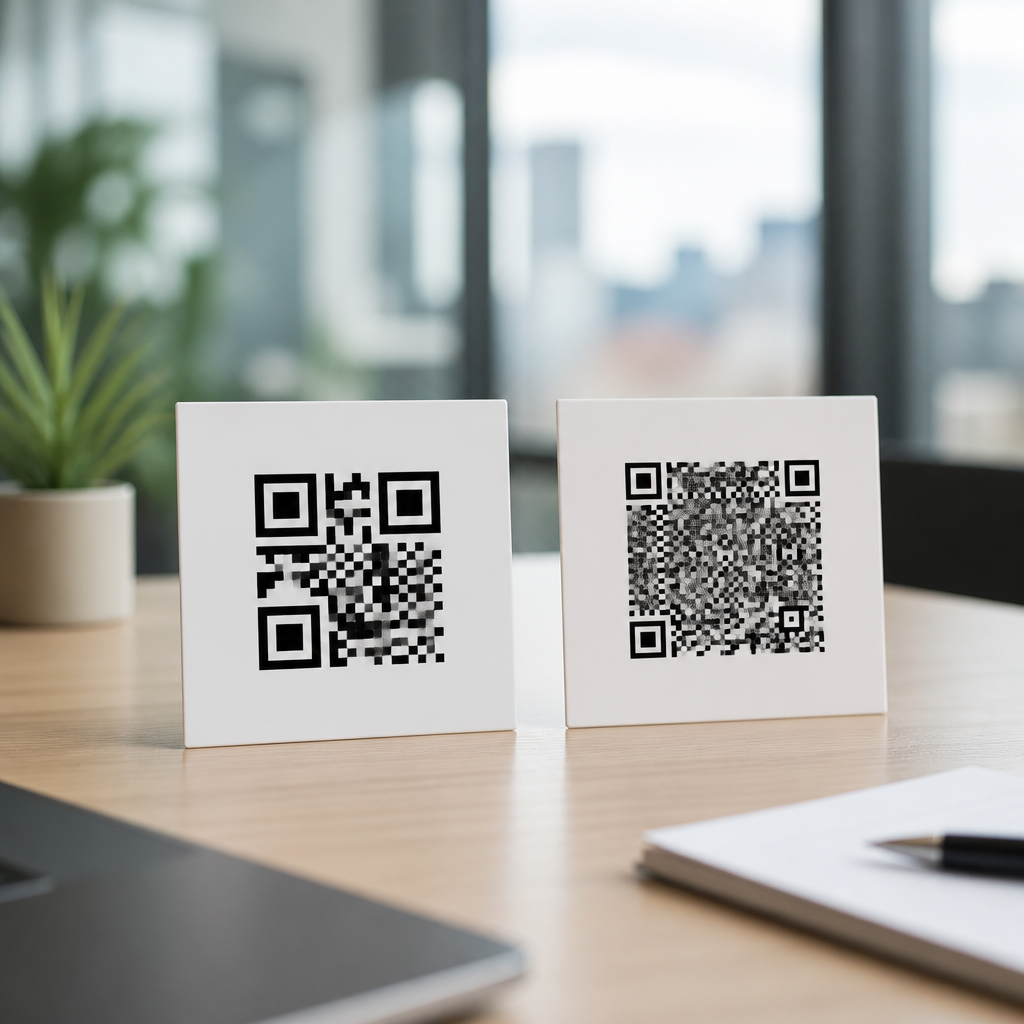
Mobile QR codes are scannable square barcodes designed to open digital content on a smartphone, and understanding the difference between static and dynamic QR codes is the first step to using them well. In practical terms, a mobile QR code converts a camera scan into an action: opening a website, downloading an app, joining Wi-Fi, saving a contact card, sending a text message, or launching a payment flow. I have implemented QR campaigns for retail menus, event check-ins, packaging inserts, and field service manuals, and beginners nearly always ask the same question first: should this code be static or dynamic? That choice matters because it affects cost, flexibility, analytics, security, print durability, and long-term maintenance.
A QR code, short for Quick Response code, stores machine-readable data in a matrix of black and white modules. Modern smartphones read that pattern through the native camera app or a wallet, browser, or scanning utility. “Mobile QR codes” usually refers not to a separate code format, but to QR codes created for smartphone-first experiences. That means the landing page must load fast on mobile networks, the action should be obvious on a small screen, and the code should be easy to scan from packaging, posters, receipts, or screens. In this Mobile QR Code Basics hub, the foundation is simple: all QR codes can be grouped into static or dynamic types, and the right type depends on what happens after the scan.
For beginners, the confusion comes from the fact that both types may look nearly identical. A static QR code directly contains the final destination data, such as a URL, phone number, or plain text. A dynamic QR code usually contains a short redirect URL controlled by a QR platform, and that redirect sends the user to the current destination. Because the visible pattern does not reveal that distinction, many first-time users choose based on price alone and later discover limitations. If you print a static code on 10,000 product labels and then change the website, the printed code cannot be updated. If you use a dynamic code, you can redirect it later without reprinting.
This distinction matters for businesses, schools, nonprofits, and individuals because QR codes often live longer than the campaign that created them. Menus change, event pages expire, contact details get updated, and app store links need device-specific routing. A poor choice creates broken links, wasted print runs, and no visibility into scan performance. A good choice supports durable mobile experiences, cleaner operations, and measurable results. Once you understand how static and dynamic QR codes work, the rest of mobile QR code planning becomes easier: size, placement, content, testing, tracking, and compliance all flow from this basic decision.
What Are Mobile QR Codes and How Do They Work?
Mobile QR codes are standard QR codes used in smartphone-centered journeys. When a phone camera detects the code, the operating system decodes the data and prompts an action. If the code contains a web address, the phone opens the browser. If it contains a vCard, the user can save contact information. If it contains Wi-Fi credentials, supported devices can join a network without manual entry. This is why QR codes are so useful in the physical world: they bridge offline objects and digital actions in one scan.
Technically, QR codes support several encoding modes, including numeric, alphanumeric, byte, and Kanji, with Reed-Solomon error correction allowing partial damage while preserving readability. The four error correction levels—L, M, Q, and H—balance data capacity against resilience. In the field, I usually choose M or Q for printed marketing pieces because they survive moderate wear without creating codes that are unnecessarily dense. Scan reliability also depends on quiet zone spacing, contrast, print quality, and the distance-to-size ratio. A common rule is a minimum printed size around 2 x 2 centimeters for simple uses, but larger is safer when scanning from farther away.
Static QR Codes Explained
A static QR code permanently encodes its destination or payload. If you generate a static URL QR code pointing to example.com/menu-summer, that exact address is built into the pattern. The benefit is simplicity. Static codes can be created with free tools, hosted independently, and used without relying on a third-party redirect service. For personal contact cards, classroom handouts, or a permanent product manual URL, static is often enough.
Static codes also work well for information that is not expected to change. Good examples include a museum label linking to a stable collection page, a password-free public URL printed in a textbook, or a charity donation page built on a permanent web address. If the content remains available for years, a static code can be durable and inexpensive. There is no dashboard requirement and no subscription needed just to keep the code functioning.
The limitation is inflexibility. You cannot edit the destination after printing, and in most cases you cannot collect scan analytics unless tracking is handled on the landing page itself through tools such as Google Analytics 4, Matomo, or server logs. Static codes may also become visually dense when storing long URLs or larger payloads, reducing scan performance on low-quality prints. That is why URL shortening, canonical link planning, and durable page architecture matter when using static QR codes at scale.
Dynamic QR Codes Explained
A dynamic QR code encodes a short redirect controlled through a QR management platform. The printed code stays the same, but the destination behind it can be changed later. This is the defining advantage. In real deployments, dynamic codes are ideal when the campaign, offer, menu, inventory page, app link, or file download may change over time. I have used one printed code on countertop signage for multiple seasonal promotions simply by editing the destination in the dashboard.
Dynamic systems usually offer scan analytics, device and location reporting, expiration controls, password protection, and A/B destination testing. Some platforms support deep links for app opening, smart routing by operating system, UTM parameter management, and bulk generation. For example, a restaurant can print one code on a table tent, update the menu weekly, and review scan volume by hour to match staffing patterns. An event organizer can redirect a code from registration to agenda to post-event survey across the event lifecycle.
The tradeoff is dependency. Most dynamic QR codes rely on a provider’s redirect infrastructure. If the subscription lapses, if the platform retires a feature, or if the service experiences downtime, scans can fail. Reputable providers mitigate this with service-level commitments, export options, custom domains, and HTTPS support. Beginners should also understand pricing models. Some vendors charge by active code count, others by scan volume, feature tier, team seats, or white-label domain use. Dynamic is more powerful, but it requires governance, vendor review, and ongoing ownership.
Static vs Dynamic QR Codes: Key Differences for Beginners
The easiest way to decide is to ask three questions: Will the destination ever change? Do I need scan analytics? Am I comfortable depending on a QR platform? If the destination is permanent and analytics are unnecessary, static is usually sufficient. If you need flexibility or measurement, dynamic is usually the better choice.
| Factor | Static QR Code | Dynamic QR Code |
|---|---|---|
| Destination edits after printing | No | Yes |
| Built-in scan analytics | Usually no | Usually yes |
| Third-party platform dependency | Low | High |
| Best for | Permanent links, simple use cases | Campaigns, changing content, tracking |
| Typical cost | Free or low one-time cost | Subscription or usage-based |
| Risk after URL changes | High | Low if managed well |
There are also operational differences beginners often overlook. Static codes should point to stable URLs you control, ideally on a domain with a clear content maintenance process. Dynamic codes should use a provider that supports custom domains, SSL, data export, and role-based access if multiple people manage campaigns. In both cases, test on iPhone and Android, under bright and dim light, on different screen sizes, and at realistic scan distances. A technically valid QR code can still perform badly if the landing page is slow, the placement is awkward, or the call to action is unclear.
Common Mobile QR Code Use Cases and Best Practices
Mobile QR codes appear everywhere because they remove typing friction. Retail packaging can link to setup guides, ingredient sourcing, warranty registration, or review requests. Restaurants use them for menus and feedback forms. Real estate agents place them on signs for listing pages and virtual tours. Healthcare providers use them for appointment check-in, patient education, and wayfinding, though regulated environments need special care around privacy and data handling. Schools use them for assignment resources, campus maps, and attendance workflows.
Best practice starts with the mobile destination, not the code itself. Use responsive pages, compress images, and keep forms short. Put a clear instruction next to the code, such as “Scan to view the menu” or “Scan for installation steps.” Maintain sufficient color contrast, preserve the quiet zone, and avoid placing codes on curved, reflective, or heavily textured surfaces. ISO/IEC 18004 defines the QR code standard, but practical performance comes from field testing. For printed materials, I recommend verifying scans from multiple angles and distances before committing to a full production run.
Security deserves equal attention. Users should be sent to recognizable domains, preferably HTTPS pages with consistent branding. Bad actors sometimes cover legitimate codes with fraudulent stickers, especially in payment scenarios. Businesses can reduce risk by checking signage regularly, using tamper-evident materials when appropriate, and teaching users to verify the URL preview before opening a page. Good QR design is not only about scan speed; it is also about maintaining trust at the moment of action.
How Beginners Should Choose the Right QR Code Type
Choose static QR codes for content that will not change, where cost and independence matter more than reporting. Choose dynamic QR codes for anything tied to a campaign, evolving information, or measurable performance. If you are unsure, map the full life of the code: where it will appear, who owns the destination, how often content changes, what happens if the URL moves, and whether scan data affects decisions. That simple planning exercise usually reveals the correct type quickly.
Static and dynamic QR codes are both valuable tools in Mobile QR Code Basics, but they serve different operational needs. Static offers permanence, simplicity, and low dependency. Dynamic offers flexibility, analytics, and campaign control. The main benefit of understanding the difference is avoiding rework: you print once, route people correctly, and maintain a smooth mobile experience over time. Start by auditing your use case, then generate a code that matches the expected lifespan and measurement needs. When in doubt, test a small rollout first and build from real scan behavior.
Frequently Asked Questions
What is the difference between a static QR code and a dynamic QR code?
A static QR code contains fixed information directly inside the code itself. Once it is created, the destination or embedded content cannot be changed. For example, if a static QR code points to a website URL, that exact URL is permanently stored in the code. If the web address changes later, the original code will still send users to the old link. Static QR codes are commonly used for simple, permanent actions such as sharing a basic webpage, phone number, email address, Wi-Fi credentials, or contact details.
A dynamic QR code works differently. Instead of storing the final destination directly, it stores a short redirect link that sends the scanner to the current destination set by the QR code owner. That means the destination can be updated even after the code has been printed, published, or placed on packaging, posters, menus, signs, or event materials. Dynamic QR codes are especially useful for campaigns that may change over time, such as retail promotions, restaurant menus, product packaging inserts, event check-ins, app downloads, and payment flows.
In beginner terms, the easiest way to think about it is this: static means “locked,” while dynamic means “editable.” Static QR codes are straightforward and often free to create, but dynamic QR codes give you more flexibility, better campaign control, and access to features like scan tracking, analytics, and destination updates.
When should beginners use a static QR code instead of a dynamic one?
Beginners should use a static QR code when the content will not change and there is no need for tracking or future edits. If you are linking to something permanent, static can be a practical and cost-effective choice. Good examples include a personal contact card, a stable portfolio homepage, a plain text message template, a fixed Wi-Fi password for a home office, or a permanent instruction page that is unlikely to move.
Static QR codes are also helpful when simplicity matters most. Because the data is embedded directly into the code, there is no dependency on a QR platform to maintain redirects. Once generated correctly, the code can continue to work as long as the underlying content remains available. This can make static QR codes appealing for low-maintenance, one-purpose uses.
That said, beginners should be careful not to choose static just because it seems easier at first. A lot of real-world QR code use cases eventually need updates. A restaurant menu may change, an event registration page may close, a product insert may need a new landing page, or a marketing campaign may need a seasonal promotion. If there is any chance the destination will need to change, a dynamic QR code is usually the smarter long-term option, even for beginners.
Why are dynamic QR codes often better for marketing, events, and business use?
Dynamic QR codes are often better for business use because they provide flexibility after launch. In real campaigns, things change. A retail promotion may need a new landing page, an event check-in link may need to be switched at the last minute, a printed menu may require updated pricing, or packaging inserts may need to point customers to a new support page or limited-time offer. With a dynamic QR code, those updates can be made without reprinting the code itself.
Another major advantage is data. Many dynamic QR code platforms provide analytics such as the number of scans, time of scan, location trends, device types, and campaign performance. This helps businesses understand whether a QR code is actually being used and whether the content behind it is effective. For example, if a product package QR code gets many scans but few conversions, that may signal the landing page needs improvement. Static QR codes usually do not offer this built-in level of insight.
Dynamic QR codes also support better campaign management. Businesses can use one code across multiple stages of a promotion, test different destinations, pause or redirect traffic, and keep printed materials useful for longer. For event organizers, this can be especially valuable for check-in pages, schedules, ticket validation, and updates. For restaurants, it can keep table signage usable even when menu items or prices change. For brands using QR codes on packaging, it prevents waste by allowing post-print updates instead of forcing a redesign or reprint.
In short, dynamic QR codes are often the more professional option because they combine convenience, adaptability, and measurable performance.
Can a static QR code be changed or upgraded to dynamic later?
A true static QR code cannot be changed after it has been created, because the encoded data is permanently built into the pattern of the code. If it links directly to a specific URL, phone number, or file, that information stays there for the life of the code. You cannot “edit” the destination later without generating a completely new QR code.
Whether it can be upgraded depends on how it was set up in the first place. If the static QR code points to a URL that you control, you may be able to change the content at that destination. For example, if the code links to a page on your own website, you could update that webpage while keeping the same URL. In that case, the QR code still works, but only because the content behind the URL has changed, not because the QR code itself has been edited.
However, if the code points to a URL you cannot modify, or if the URL itself needs to change, then the static code cannot be rescued. You would need to create and distribute a new QR code. This is one of the biggest reasons businesses prefer dynamic QR codes for printed assets. Once a code is on flyers, product packaging, event signage, menus, or posters, replacing it can be expensive and inconvenient.
For beginners, the key takeaway is simple: if future edits are even remotely possible, start with dynamic. It is much easier to begin with flexibility than to discover later that a static code has locked you into an outdated destination.
How do I choose the right QR code type for websites, apps, Wi-Fi, contacts, payments, or check-ins?
The right choice depends on whether the content is permanent or likely to change, and whether tracking matters. For websites, dynamic QR codes are usually the best option because landing pages, promotions, and campaign goals often change. If the QR code is being used on print materials, packaging, event signage, or store displays, dynamic gives you the ability to update the destination without replacing the code.
For app downloads, dynamic QR codes are also a strong choice, especially if you want to route users by device type, track installs, or change the app store destination later. For event check-ins, dynamic is usually preferred because schedules, registration flows, attendance pages, and access rules can change quickly. For payments, dynamic codes can be useful when transaction flows, payment providers, or campaign-specific checkout experiences need to be updated or monitored.
Static QR codes are often a good fit for direct device actions that are unlikely to change, such as joining a fixed Wi-Fi network, saving a contact card, composing a prewritten text message, or opening a permanent email address. These uses are usually simple, self-contained, and less dependent on analytics or future edits. Still, even here, if business details, Wi-Fi credentials, or contact information may change, dynamic may be worth considering through a managed landing page or redirect structure.
A practical beginner rule is this: use static for simple, stable information and use dynamic for anything tied to business operations, campaigns, customer experience, or measurable results. If the QR code will live in the real world for a long time or be printed at scale, dynamic is usually the safer and more strategic choice.





