
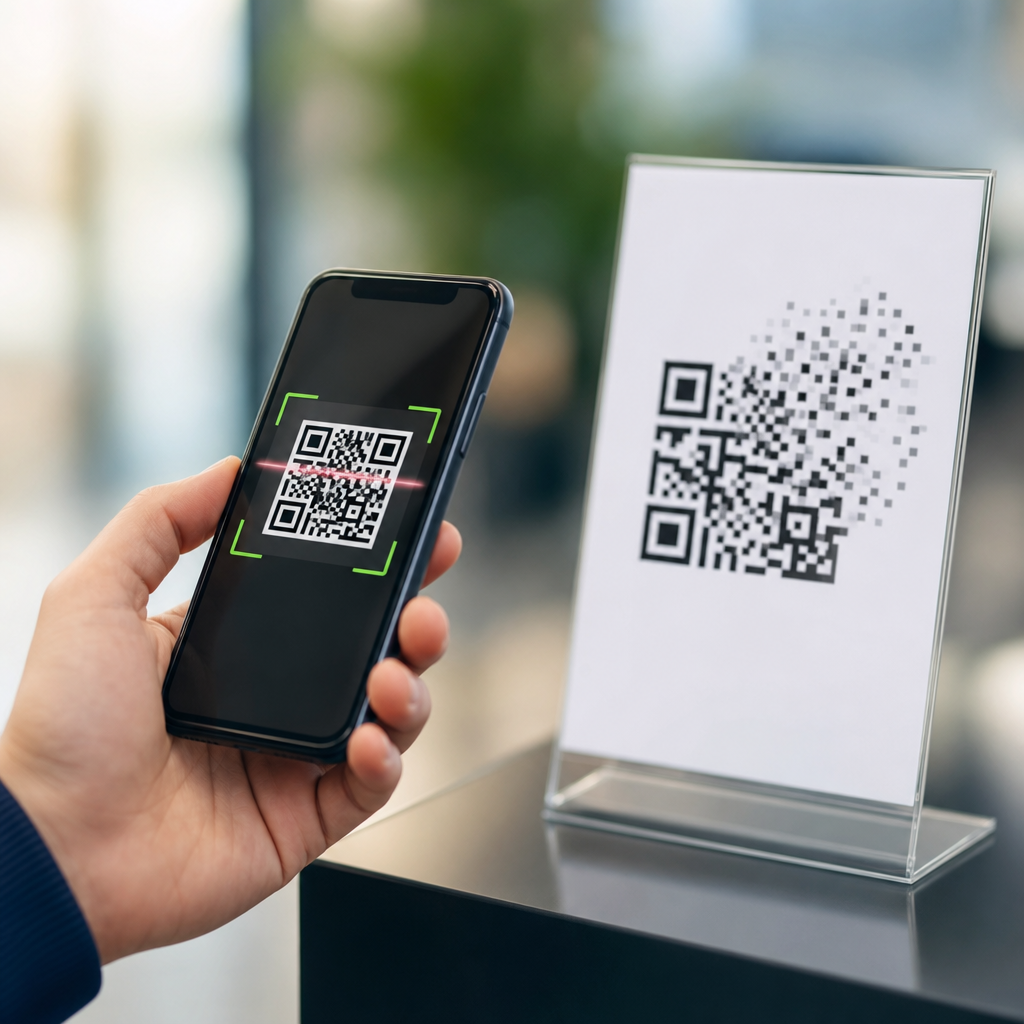
Error correction in QR codes is the built-in ability of a code to stay readable even when part of it is dirty, scratched, faded, covered, or printed imperfectly. In practical terms, it means a phone can still decode the data because extra recovery information was added when the QR code was generated. This matters because mobile QR codes are used in the real world, not in lab conditions. Labels get scuffed, menus pick up grease, packaging curves, screens glare, and posters sit in rain or sunlight. When I test QR campaigns across print, product packaging, and mobile screens, error correction is one of the first variables I check because it directly affects scan reliability, user frustration, and conversion rates. To understand it clearly, you also need to understand how mobile QR codes work from end to end: data is encoded into modules, corrected with redundancy, rendered for print or display, captured by a smartphone camera, then interpreted by decoding software. This article explains that full process and shows where error correction fits.
A QR code, short for Quick Response code, is a two-dimensional matrix barcode invented by Denso Wave in 1994. Unlike a traditional one-dimensional barcode, which stores data along one axis, a QR code stores information both horizontally and vertically. That design allows more capacity and faster scanning. Mobile QR codes are simply QR codes intended to be read by smartphones and tablets using native camera apps or scanning software such as Google Lens, Apple Camera, Samsung Camera, WeChat, or dedicated SDKs like ZXing and Dynamsoft. Error correction is implemented using Reed-Solomon coding, a well-established method also used in CDs, satellite communication, and data transmission systems. The core idea is straightforward: the generator adds mathematical redundancy so the decoder can reconstruct missing or corrupted codewords. The result is a symbol that tolerates real-world damage while preserving usable data for the mobile scanner.
For businesses, error correction influences more than technical accuracy. It affects package design, minimum print size, contrast requirements, logo placement, scan distance, and whether a code survives a warehouse, retail shelf, restaurant table, or event badge. It also affects user trust. If a consumer scans a code twice and gets nothing, they often abandon the action. If the same code scans instantly despite creases or screen smudges, the brand looks competent. That is why a page about what error correction is should also serve as a hub for how mobile QR codes work generally: the scanning experience depends on symbol structure, encoding choices, camera behavior, environmental conditions, and destination quality. When those pieces are designed together, QR codes perform consistently across iPhone and Android devices, in stores, on signs, in apps, and on product labels.
How mobile QR codes work from data to scan
A mobile QR code begins as data. That data may be a URL, plain text, Wi-Fi credentials, vCard contact information, payment instructions, or an app deep link. The generator selects an encoding mode such as numeric, alphanumeric, byte, or Kanji, then converts the content into bit streams. Next it organizes those bits into codewords and adds error correction codewords using Reed-Solomon algorithms defined in ISO/IEC 18004. The final data is placed into the QR symbol alongside fixed structural patterns: finder patterns in three corners, timing patterns, alignment patterns, format information, and sometimes version information. The small black and white squares are called modules. Their arrangement is not random; each module contributes to the decoder’s ability to locate, orient, sample, and interpret the symbol quickly.
When a user opens a mobile camera, the scanning pipeline starts before they tap anything. The camera captures an image stream. Software detects candidate shapes with square geometry and high contrast, identifies the finder patterns, corrects for perspective if the code is tilted, and samples the grid. The decoder then reads format information, applies the correct mask pattern, reconstructs the codewords, and uses error correction to repair damaged or uncertain sections. If enough data survives, the payload is recovered and handed off to the operating system. On iOS and Android, that usually means opening a URL prompt, joining a network, saving contact data, or launching an app intent. In field testing, the biggest mobile variables are autofocus speed, motion blur, low-light noise, reflective surfaces, and the distance between camera and code.
Static and dynamic QR codes behave the same at the symbol level, but they differ at the destination layer. A static QR code stores the final destination directly, such as a long URL. A dynamic QR code usually stores a short redirect URL controlled by a management platform. That allows edits, analytics, expiration rules, geotargeting, and campaign attribution without reprinting the symbol. For mobile use, dynamic codes are often better because they keep the encoded payload shorter, which can produce cleaner symbols with lower version numbers and easier scans. Shorter data density reduces module complexity, especially valuable on small labels or distant signage. Error correction still applies either way, but smaller, less dense symbols generally give scanners more margin under poor conditions.
What error correction does inside a QR code
Error correction in QR codes works by adding redundant codewords that let the decoder recover lost information. QR codes offer four standardized levels: L, M, Q, and H. Level L restores about 7 percent of damaged data, M about 15 percent, Q about 25 percent, and H about 30 percent. Those percentages are approximations used in industry guidance, not guarantees for every damage pattern. Recovery depends on where the damage occurs, symbol size, print quality, masking, and whether the damaged area overlaps critical patterns. I usually explain it this way to teams: error correction is not magic insurance; it is a calculated tradeoff between resilience and capacity. More correction means more redundancy, but also a denser symbol for the same payload.
| Error correction level | Approximate recovery capacity | Best use case | Main tradeoff |
|---|---|---|---|
| L | 7% | Clean digital display, short URLs, large codes | Lowest resilience |
| M | 15% | General marketing, menus, posters, packaging | Moderate density |
| Q | 25% | Light wear, curved surfaces, partial obstruction | Higher density |
| H | 30% | Logo overlays, industrial labels, harsh handling | Largest and densest symbol |
The most common misconception is that higher error correction is always better. In reality, increasing from M to H can make the QR code visually denser, which may hurt scanning when the printed size stays the same. A tiny code on a supplement bottle with H-level correction and a logo in the center can become harder to read than a slightly larger code at M or Q with no logo. The right choice depends on context. Restaurant table tents, direct mail, and retail packaging often work well at M or Q. Harsh industrial environments or branded marks with center overlays may justify H, but only after print testing. Error correction should be treated as one variable in the full symbol design, not a substitute for contrast, quiet zone, or adequate size.
Real-world factors that affect mobile scanning performance
Most scan failures blamed on error correction are actually caused by production or environment issues. The quiet zone, the empty margin around the code, is essential; without it, decoders struggle to separate the symbol from surrounding graphics. The standard recommendation is four modules wide on all sides. Contrast also matters. Black on white remains the safest choice because phone cameras and image processing handle it predictably. Inverted codes, low-contrast brand colors, glossy laminates, and metallic substrates reduce reliability. Print resolution matters too. Ink spread can close small gaps, while poor thermal printing can create broken modules. On screens, moiré, cracked glass, low brightness, and refresh artifacts can interfere with sampling, especially on older devices.
Physical size must match scanning distance and camera capability. A common rule is that the minimum QR code size should be about one-tenth of the intended scanning distance, though this varies by device and symbol density. For example, a code scanned from 20 inches should be at least around 2 inches wide. Dense payloads need larger symbols because individual modules become smaller. Curved surfaces create additional distortion. On cans and bottles, alignment near the seam or tight curvature can warp module geometry enough to lower scan speed. In my own packaging tests, increasing the print size by even 15 to 20 percent often improves real-world scan success more than raising error correction alone. Good deployment decisions beat theoretical capacity every time.
Destination experience also affects how mobile QR codes work in practice. A code that scans instantly but opens a slow, non-mobile page still fails the user. Mobile landing pages should load fast, avoid intrusive interstitials, and match the physical context of the scan. A code on product packaging should not land on a desktop homepage. It should open the exact page for ingredients, authentication, instructions, warranty registration, or replenishment. Dynamic QR platforms help here because they support redirects, UTM parameters, first-party analytics, and A/B testing. When teams connect scan data with analytics platforms such as Google Analytics 4, they can measure scan-through rate, bounce rate, location trends, and device mix, then optimize both the symbol and destination.
Best practices for choosing error correction and building better codes
Choose the lowest complexity that still survives the environment. Start with a short destination, preferably a dynamic short URL, then test at M. Move to Q or H only when the use case justifies it, such as rough handling, partial obstruction, or a carefully controlled logo overlay. Keep the quiet zone intact, maintain strong contrast, and avoid squeezing a dense code into a small area. If branding is required, reduce payload length first, then reserve enough error correction to support the design change. Validate with multiple devices, including older Android phones, not just current flagship models. I recommend testing under realistic conditions: low light, movement, glare, angled scans, and slightly damaged samples. Lab-perfect scans can hide expensive field failures.
The main benefit of understanding error correction in QR codes is better decision-making. You can choose symbol settings that fit the environment instead of guessing, and you can build mobile QR experiences that scan faster, fail less often, and lead users to relevant destinations. Remember the full chain: data encoding, structure, redundancy, print or display quality, smartphone capture, decoding, and landing-page performance. Error correction strengthens the chain, but it cannot rescue poor contrast, missing quiet zones, tiny module sizes, or weak mobile destinations. If you manage packaging, retail signage, events, restaurants, or product support, audit your current codes against these basics and run device testing before the next campaign goes live. That simple review will improve reliability and user experience immediately.
Frequently Asked Questions
What does error correction mean in a QR code?
Error correction in a QR code is the built-in ability of the code to remain scannable even when part of it is damaged, dirty, faded, distorted, or partially blocked. When a QR code is created, it does not store only the visible data, such as a URL or text string. It also includes extra recovery information that helps a scanner reconstruct the missing or unreadable parts. That is why a phone can often scan a code on scratched packaging, a wrinkled flyer, a greasy restaurant menu, or a sign exposed to weather. In simple terms, error correction makes QR codes practical for real-world use, where perfect printing and perfect scanning conditions are rare. Without it, even minor wear or printing flaws could make many codes fail.
How does QR code error correction actually work?
QR code error correction works by adding redundancy to the encoded data at the time the code is generated. Instead of storing only the raw content, the QR code includes mathematically derived recovery data that allows scanning software to identify and repair a certain amount of missing or corrupted information. This is commonly handled using Reed-Solomon error correction, a proven method used in many digital storage and communication systems. The important idea is not that the QR code becomes invincible, but that it gains tolerance. If part of the pattern is scratched off, blurred by poor printing, hidden by glare, or affected by a curved surface, the scanner can use the remaining readable modules and the recovery data to infer what was lost. That built-in resilience is one of the main reasons QR codes work so well on product labels, posters, tickets, mailers, and mobile screens.
What are the different QR code error correction levels?
QR codes are typically generated with one of four standard error correction levels: L, M, Q, and H. Level L provides the lowest amount of recovery capacity and allows about 7% of the code to be restored. Level M allows about 15%, Level Q about 25%, and Level H about 30%. The higher the level, the more damage or obstruction the code can potentially survive. However, there is a tradeoff. More error correction means more of the QR code’s total capacity is used for recovery information rather than for the actual content. As a result, the pattern usually becomes denser and more complex for the same amount of data. In practice, that means selecting the right level depends on where and how the code will be used. A clean digital display may need less correction, while packaging, outdoor signage, or anything likely to be scuffed or partially covered often benefits from a higher level.
Why is error correction so important for mobile QR codes in everyday use?
Error correction matters because QR codes are almost never used under perfect conditions. In the real world, labels get scraped during shipping, menus collect fingerprints and grease, product packaging bends around corners, posters fade in sunlight, and screens reflect overhead lighting. Even a good camera and a modern scanning app cannot compensate for every physical problem if the code itself has no recovery capacity. Error correction gives mobile devices a much better chance of decoding the code quickly despite those imperfections. It improves reliability, reduces failed scans, and creates a smoother experience for the user. That is especially important in marketing, payments, inventory, event access, and packaging, where a failed scan can mean lost engagement, delayed operations, or customer frustration. In short, error correction is one of the key features that turns QR codes from a fragile visual pattern into a practical tool for everyday scanning.
Should you always use the highest error correction level in a QR code?
Not always. While a higher error correction level can make a QR code more resistant to damage, it is not automatically the best choice in every situation. Increasing error correction also increases the density of the code, which can make it harder to scan if the code is printed very small, viewed from a distance, or packed with too much data. The best choice depends on the environment, the size of the code, the amount of content being encoded, and the expected scanning conditions. For example, a QR code on industrial equipment, outdoor signage, or consumer packaging may benefit from a higher level because wear and obstruction are more likely. A code displayed clearly on a phone screen or used in a controlled indoor setting may work perfectly well with a lower or medium level. The goal is balance: enough error correction to handle real-world imperfections, but not so much that the code becomes unnecessarily dense or difficult to scan.





