
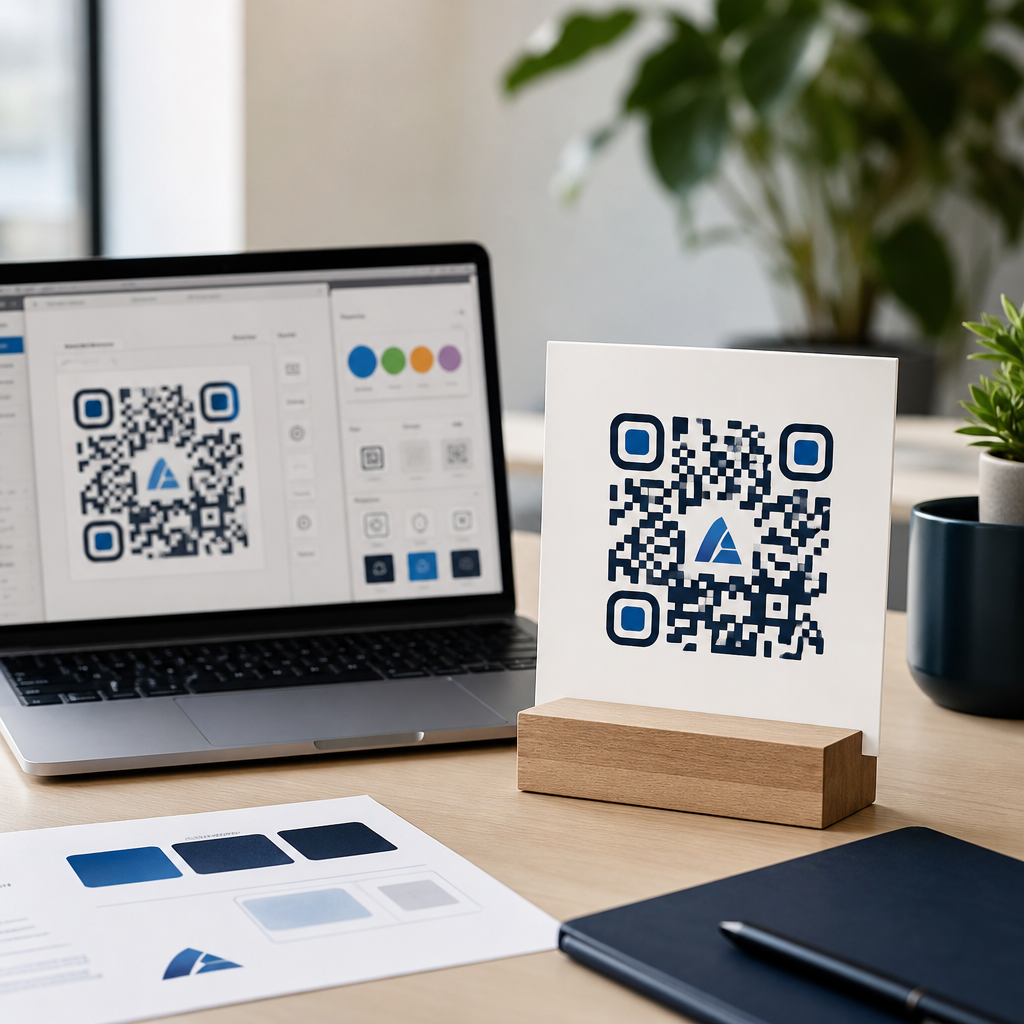
Top QR code generators for custom branding help businesses turn a basic scannable square into a recognizable marketing asset. A QR code generator is a tool that creates Quick Response codes linking users to websites, menus, apps, contact cards, payment pages, PDFs, and other mobile destinations. Custom branding means changing color, shape, frames, logos, error correction, and destination behavior so the code fits a company’s visual identity while still scanning reliably. In the mobile marketing work I have managed, the difference between a generic black-and-white code and a properly branded QR code has been measurable: stronger scan confidence, cleaner campaign attribution, and better consistency across packaging, print, signage, and paid media.
This matters because QR codes now sit at the intersection of offline and online customer journeys. Restaurants use them for digital menus, retailers place them on shelf talkers, manufacturers print them on packaging, and event teams include them on badges and banners. The best QR code generators do more than produce an image. They support dynamic redirects, analytics, UTM tagging, bulk creation, team permissions, and export formats suitable for design and production workflows. For a brand building a repeatable mobile QR code strategy, choosing the right platform affects campaign speed, governance, and scan performance. This hub explains what makes a generator good, which platforms stand out, and how to match a tool to your branding goals.
What makes a QR code generator best for custom branding
The best QR code generators for custom branding combine design flexibility with technical discipline. Design flexibility includes support for custom colors, rounded modules, different eye patterns, center logos, branded frames with calls to action, and export formats such as SVG, EPS, and PDF for print. Technical discipline means preserving adequate contrast, quiet zone spacing, and error correction so the code remains readable under real-world conditions. In practice, I treat branding options as secondary to scanability. A beautiful code that fails under fluorescent store lighting or on corrugated packaging is not a successful asset.
Dynamic QR codes are usually the decisive feature. A static QR code encodes one fixed destination and cannot be changed after printing. A dynamic QR code points to a short redirect URL controlled by the platform, so you can update the landing page later without reprinting the code. That capability is essential for seasonal campaigns, packaging updates, A/B testing, and fixing broken links. The strongest platforms also provide scan analytics, device and geography reporting, password protection, expiration rules, folders, and API access. If you manage many campaigns, these are not extras. They are the operating system for your QR code program.
Another factor is workflow fit. Designers often need vector output, marketers need analytics and destination editing, and operations teams need bulk generation or templates. A small coffee shop may only need a menu QR code with a logo. A franchise network may need hundreds of location-specific codes with governance controls and standardized naming. The best tool is the one that handles your expected volume, compliance standards, and production environment without forcing workarounds.
Best QR code generators compared
Several platforms consistently stand out for branded mobile QR code creation. QR Code Generator Pro is widely used because it balances user-friendly design controls with dynamic code management and campaign analytics. Bitly is strong when link management is already central to your workflow, since branded links and QR generation live together. Beaconstac is a serious option for larger teams that need enterprise controls, API access, retargeting integrations, and stronger governance. QR TIGER is popular for its broad QR code types, customization options, and practical pricing tiers. Flowcode focuses heavily on attractive designs, fast creation, and creator or event use cases. Canva is not a full QR code management platform, but it is useful when teams want simple code creation inside a broader design workflow.
| Platform | Best for | Branding strengths | Key limitation |
|---|---|---|---|
| QR Code Generator Pro | General business use | Logo insertion, frames, colors, dynamic editing | Advanced governance is lighter than enterprise tools |
| Bitly | Teams managing links and QR together | Branded short links plus QR distribution | Design options are less specialized |
| Beaconstac | Enterprise campaigns | Templates, bulk, API, analytics, security controls | Higher complexity and cost |
| QR TIGER | SMBs needing flexibility | Strong customization and broad code types | Interface depth can feel busy |
| Flowcode | Events, creators, simple branded campaigns | Stylized designs and straightforward setup | Less suited to complex admin structures |
Each platform solves a slightly different problem. In one packaging rollout I supported, Beaconstac made sense because the client needed bulk dynamic QR codes mapped to SKU-level destinations and wanted central admin control. In a smaller retail campaign, QR Code Generator Pro was enough because the team mainly needed editable destinations, logo support, and clean reporting. If you are exploring related topics, your next decision usually connects to design rules, analytics setup, and static versus dynamic code strategy within your broader Creating Mobile QR Codes workflow.
How branding choices affect scan performance
Custom branding improves recognition, but every design change alters scan tolerance. The safest QR codes maintain high contrast between foreground and background, a clear quiet zone around the code, and limited distortion to module shapes. ISO/IEC 18004 defines the QR code standard, and while most generators abstract the technical details, good marketers should still understand the basics. Error correction levels matter because they determine how much data damage the code can tolerate. If you place a logo in the center, higher error correction helps preserve readability, though it slightly increases code density.
From testing codes across packaging, posters, table tents, and direct mail, I use a few practical rules. Dark foreground on light background scans best. Inverted light-on-dark designs can work, but performance becomes more device-dependent. Gradients look attractive in mockups yet often fail in poor lighting or when printed at small sizes. Rounded modules and stylized eyes are usually acceptable in moderation, but aggressive artistic changes reduce reliability. A branded frame saying “Scan to view menu” or “Scan for warranty registration” often increases user action more than decorative edits to the code itself, because the call to action answers the immediate question: why should I scan this?
File format also affects outcomes. For print, SVG or EPS is preferable because vectors scale without losing edge clarity. PNG works for digital placement, especially on websites, email graphics, and social posts, but low-resolution raster exports can create soft edges that make scanning harder. Always test the final production file, not just the preview inside the generator.
Features businesses should prioritize
If your goal is branded QR codes that support marketing and operations, prioritize five features. First, dynamic editing lets you change destinations without replacing printed assets. Second, analytics should show scans over time, location, device type, and campaign source so you can connect offline touchpoints to measurable outcomes. Third, branding controls should include logos, frames, color choices, custom short domains where available, and high-quality exports. Fourth, organization features such as folders, tags, templates, bulk upload, and team roles become critical once you move beyond a handful of codes. Fifth, integrations matter. Platforms that connect to Google Analytics, Zapier, CRM systems, or ad retargeting workflows reduce manual reporting and extend campaign value.
Security and governance deserve more attention than they usually get. Dynamic QR codes rely on redirect infrastructure, so platform uptime and account controls matter. Enterprises may need SSO, audit logs, domain verification, and permission tiers by market or department. Regulated industries may also require explicit data handling reviews, especially if QR codes lead to forms collecting personal information. Even for smaller businesses, naming conventions and expiration policies prevent confusion later. A code labeled “Summer Menu Final Final 2” becomes a problem when six teams try to update it a year later.
Choosing the right generator by use case
The best QR code generator depends on how you plan to deploy mobile QR codes. For restaurants, the priority is dependable dynamic menu links, easy updates, and print-friendly assets that survive grease, glare, and frequent reprints. For consumer packaged goods, bulk creation and analytics segmentation by SKU or region are more important. For real estate, branded property flyers benefit from simple landing page edits and agent-level reporting. Events need fast turnaround, attractive design, and scan tracking by session, sponsor, or location. Healthcare and regulated sectors typically need conservative design, dependable redirects, and stronger administrative controls.
Budget should be considered alongside risk. Free QR code generators can be useful for prototypes, internal signs, or one-off static links, but they often lack analytics, editable destinations, reliable branding controls, and long-term governance. Paid platforms are justified when a QR code is printed at scale, tied to revenue, or embedded in a campaign that cannot tolerate broken destinations. In my experience, businesses regret underinvesting far more often than they regret paying for dynamic control on important assets.
Conclusion
Top QR code generators for custom branding are not interchangeable. The right choice balances visual customization, scan reliability, dynamic management, analytics, and team workflow. QR Code Generator Pro, Bitly, Beaconstac, QR TIGER, Flowcode, and Canva each serve different needs, from simple branded campaigns to enterprise deployment. The strongest results come from treating branding as part of a broader mobile QR code system, not as a cosmetic afterthought.
If you are building a hub around Best QR Code Generators within Creating Mobile QR Codes, use this page as your starting framework. Shortlist tools based on your use case, insist on dynamic capabilities for important campaigns, export vectors for print, and test every branded code on actual devices before launch. Then move deeper into related decisions such as static versus dynamic QR codes, QR code design best practices, and QR code analytics setup so every scan has a clear business purpose.
Frequently Asked Questions
What should I look for in a QR code generator for custom branding?
When comparing QR code generators for custom branding, start with the features that affect both appearance and performance. A strong platform should let you customize core design elements such as colors, corner markers, pattern style, frames, and calls to action, while also supporting logo uploads and branded landing pages when needed. Just as important, it should preserve scan reliability. The best tools give you control over error correction levels, contrast, quiet zone spacing, and export quality so your branded code still works across different phones, lighting conditions, and print surfaces.
You should also evaluate whether the generator offers dynamic QR codes. Dynamic codes allow you to change the destination URL or content later without reprinting the code, which is a major advantage for campaigns, product packaging, menus, event materials, and seasonal promotions. Analytics is another key feature. Many businesses want to know how often a code was scanned, where scans happened, what devices were used, and which campaigns performed best. If measurement matters, choose a platform with clear reporting and integrations with broader marketing tools.
Finally, think about practical business needs. File formats such as SVG, EPS, PNG, and PDF matter for print and digital use. Team access, brand asset libraries, bulk creation, password protection, expiration settings, and white-label options can also be valuable depending on your organization. In short, the right QR code generator is not just a design tool. It should support branding, campaign flexibility, tracking, and reliable scanning at the same time.
Do branded QR codes scan as well as standard black-and-white QR codes?
Yes, branded QR codes can scan just as well as standard black-and-white codes, but only when they are designed correctly. A common mistake is assuming that adding a logo, changing colors, or reshaping elements automatically keeps the code functional. In reality, scan performance depends on contrast, spacing, size, print quality, and the degree of customization applied. The best QR code generators for custom branding are built to balance design freedom with technical standards, helping businesses personalize codes without making them unreadable.
For example, strong contrast between the foreground and background is essential. A light gray code on a white background may look elegant, but it can fail in real-world scanning conditions. The same goes for oversized logos that cover too much of the data area or decorative shapes that interfere with the code’s structure. This is where error correction becomes important. Higher error correction allows a QR code to remain scannable even if part of it is obscured by a logo or minor damage, though it can also make the code denser. Good generators help manage that tradeoff automatically.
The safest approach is to test every branded QR code before launching it. Scan it with multiple devices, under different lighting conditions, and from the expected real-world distance. Test both printed and digital versions if you plan to use it across channels. When branding is applied thoughtfully, a custom QR code can be highly recognizable and still perform reliably, making it a practical marketing asset rather than just a visual enhancement.
Are dynamic QR codes better than static QR codes for branded marketing campaigns?
In most branded marketing campaigns, dynamic QR codes are the better choice because they offer flexibility after the code has already been published. A static QR code permanently stores the final destination, which means if the URL changes, the campaign ends, or you want to update the user experience, you need to create and distribute a new code. That can be inconvenient and expensive, especially for printed materials such as product labels, packaging, posters, table tents, direct mail, and signage.
Dynamic QR codes solve that problem by pointing to a short redirect that can be updated later. This means a business can keep the same branded QR code design in circulation while changing the destination behind it. For example, the same code on a restaurant flyer could direct users to a seasonal menu one month, a catering page the next month, and a holiday promotion later in the year. That kind of flexibility is especially useful for brands that want consistency in design but agility in campaign execution.
Another major advantage of dynamic QR codes is analytics. Businesses can often track scan counts, time of day, device type, and location data, depending on the platform and privacy settings. This helps marketers understand performance and optimize campaigns without guessing. Static QR codes still have their place for simple, permanent uses like Wi-Fi access, basic contact cards, or long-term informational links. But for branded campaigns where updates, testing, and measurement matter, dynamic QR codes are usually the more strategic option.
Which industries benefit the most from custom branded QR code generators?
Custom branded QR code generators are useful across many industries, but they are especially valuable in sectors where offline-to-online engagement matters. Retail is a major example. Brands can place QR codes on packaging, shelf displays, hang tags, and storefront materials to connect shoppers to product videos, reviews, loyalty programs, or limited-time offers. Restaurants and hospitality businesses also benefit because branded QR codes can lead guests to digital menus, reservation forms, feedback pages, event schedules, or property information while reinforcing the brand’s visual identity.
Real estate is another strong use case. Agents and firms can add branded QR codes to signs, brochures, and property flyers that take prospects directly to virtual tours, listing pages, mortgage tools, or contact forms. In events and entertainment, custom QR codes can streamline ticketing, schedules, venue maps, sponsor activations, and merchandise promotions. Healthcare, education, and professional services can also use them for patient forms, resource pages, appointment booking, onboarding, and document access, as long as privacy and compliance considerations are properly addressed.
What ties these industries together is the need to make every customer touchpoint feel intentional and trustworthy. A generic QR code may function, but a branded one can better align with a company’s packaging, signage, and campaign design, making it more likely that users recognize it as legitimate and worth scanning. Any organization that wants to bridge physical materials and mobile destinations in a polished, measurable way can benefit from a high-quality custom QR code generator.
How can I make sure a custom branded QR code stays on-brand without hurting usability?
The key is to treat branding and usability as partners, not competing priorities. Start by using brand colors selectively rather than aggressively. You do not need to force every brand color into the code. In most cases, one primary dark brand color on a light background works better than a complex palette. Keep the contrast high, leave enough white space around the code, and avoid busy backgrounds that make scanning difficult. If you add a logo, keep it centered and proportionate so it enhances recognition without covering too much of the code’s data pattern.
Frames and calls to action can also improve usability when used well. A branded frame with text such as “Scan to View Menu,” “Shop the Collection,” or “Get the App” gives users immediate context and often increases scan rates. This is especially important because many people still hesitate to scan a code if they do not know where it leads. Good QR code generators allow you to add these directional elements while maintaining correct spacing and structure.
Most importantly, test the final code in the same environments where it will be used. A code that scans perfectly on a laptop screen may behave differently on glossy packaging, outdoor signage, or low-light menus. Check print size, material, viewing distance, and mobile device compatibility. Also confirm that the destination page is mobile-friendly, since the user experience does not end with the scan. A truly effective branded QR code feels visually consistent with the brand, scans quickly, and leads to a smooth mobile destination that matches the promise of the campaign.





