
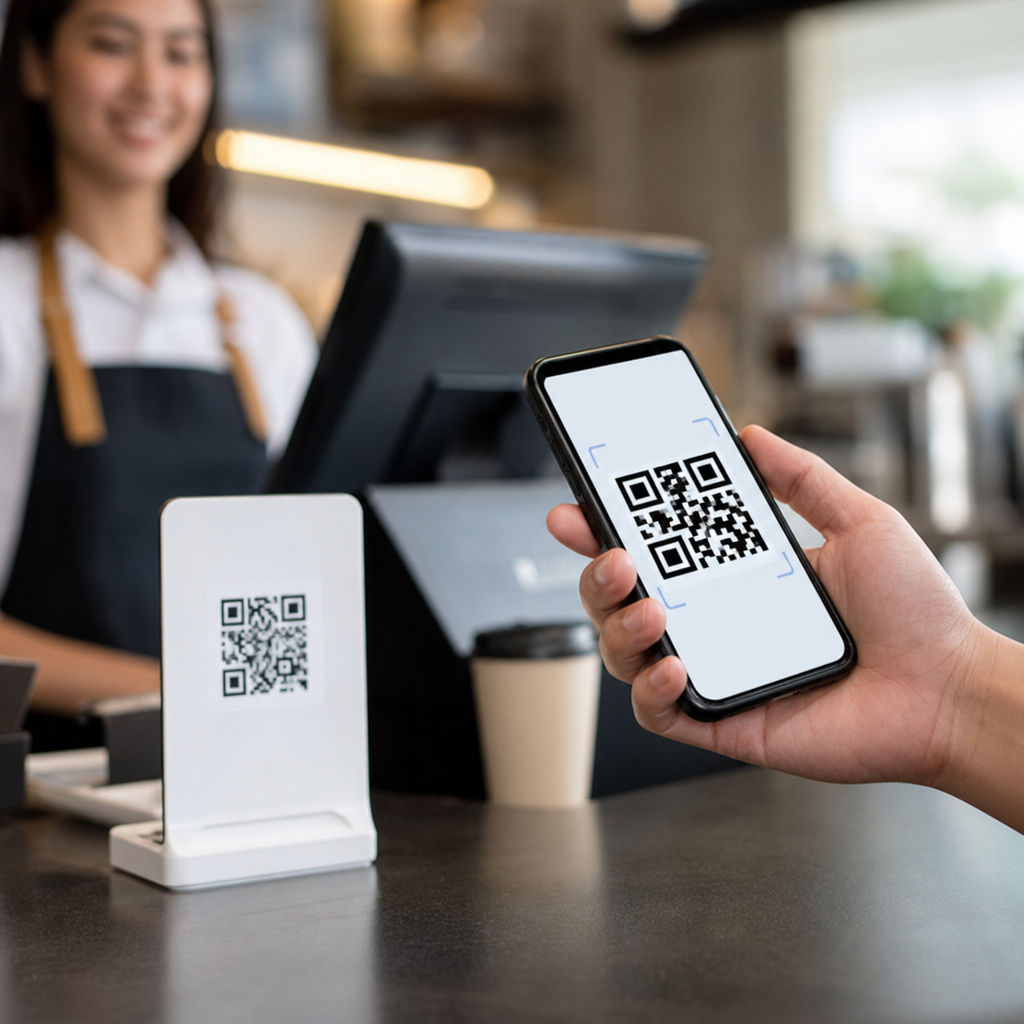
QR codes have changed checkout from a stop-and-wait moment into a fast, low-friction handoff between buyer and seller. In retail, hospitality, events, transportation, and service businesses, a QR code checkout flow lets customers scan with a smartphone, review a cart or invoice, and complete payment without typing long card numbers, handling cash, or waiting for a terminal to free up. When people ask how QR codes improve speed and convenience at checkout, the short answer is simple: they remove unnecessary steps, reduce manual entry, and connect the customer directly to the right payment screen.
A QR code, or Quick Response code, is a two-dimensional barcode that stores information such as a payment link, order ID, merchant account details, discount code, or digital receipt destination. At checkout, the code can be merchant-presented, where the business displays it and the customer scans, or customer-presented, where the buyer shows a code on their phone for staff to scan. I have helped businesses deploy both models, and the difference in line speed is immediate when the payment path is designed well. Fewer taps, fewer handoffs, and fewer device errors lead to a more reliable end-of-sale experience.
This matters because checkout is where revenue is either captured cleanly or lost through delay, confusion, and abandonment. Baymard Institute research has repeatedly shown that complicated checkout processes are a major cause of cart abandonment in ecommerce, and the same principle applies in person. When a customer has to wait for a cashier to key in details, search for a product, print a bill, or troubleshoot a terminal, friction rises. QR code payments streamline those steps by linking directly to a prefilled payment page, digital menu, ticket, invoice, or loyalty record. For a sub-pillar on mobile QR code basics, this hub page explains the core benefits of mobile QR codes at checkout and shows where they deliver the strongest operational advantage.
Why QR codes make checkout faster
QR codes speed up checkout because they compress several actions into one scan. Instead of asking a customer to open an app, search for a merchant, enter an amount, and confirm account details, a QR code can load the exact payment destination with the correct merchant and transaction context already attached. In a café, for example, a table QR code can open a payment page tied to a specific order. In a parking lot, a code on the meter can identify the location and duration options instantly. In both cases, the scan replaces multiple manual steps and cuts the chance of user error.
The biggest time savings usually come from reducing bottlenecks around shared hardware. Traditional chip-and-PIN terminals can create a queue when only one or two devices are available, especially during lunch rushes or event intermissions. Merchant-presented QR codes distribute the workload to customers’ own phones, which means more transactions can happen in parallel. I have seen quick-service operators move from one-line-per-register processing to multi-customer simultaneous payment simply by adding printed counter codes linked to dynamic carts. Staff still oversee the sale, but they no longer have to shepherd every tap.
QR code checkout also helps when connectivity or device compatibility is uneven. Near Field Communication payments are fast, but they depend on supported phones, wallets, and terminal configuration. QR codes work across iOS and Android using the standard camera in most cases, making them broadly accessible. They are not a universal replacement for cards or wallets, but they provide a practical fallback that prevents stalls at the point of sale.
How QR codes improve convenience for customers
Convenience is not just about speed; it is about reducing effort and uncertainty. A good QR checkout flow gives customers clarity on what they are paying for, how much they owe, and what happens next. Because the QR code can lead to a branded page with itemized charges, tip options, saved payment methods, and receipt delivery, customers feel more in control than they do with a rushed card handoff. In table service restaurants, that means no waiting for the server to bring a check, run a card, and return. In clinics or repair shops, it means paying from a texted or printed code while standing where it is most comfortable, not at a crowded front desk.
Mobile QR codes are especially useful for self-service and after-hours scenarios. Hotels can place QR codes at kiosks for express checkout. Utility providers can add them to paper bills so customers jump straight to a secure payment screen. Pop-up shops and market vendors can accept payment without investing in a full countertop setup. For many buyers, the familiar act of scanning a code feels easier than downloading a dedicated app or reading card details aloud. That ease matters because convenience directly affects completion rates and customer satisfaction.
Accessibility benefits are often overlooked. A scanned payment page can enlarge text, support screen readers, switch languages, and save card data securely through the customer’s preferred browser or wallet. Physical terminals do not always offer that flexibility. The best implementations pair clear signage with concise instructions such as “Scan to pay” and a visible fallback option for card or cash, ensuring the convenience gain does not turn into confusion for less confident users.
Operational benefits for businesses
For merchants, the benefits of mobile QR codes extend beyond shorter lines. QR-based checkout can reduce hardware dependence, lower maintenance demands, and simplify deployment across multiple locations. A business can print static codes for fixed destinations or use dynamic QR codes managed through platforms such as Stripe Payment Links, PayPal QR Codes, Square, or regional payment providers. Dynamic codes are more useful for checkout because the destination can be updated without reprinting signage, and performance can be tracked by location, campaign, or staff station.
QR codes also improve data capture and reconciliation when they are tied to order management systems. In a practical deployment, each code can carry identifiers for store number, register, table, employee, invoice, or event booth. That makes it easier to match payments to orders and troubleshoot disputes. A merchant can see whether a customer paid from table 14, kiosk 3, or an emailed invoice reminder, then compare completion rates and average payment time across channels. This is one reason QR codes fit well into omnichannel operations: they connect physical interactions to digital records cleanly.
Training is another advantage. Staff can learn a simple script quickly: direct the customer to scan, confirm the amount on screen, and verify success on the merchant dashboard or order display. That workflow is often easier to teach than full terminal troubleshooting. The tradeoff is that businesses must design the flow carefully, with obvious branding, secure HTTPS pages, and clear on-screen confirmation, because a poorly designed page can erase the speed gains.
Common checkout use cases and their advantages
Different industries use QR code checkout in different ways, but the pattern is consistent: the code removes a manual step that used to slow down payment. The best use cases are not gimmicks; they solve a queue, staffing, or payment-access problem with a scan that feels natural.
| Use case | How the QR code is used | Main checkout benefit |
|---|---|---|
| Quick-service restaurants | Counter or table code opens a prefilled payment page | Shorter lines and faster table turns |
| Retail pop-ups and markets | Merchant displays a payment code at the stall | Low hardware cost and quick setup |
| Invoices and service calls | Code on bill links to amount due | Faster collections and fewer entry errors |
| Events and ticketing | Attendee scans to buy food, merchandise, or upgrades | Parallel payments during peak surges |
| Parking and transit | Code identifies location or route automatically | Less machine interaction and quicker payment |
In each example, the convenience comes from context. The customer does not start with a blank screen; the QR code carries them to the exact action they need. That is why conversion improves when businesses place codes at the right decision point: on the table, on the shelf edge, on the invoice, or at the gate.
Security, trust, and implementation best practices
QR codes improve checkout only when customers trust the process. The main risk is not the QR format itself but malicious redirection through tampered stickers or misleading landing pages. Businesses should use branded payment pages, secure domains, tamper-resistant placement, and routine inspections of printed codes. If the code is dynamic, access controls and change logs matter. Payment providers should support encryption, tokenization, fraud screening, and PCI DSS-aligned handling of card data. Customers should never be asked to download suspicious files or enter unnecessary information after scanning.
There are also practical limits. Some customers prefer cards, some phones have poor cameras, and some environments have weak mobile data. The most effective checkout setups treat QR codes as a strong option, not the only option. Good signage, stable Wi-Fi where appropriate, and a visible alternative payment path keep the experience inclusive. When businesses measure time-to-pay, abandonment rate, and payment completion by method, they can see where QR codes deliver real gains and where another method should remain available.
QR codes improve speed and convenience at checkout because they turn payment into a direct, mobile-first action. They reduce queue time, cut manual entry, support self-service, and give businesses flexible, trackable payment flows without heavy hardware dependence. They work best when linked to clear, secure pages and supported by thoughtful placement, staff training, and fallback options. If you are building out mobile QR code basics for your business, start by mapping one checkout bottleneck, testing a QR flow in that moment, and measuring whether customers finish faster and with fewer support needs.
Frequently Asked Questions
How do QR codes make checkout faster for customers?
QR codes speed up checkout by removing several of the slowest steps in a traditional payment process. Instead of waiting for a cashier to enter items manually, pass over a payment terminal, or collect cash and make change, customers can simply scan a code with their smartphone and move directly into a payment page, digital cart, or prefilled invoice. That means fewer delays caused by card entry, cash handling, receipt printing, or crowded checkout counters. In many settings, the QR code also connects the customer straight to the exact amount due, which reduces mistakes and eliminates the need to type in totals or account details.
This faster flow is especially useful in busy environments such as retail stores, restaurants, event venues, transit systems, and service businesses. When many people are trying to pay at once, QR code checkout reduces bottlenecks because customers do not all need access to the same physical terminal. Several people can complete payment at the same time using their own devices. The result is shorter lines, quicker table turnover, faster order completion, and a smoother overall experience that feels more convenient from start to finish.
Why is QR code checkout considered more convenient than traditional payment methods?
Convenience comes from simplicity. A QR code turns checkout into a quick scan-and-pay action that people can complete on a device they already know how to use. There is no need to hand over a card, count cash, wait for a terminal, or repeatedly enter billing information. In many cases, the customer can review the order, confirm the amount, choose a preferred payment method, and finish the transaction in just a few taps. That reduces friction and makes the payment process feel much less disruptive.
QR code checkout is also convenient because it works well in a wide range of customer journeys. A code can be placed on a counter, receipt, table tent, product display, invoice, kiosk, ticket, parking meter, or service vehicle. This flexibility allows businesses to bring payment directly to the point of decision instead of forcing customers to stand in a specific line or visit a separate checkout area. For customers, that often means more control, more payment options, and less waiting. For businesses, it creates a more efficient and adaptable checkout system that fits modern buying behavior.
Can QR codes help reduce lines and improve checkout flow during busy periods?
Yes, one of the biggest operational advantages of QR code checkout is its ability to reduce congestion during peak demand. Traditional checkout depends heavily on shared hardware, staffed counters, or one-by-one payment handling. When traffic increases, those systems can become chokepoints. QR codes distribute the payment process across customers’ own smartphones, allowing multiple transactions to happen at the same time rather than in sequence. This keeps lines moving and helps businesses serve more people without adding the same amount of physical checkout equipment.
In practical terms, that can make a major difference. A restaurant can let guests scan and pay at the table instead of waiting for the check. An event organizer can speed up concessions by allowing attendees to scan a code and pay before reaching the pickup point. A transportation provider can enable riders to purchase or validate fares quickly without stopping at a staffed desk. In each case, the business reduces wait times while making the experience feel faster and more organized. Better checkout flow also helps staff focus on service and fulfillment instead of constantly managing payment queues.
Are QR code payments secure enough for checkout?
QR code checkout can be very secure when businesses use trusted payment providers and follow standard payment security practices. The QR code itself usually acts as a bridge, directing the customer to a secure payment environment or linking to a transaction with predefined details. Because the customer is often paying through a recognized app, mobile wallet, or encrypted payment page, they may avoid some of the risks associated with manually sharing card details or passing physical payment tools back and forth. In many systems, tokenization, encryption, and built-in authentication add further protection.
That said, security depends on implementation. Businesses should use dynamic or verified QR codes where appropriate, display codes clearly, monitor for tampering, and make sure the payment destination is legitimate and branded. Customers should also be encouraged to scan only official codes and confirm they are on a secure payment page before completing the transaction. When set up properly, QR code checkout can support both speed and trust, giving customers a faster payment option without sacrificing the security standards expected in modern commerce.
What types of businesses benefit most from using QR codes at checkout?
QR code checkout is valuable across many industries, but it is especially effective anywhere speed, flexibility, and customer flow matter. Retail stores can use QR codes for quick-pay stations, self-service purchases, or pop-up selling environments. Restaurants, cafes, and bars can streamline table service by letting guests view the bill and pay without waiting for staff to bring a terminal. Event venues and entertainment businesses can reduce lines at concessions, merchandise booths, and entry points. Transportation providers can simplify ticketing and fare collection, while service businesses can make it easier to pay invoices on-site or immediately after a job is completed.
Smaller businesses also benefit because QR code checkout can lower dependence on expensive hardware and fixed payment stations. A mobile vendor, market stall, delivery business, repair technician, or independent service provider can accept payments quickly with minimal setup. Larger businesses benefit from scalability, since QR codes can support high transaction volume across multiple locations without creating the same level of friction at the register. In both cases, the core advantage is the same: QR codes make checkout more immediate, more accessible, and more convenient for both the customer and the business.





