
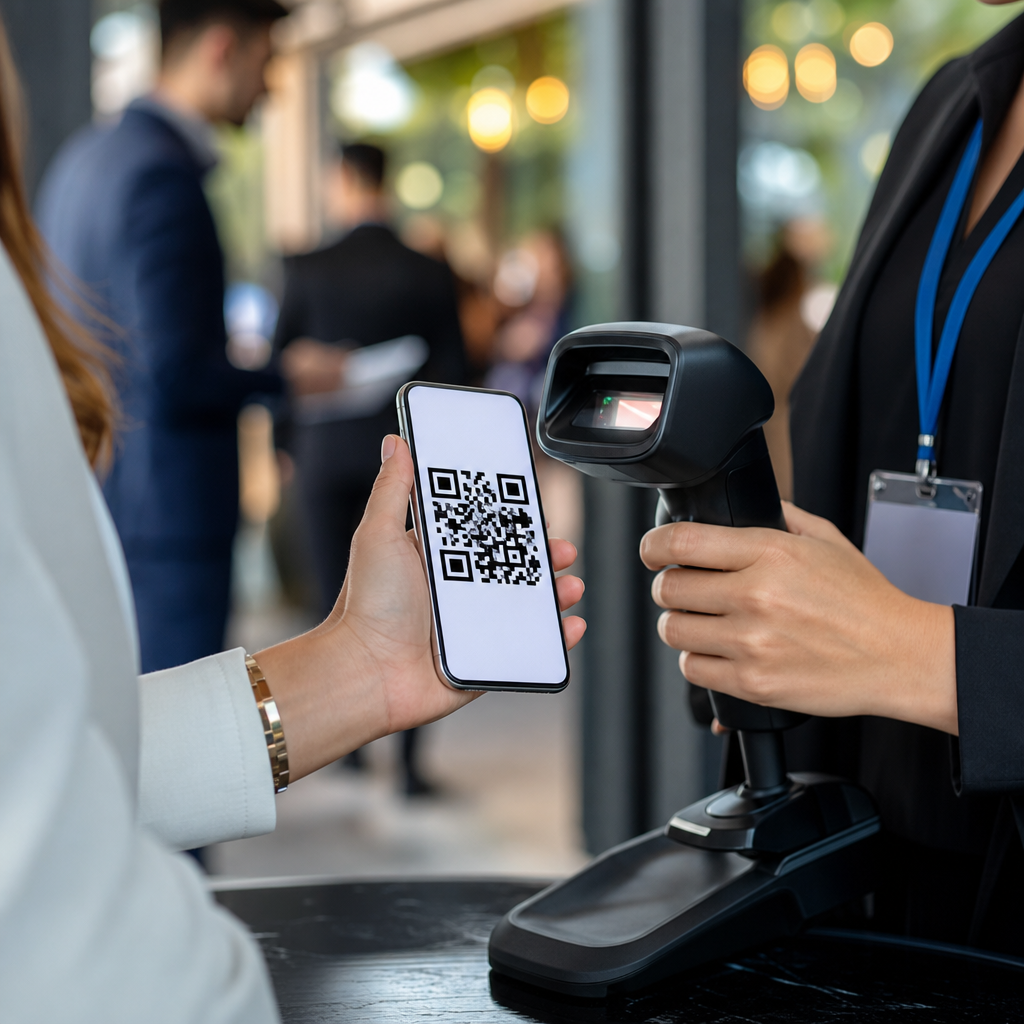
Event QR codes for tickets and check-ins have become a standard part of modern event operations because they connect registration, access control, attendance tracking, and post-event engagement in one mobile-friendly system. In practical terms, an event QR code is a scannable code linked to a ticket record, guest profile, venue action, or digital content, usually delivered to a smartphone wallet, email, or event app. Within mobile QR code basics, this topic matters because it shows how different types of mobile QR codes solve distinct problems: static codes for fixed information, dynamic codes for editable destinations, unique single-use codes for admission, and segmented codes for VIP access, staff entry, parking, lead retrieval, and session tracking. I have implemented QR-based entry flows for conferences, festivals, fundraising galas, and training events, and the difference between a smooth door operation and a bottleneck almost always comes down to code type, scanner setup, network planning, and data hygiene. For organizers, the appeal is simple: faster check-ins, lower fraud risk, cleaner attendance data, and fewer printed materials. For attendees, the benefit is equally clear: no paper ticket required, less waiting, and a more reliable entry experience.
What event QR codes are and how they work
At the most basic level, event QR codes encode a string that points a scanner toward a specific record or action. For tickets and check-ins, that string usually contains either a unique identifier tied to a cloud database or a signed payload that can be validated by scanning software. The distinction matters. A static QR code generally contains fixed information and cannot be changed after creation, which makes it useful for venue maps, Wi-Fi instructions, emergency contacts, sponsor landing pages, or a permanent registration page. A dynamic QR code points to a short URL or managed redirect that can be edited later, allowing organizers to update destinations, pause campaigns, track scan analytics, or swap content without reissuing the printed code. For admission itself, most platforms generate unique attendee-level codes, often dynamic behind the scenes, because each scan must resolve to one registration record and one status.
In real operations, a scanner reads the code, checks the registration database or locally synced attendee list, validates status, and returns a clear result such as valid, already checked in, invalid, refunded, transferred, or restricted. That response can trigger additional actions: printing a badge, logging arrival time, assigning continuing education credit, or opening a turnstile through an API connection. Well-known event systems such as Eventbrite, Cvent, Bizzabo, Whova, and Splash support QR-based workflows, while access control environments may also integrate Zebra badge printers, Honeywell scanners, and mobile devices running dedicated check-in apps. The technical goal is not just to scan a code; it is to make the code a reliable key into the operational system behind the event.
Types of mobile QR codes used at events
Event teams often talk about event QR codes as if they are one category, but there are several distinct types of mobile QR codes, and each serves a different job. Static informational QR codes work best when the destination never changes, such as a venue floor plan mounted near elevators or a code on signage that opens the event schedule PDF. Dynamic informational QR codes are better when the content may change, such as an agenda page, exhibitor list, livestream link, or emergency update page. Unique attendee QR codes are individual ticket credentials, generated one per registrant and validated at entry. Group or bundle QR codes can represent multiple admissions under one buyer, though they require careful handling to avoid line delays when part of the group arrives separately. Role-based QR codes are created for speakers, vendors, crew, media, and staff, each with different permissions. Session-level QR codes track room attendance, while lead capture QR codes let exhibitors collect prospect data with consent.
The hub value of this topic is understanding that “types of mobile QR codes” is not only about image format; it is about operational intent. A general admission ticket code needs anti-duplication logic. A parking pass code may need time windows and lot restrictions. A backstage access code should support permission tiers and rapid revocation. A sponsor activation code may prioritize analytics over identity. When planners choose the wrong type, problems appear quickly. I have seen organizers use one static code for all attendees, assuming door staff would manually compare names on screens. That approach invites unauthorized reuse and slows lines. By contrast, assigning one unique code per person with a synced scanner list reduces disputes and creates a dependable attendance log.
Best uses for ticketing, access control, and on-site operations
For ticketing, QR codes are most effective when each code is linked to a single registration state and a clear ruleset. A standard flow includes purchase, confirmation email, wallet pass delivery, reminder email, scanner validation, and status change on entry. This supports paid tickets, complimentary admissions, transfers, refunds, and no-show reporting. At conferences, codes often connect to badge printing so attendees scan once and receive a name badge instantly. At concerts or sporting events, the same code may be tied to a seat assignment and anti-screenshot protections in the hosting app. At trade shows, codes can also support re-entry, meal entitlements, and session reservations.
Operationally, separate code types help prevent congestion. VIP guests may have a dedicated lane and code prefix. Staff may use reusable credentials that log zone access without consuming a ticket. Press can be scanned for accreditation pickup rather than venue admission. Hybrid events use attendee QR codes on site while remote participants receive dynamic access links instead. These are all mobile QR code types in practice because the code is the interface between the person and a defined event action.
| QR code type | Primary use | Key advantage | Main limitation |
|---|---|---|---|
| Static informational | Maps, Wi-Fi, fixed instructions | Simple and inexpensive | Cannot be edited after publishing |
| Dynamic informational | Agenda, updates, landing pages | Editable and trackable | Depends on redirect infrastructure |
| Unique attendee ticket | Admission and check-in | Per-person validation and audit trail | Requires accurate database sync |
| Role-based access | Staff, vendors, speakers, media | Permission control by zone or time | More complex rules management |
| Session attendance | Breakouts, CE credit, capacity tracking | Detailed participation data | Needs repeated scanning discipline |
Security, fraud prevention, and scanner reliability
The biggest question organizers ask is whether QR codes are secure enough for ticketing. The correct answer is yes, if the implementation is sound. Security does not come from the square pattern itself; it comes from uniqueness, validation logic, encryption or signing methods, access rules, and scanner controls. Single-use redemption is essential for most paid events. Once scanned successfully, the credential should immediately change status. Good systems also flag duplicate attempts, record device and time stamp data, and allow supervisors to override only with reason logging. For higher-risk events, rotating barcodes inside an app, identity checks, wallet-bound tickets, or device-linked authentication can reduce screenshot sharing.
Scanner reliability is just as important as fraud prevention. Camera-based scanning on modern iOS and Android devices works well in many environments, but dim venues, cracked screens, low brightness, rain, and poor cellular service can expose weak setups. Best practice is to use a check-in application that supports offline mode with periodic synchronization, maintain charged backup devices and battery packs, and test scan speed on older phones before event day. I recommend a live door simulation with real attendee records, not just a sample code, because line behavior depends on the full process: opening the app, focusing, validating, and handling exceptions. GS1 standards are more relevant in retail and logistics, but the event sector still benefits from the same discipline around data integrity, scan quality, and unambiguous identifiers.
Planning, testing, and measuring performance
Successful event QR code programs are built before the first ticket is sold. Start by defining the required code types: admission, parking, staff access, session tracking, exhibitor lead retrieval, or informational signage. Then map each to a system owner, validation rule, and fallback process. A fallback matters because networks fail, names are misspelled, and guests arrive with dead phones. Common backups include manual lookup by email, printed alphabetized lists for supervisors, badge reprint stations, and SMS resend options. File format and rendering also deserve attention. High-contrast black-on-white codes scan best, and quiet zone spacing should not be cropped by aggressive email templates or wallet pass designs.
Measurement should go beyond total scans. Useful metrics include average check-in time per attendee, peak throughput per lane, duplicate scan rate, failed validation reasons, no-show percentage, session fill rate, and sponsor engagement from informational codes. Dynamic codes make this analysis easier because redirects can log time, device, and campaign source. After several deployments, patterns become obvious. Morning keynote entry may need more lanes than afternoon breakouts. Parking scans may spike thirty minutes before doors open. A donor gala may need assisted check-in for guests forwarded a ticket by a household member. Those findings improve future events and strengthen the entire mobile QR code strategy across subtopics, from static versus dynamic QR codes to secure single-use credentials and analytics-enabled campaign codes.
Event QR codes for tickets and check-ins are the most practical gateway into understanding types of mobile QR codes because they force organizers to match the code type to a real operational need. Static codes support permanent information. Dynamic codes support editable content and analytics. Unique attendee codes enable secure admission and accurate attendance logs. Role-based and session-level codes extend the model across staffing, access control, education tracking, and exhibitor programs. When chosen well and tested properly, these tools reduce line times, improve data quality, and create a better attendee experience without adding complexity at the door.
The main benefit is not the code itself; it is the dependable system built around it. Strong event QR code execution requires clear permissions, clean registration records, offline-capable scanners, and rehearsed exception handling. That is why this page serves as a hub within mobile QR code basics: every related article on static, dynamic, secure, analytic, and role-based QR code use branches from the same decision point—what action should this code trigger, for whom, and under what rules. Use that framework before your next event, test every scan path in advance, and build your ticketing and check-in flow on the right QR code type from the start.
Frequently Asked Questions
What is an event QR code, and how does it work for tickets and check-ins?
An event QR code is a scannable code tied to a specific ticket, registration record, attendee profile, or event-related action. In most event workflows, the code is generated when a person completes registration or purchases a ticket, then delivered through email, an event app, or a smartphone wallet. When the attendee arrives, staff scan the code with a mobile device or check-in platform, which instantly pulls up the ticket status and confirms whether the person is approved for entry, already checked in, assigned to a certain access level, or eligible for add-ons such as VIP areas, meals, or session access.
What makes event QR codes especially effective is that they connect multiple parts of event operations in one mobile-friendly system. Instead of relying on printed lists, manual verification, or separate tools for access and attendance, organizers can use the same code to validate entry, reduce lines, track arrivals in real time, and create a cleaner guest experience. Depending on the setup, the QR code may also trigger actions after entry, such as opening digital agendas, sharing maps, linking to exhibitor content, collecting lead data, or supporting post-event engagement. In short, it is not just a ticket image on a phone; it is a practical bridge between registration data and on-site event management.
Why are QR codes better than traditional paper tickets or manual check-in methods?
QR codes improve speed, accuracy, and flexibility in ways that traditional paper tickets and manual check-in methods often cannot match. With paper-based systems, staff may need to search guest lists, inspect printed confirmations, handle misplaced tickets, or manually mark attendance. That process increases wait times and creates more opportunities for entry errors. By contrast, a QR code can be scanned in seconds, allowing staff to confirm identity or ticket validity almost immediately. This is especially valuable for conferences, concerts, trade shows, fundraisers, and large multi-entry events where fast flow at entrances directly affects the attendee experience.
They also offer stronger operational visibility. Organizers can monitor how many guests have arrived, when peak entry periods occur, and which ticket types are being used in real time. That kind of data helps with staffing, security decisions, capacity management, and post-event reporting. QR-based systems can also support fewer touchpoints, lower printing costs, easier updates, and a more sustainable process overall. If a guest loses a printed ticket, changes devices, or needs a registration update, digital delivery is usually easier to correct than a paper workflow. For modern events, QR codes are often the more scalable and reliable option because they centralize ticket verification, attendance tracking, and mobile engagement in one process.
Are event QR codes secure enough to prevent ticket fraud and duplicate entry?
Yes, event QR codes can be very secure when they are part of a properly managed ticketing and check-in system. The QR code itself usually references a unique record in the event platform, which means the scan result depends on the live data behind the code rather than on the visual image alone. When staff scan it, the system can verify whether the ticket is valid, whether it has already been used, and whether it belongs to the correct event date, session, or access category. That makes it much harder for someone to reuse a screenshot, duplicate a printed copy, or enter with an altered confirmation.
Security becomes even stronger when organizers use best practices such as unique attendee-level codes, real-time scan validation, role-based staff permissions, encrypted or tokenized ticket links, and audit logs for entry activity. Some platforms also support rotating codes, app-based delivery, ID matching, or wallet integration for additional control. While no system is completely immune to misuse, QR code check-in is generally more secure than manual visual inspection because it creates a verified digital checkpoint. The key is not just generating a code, but connecting that code to a live event database and enforcing clear scanning procedures at every entry point.
Can the same event QR code be used for more than just entry at the venue?
Absolutely. One of the biggest advantages of event QR codes is that they can support much more than basic admission. A single code can be used throughout the attendee journey, from arrival to post-event follow-up. For example, organizers may use the same QR code to check in guests at the main entrance, validate access to breakout sessions, track attendance for continuing education credits, enable lead retrieval at exhibitor booths, redeem meal vouchers, or verify VIP access at restricted areas. This creates a more seamless experience for attendees and gives event teams a unified source of operational data.
Beyond access control, event QR codes can also connect attendees to digital content. After a scan, users might be directed to a mobile agenda, speaker materials, networking profiles, surveys, promotional offers, venue maps, or sponsor activations. This makes the code useful before, during, and after the event, not just at the front door. From an organizer’s perspective, that broader functionality increases the value of the QR code system because it ties registration, engagement, analytics, and follow-up into one framework. Instead of treating the ticket as a one-time pass, event teams can use the QR code as an ongoing interaction tool that supports both operations and attendee experience.
What should event organizers do to make QR code ticketing and check-in run smoothly?
Successful QR code check-in starts with preparation. Organizers should choose a dependable platform that generates unique codes, supports real-time scanning, and integrates well with registration and reporting tools. Before the event, it is important to test the entire workflow, including ticket delivery, wallet compatibility, app performance, scanner speed, duplicate scan handling, and staff permissions. Attendees should receive clear instructions on where to find their QR code and how to present it quickly at entry. That may include reminders to save the ticket to a phone wallet, increase screen brightness, or download the event app in advance.
On-site execution matters just as much. Staff should be trained not only on how to scan codes, but also on how to handle exceptions such as dead phone batteries, name changes, walk-in registrations, invalid tickets, or attendees who cannot locate their confirmation. Organizers should also plan for connectivity issues by confirming whether the system supports offline scanning or backup procedures. Clear signage, separate lanes for VIPs or groups, and enough staffed scanning points can significantly improve traffic flow. After the event, the check-in data should be reviewed for attendance analysis, no-show rates, session popularity, and follow-up campaigns. When event teams combine solid technology with good planning, QR code ticketing becomes a fast, accurate, and highly scalable way to manage both access and engagement.





