
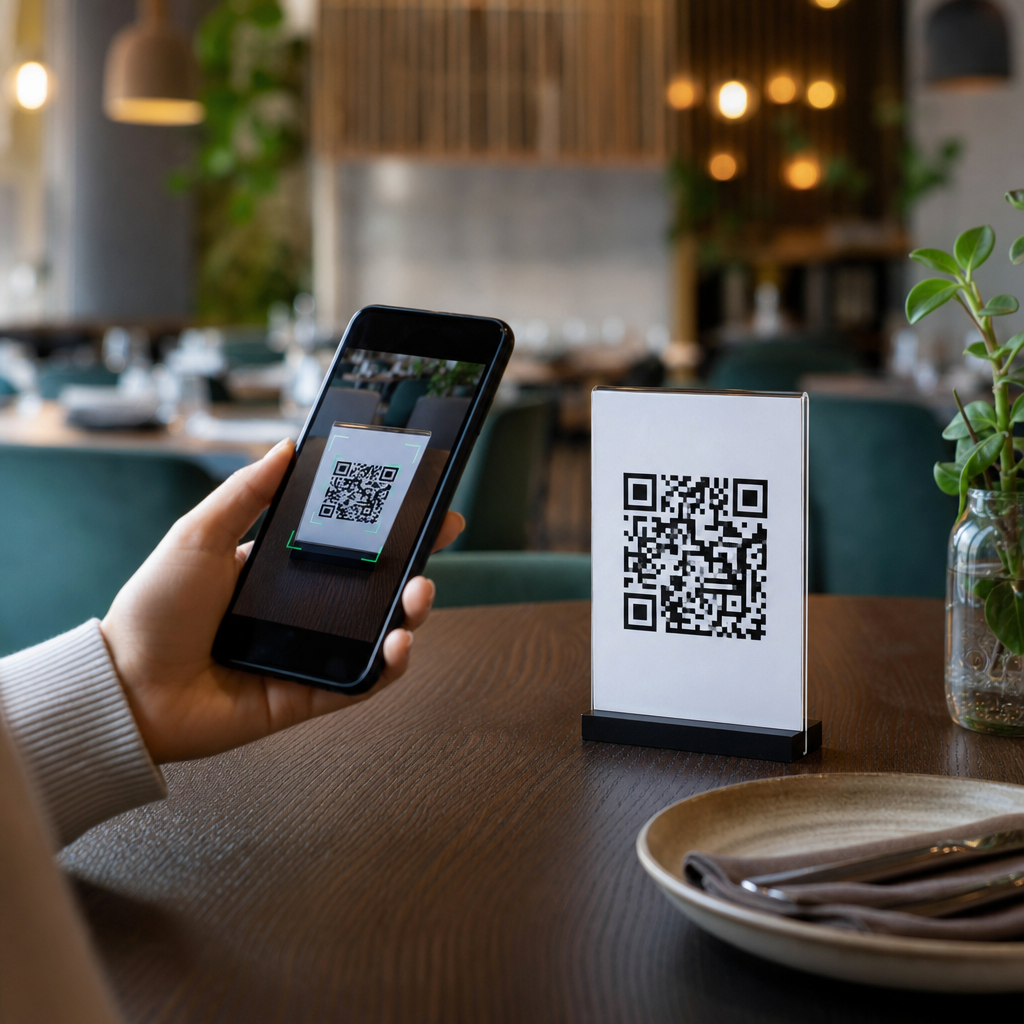
QR codes changed restaurant menus from static printed lists into flexible digital touchpoints that can be updated in minutes. In restaurants and hospitality, a QR code is a scannable matrix barcode that opens a web page, PDF, ordering interface, payment screen, loyalty offer, or guest feedback form on a diner’s phone. I have helped operators deploy these systems in cafés, hotel lounges, fast-casual chains, and full-service dining rooms, and the same lesson appears every time: the code itself is simple, but the menu experience behind it determines whether guests order more smoothly or feel frustrated. That is why understanding how restaurants use QR codes for digital menus matters. It affects labor efficiency, accuracy, upselling, hygiene, language access, brand consistency, and the speed at which a venue can react to supply changes or daily specials.
Digital menus became mainstream during the pandemic, but their value did not disappear when printed menus returned. Restaurants now use QR codes to solve operational problems that paper cannot solve well. A chef can remove a sold-out dish immediately. A bar manager can swap seasonal cocktails by time of day. A hotel can present breakfast, room service, and late-night menus from one platform without reprinting binders. For guests, the benefit is direct access to current information, often with photos, allergen notes, and modifiers. For operators, the benefit is control. Modern platforms such as Toast, Square, BentoBox, Popmenu, GloriaFood, and Owner.com connect menu publishing to ordering, analytics, and payments, turning a simple scan into a measurable part of service delivery.
This article serves as a hub for restaurants and hospitality teams evaluating QR menu strategy. It explains what a strong digital menu includes, how different venue types use QR codes, what technology stack supports them, where they improve profitability, and what pitfalls to avoid. The goal is not to argue that every restaurant should eliminate print. The practical approach is hybrid: use QR codes where they reduce friction, preserve print where it supports accessibility or brand expectations, and design every menu page for speed, clarity, and conversion.
What a restaurant QR code menu actually does
A restaurant QR code menu gives guests instant access to menu content through their smartphone camera, usually without downloading an app. In the best implementations, the QR code opens a mobile-optimized webpage rather than a static PDF. A webpage loads faster, scales better on smaller screens, supports structured sections, and lets operators update items, prices, and availability centrally. I have seen operators start with PDF menus because they are easy to publish, then migrate quickly when guests complain about pinching, zooming, and slow load times. A true digital menu should present categories clearly, show item descriptions, list allergens, support modifiers, and maintain readable typography in poor lighting.
The menu can do far more than display dishes. Restaurants embed ordering links, reservation buttons, call-server requests, language toggles, wine pairing prompts, and review collection tools. In quick-service environments, the QR code may send guests directly to a self-order interface integrated with point-of-sale software. In full-service dining, it may support browsing while preserving table service. In hotels, QR menus often connect to room service ordering or spa dining packages. The key is intent. If the goal is browsing, the design should emphasize readability and atmosphere. If the goal is order conversion, the flow should reduce taps and present high-margin items prominently.
How different hospitality businesses use QR menus
Restaurants and hospitality venues use QR codes differently because service models differ. A coffee shop may place one code at the register and another on tables, leading customers to a concise menu with add-ons, seasonal drinks, and pickup timing. A fast-casual brand may use codes on window decals, tray liners, and receipts to push mobile reordering. A fine-dining restaurant may use a discreet code to supplement a printed menu with tasting notes, producer stories, and multilingual content rather than replace the tactile menu entirely. A hotel often uses QR menus across multiple touchpoints: lobby bar tables, poolside loungers, in-room placards, conference spaces, and minibars.
Bars and pubs use QR codes especially well for rotating inventory. Draft lists change often, and digital menus prevent the familiar problem of servers verbally correcting unavailable beers all night. Ghost kitchens and food halls rely on them even more because guests may order from several brands in one location. Resorts use QR menus to bridge departments. A guest can scan at the pool, charge lunch to the room, and receive a post-meal survey automatically. These examples matter because the best QR menu strategy is operationally specific. The question is not whether QR codes work for hospitality. The question is which guest journey each code should support.
Core benefits for operations, revenue, and guest experience
The strongest operational benefit is real-time control. When an ingredient runs out, an operator can mark an item unavailable instantly instead of asking staff to memorize substitutions. This reduces order errors and guest disappointment. The second benefit is labor efficiency. Servers answer fewer repetitive questions when the menu includes ingredients, allergens, and photos. In high-volume settings, self-ordering through QR codes can shift front-of-house labor from transaction taking to hospitality and problem resolution. During busy service, that distinction matters.
Revenue gains usually come from better merchandising. Digital menus can feature profitable items, attach modifiers consistently, and highlight upgrades such as extra protein, premium sides, dessert, or wine pairings. Operators using menu engineering principles often place stars and high-contribution items near the top of categories or mark chef favorites sparingly to drive attention. Another advantage is data. Platforms can report scan rates, item views, conversion rates, abandonment points, and average ticket size by daypart. That allows managers to test whether a brunch cocktail bundle outperforms à la carte placement or whether a photo lifts dessert sales. Paper menus cannot deliver that feedback loop.
| Use Case | Primary Benefit | Example |
|---|---|---|
| Table menu scan | Faster access to current items | Guests scan and see sold-out dishes removed instantly |
| Self-order QR | Lower queue pressure | Fast-casual lunch rush moves orders to phones |
| Room service QR | Higher convenience | Hotel guest orders breakfast without calling the front desk |
| Bar menu QR | Easy rotation management | Draft beer list updates by keg availability |
| Feedback QR | More actionable reviews | Post-meal survey captures issues before public complaints |
Technology stack and implementation choices
A restaurant QR menu system usually includes five layers: the QR code itself, the destination URL, the menu management platform, integrations with POS or ordering software, and analytics. Static QR codes point to one fixed URL and are fine for simple uses, but dynamic QR codes are better for most hospitality businesses because they can be redirected without replacing printed materials. That matters when rebranding, changing domains, launching seasonal campaigns, or tracking scans by location. Reputable generators and platforms include Bitly, Uniqode, QR Code Generator Pro, and built-in tools from restaurant commerce vendors.
Destination design is where many projects succeed or fail. The page must load quickly over mobile networks, use HTTPS, and meet accessibility basics such as sufficient color contrast, alt-like descriptive labeling for images where supported, and text that remains readable without zooming. POS integration is equally important. If the digital menu and point-of-sale system are disconnected, availability, pricing, and modifiers drift out of sync. I recommend operators map menu ownership clearly: who updates prices, who publishes specials, who checks broken links, and who audits every location weekly. A QR program is not set-and-forget infrastructure. It is a living service asset.
Best practices for menu design, accessibility, and compliance
The best digital menus are intentionally simpler than printed menus. Start with clear categories, then keep item names short, descriptions precise, and prices easy to spot. Use high-quality photos selectively. Too many images slow pages and cheapen premium brands; too few images can hurt unfamiliar categories in quick-service ordering. Allergen information should be available but responsibly worded. Restaurants must avoid implying absolute safety for severe allergies when cross-contact is possible. If a kitchen cannot guarantee allergen isolation, the menu should say so plainly and direct guests to staff for confirmation.
Accessibility is nonnegotiable. Not every guest can or wants to scan a code. Some have low vision, dead phone batteries, limited data, or discomfort using phones at the table. Others prefer a tactile menu, especially in luxury settings. Good practice is to offer printed menus on request, train staff to notice hesitation, and place codes where they are easy to reach and well lit. Compliance also extends to privacy and payments. If a QR code leads to ordering or checkout, operators should use PCI-compliant payment providers, publish a privacy notice, and avoid collecting more customer data than needed. Trust increases conversion.
Common mistakes and how smart operators avoid them
The most common mistake is linking a QR code to a PDF that is hard to read on a phone. The second is poor placement: codes hidden under condiments, printed too small, or damaged by cleaning chemicals. Another frequent problem is broken operational logic. I have audited menus where brunch items appeared at dinner, unavailable modifiers remained selectable, and service charges were unclear until checkout. Every one of those issues erodes guest confidence faster than a missing printed menu would.
Smart operators test from the guest perspective. They scan every code with iPhone and Android devices, on Wi-Fi and cellular, in bright daylight and dim dining rooms. They measure the path from scan to first useful screen and remove unnecessary pop-ups, age gates, or app-download prompts. They also train staff with a simple script: explain what the QR menu does, offer a printed option immediately, and step in when a guest looks uncertain. The winning approach is not technology for its own sake. It is hospitality translated into a digital format that saves time without making service feel impersonal.
QR codes for digital menus work best when restaurants treat them as part of the guest experience, not just a cost-cutting substitute for print. They give operators real-time control over availability, pricing, merchandising, and data, while giving guests faster access to accurate menu information, ordering, and payment. In restaurants and hospitality, that flexibility is valuable across cafés, bars, hotels, resorts, food halls, and full-service dining rooms. The practical takeaway is clear: use mobile-optimized menu pages, connect them to core systems, preserve accessible alternatives, and review performance regularly.
For this Restaurants & Hospitality hub, the broader lesson is that QR menu success comes from matching the tool to the service model. A poolside cocktail menu, a room service interface, and a fine-dining wine list should not follow the same structure, even if all begin with a scan. Operators who define the guest journey first make better decisions about design, placement, and integration. They also avoid the common traps that make digital menus feel clumsy or exclusionary.
If you are building or improving a QR code menu program, start with one venue, audit the mobile experience end to end, and measure results against service speed, error rates, and average check. Then expand what works. A well-executed digital menu does more than replace paper. It makes restaurant operations sharper and hospitality easier to deliver.
Frequently Asked Questions
How do restaurants use QR codes for digital menus in day-to-day operations?
Restaurants use QR codes as a simple bridge between the physical table and a digital experience on the guest’s phone. When a diner scans the code, it can open a mobile-friendly menu, a PDF, an ordering platform, a payment page, a loyalty signup, or a feedback form. In practice, this gives operators much more control than a printed menu ever could. Instead of waiting for reprints, managers can change prices, mark items as sold out, add seasonal dishes, update wine lists, highlight happy hour promotions, or swap breakfast for lunch menus in minutes. That flexibility matters in real service conditions, especially when ingredient availability, staffing, and promotions change quickly.
Operationally, QR menus also help reduce friction. Front-of-house teams spend less time handing out, collecting, and sanitizing physical menus, and more time guiding guests, upselling, and answering specific questions. In quick-service and fast-casual environments, QR codes can connect directly to self-ordering flows, which shortens lines and increases throughput during peak periods. In full-service restaurants, the code often supports the server rather than replacing them, giving guests a convenient way to browse while still preserving hospitality. The most successful setups treat the QR code as part of a larger guest journey, not as a gimmick. The code itself is just the entry point; what matters is the speed, clarity, and usefulness of the digital experience it opens.
What are the biggest benefits of QR code menus for restaurants and guests?
The biggest benefit for restaurants is flexibility. A digital menu can be updated immediately, which reduces printing costs, minimizes errors, and allows operators to react fast when items run out or prices change. That alone can save time and prevent awkward guest interactions. Beyond that, QR menus support better merchandising. Restaurants can feature high-margin dishes, add photos, highlight pairings, promote limited-time offers, and surface upsells in a more deliberate way than most printed menus allow. If the system includes analytics, operators can also see which items get viewed most often, where guests drop off in an ordering flow, and which promotions actually drive conversions.
For guests, the main benefits are convenience and access to more information. A well-built digital menu is easy to read, searchable, and often more informative than a paper version. Diners can review allergen notes, dietary labels, ingredient details, and beverage descriptions at their own pace. Many systems also support multiple languages, which can improve accessibility in tourist-heavy locations or diverse urban markets. In some restaurants, QR codes reduce waiting time because guests can browse, order, and even pay without flagging down staff. That said, the guest benefit depends entirely on execution. If the menu loads slowly, is hard to navigate, or forces unnecessary app downloads, the convenience disappears. The real advantage comes from pairing the QR code with a fast, mobile-first interface that respects the guest’s time.
Do QR code menus replace servers, or do they work best alongside staff?
In most restaurants, QR code menus work best alongside staff rather than replacing them. Hospitality is still a human business. Guests often want recommendations, reassurance about allergens, substitutions, wine pairings, pacing, and a sense that someone is taking care of them. A QR code cannot deliver genuine warmth or read a table’s mood. What it can do is remove low-value friction from the service process. For example, it can let guests start browsing immediately, reorder another drink without waiting, split a check digitally, or view detailed menu information without needing a server to recite it all. That frees staff to focus on higher-value interactions that improve the dining experience.
The best operators use QR systems to support service, not strip it away. In a café, that may mean faster self-ordering during the morning rush. In a hotel lounge, it may mean a quieter, more discreet way for guests to order another round. In full-service dining, it may mean using QR codes for menu access and payment while preserving tableside hospitality. Problems usually arise when restaurants implement QR menus purely as a labor-cutting tactic and ignore guest expectations. If diners feel abandoned, confused, or forced into a clunky digital flow, satisfaction drops. A thoughtful system gives guests options: scan if they want speed and convenience, or engage with staff if they want guidance and personal service.
What should restaurants include in a good digital menu experience after someone scans the QR code?
A good digital menu should load quickly, display clearly on a phone, and make it easy for guests to find what they want without pinching, zooming, or hunting through a cluttered layout. At a minimum, it should include organized categories, current pricing, item descriptions, modifier options where relevant, and clear availability. Strong digital menus go further by including allergen information, dietary tags such as vegetarian or gluten-free, photos used selectively, and prompts for add-ons or pairings that feel helpful rather than pushy. The design should match the restaurant’s brand while staying simple enough for any guest to navigate, including those who are less comfortable with technology.
Restaurants should also think beyond the menu itself. The destination behind the QR code may be a broader service tool, so the full experience should support the guest’s intent. If the goal is ordering, the checkout flow must be intuitive and secure. If the goal is payment, the bill review and tip interface should be fast and transparent. If the goal is loyalty or feedback, the form should be short and clearly worthwhile. Practical details matter too: no mandatory app download, no unnecessary pop-ups, no broken links, and no outdated PDFs that are hard to read on a small screen. The most effective digital menus feel almost invisible because they remove effort instead of creating it. Guests should be able to scan, understand, choose, and act with minimal friction.
What are the most common mistakes restaurants make when implementing QR code menus?
The most common mistake is treating the QR code itself as the solution. It is not. The code is only the access point, and if what sits behind it is poorly designed, the entire experience feels frustrating. One frequent issue is linking to a static PDF that was originally designed for print. On a phone, that often means tiny text, awkward zooming, and a slow, clumsy experience. Another major mistake is failing to keep the menu updated. If guests scan a code and see items that are unavailable, old prices, or expired promotions, trust erodes quickly. Restaurants also run into problems when they place codes where they are hard to spot, print them at low quality, or use weak internet access that makes the menu slow to load.
There are also strategic mistakes. Some operators overcomplicate the journey by forcing guests to download an app, create an account, or complete too many steps before they can even view the menu. Others remove all non-digital options, which can alienate guests who prefer a printed menu or have accessibility concerns. Security and branding are often overlooked as well. A generic-looking landing page or suspicious redirect can make guests hesitant to scan. The best implementations are simple, branded, mobile-optimized, and supported by staff who can explain the system confidently. Restaurants that succeed with QR menus understand a basic truth: the technology should make service feel easier, faster, and more reliable. If it adds confusion, it has been implemented the wrong way.





