
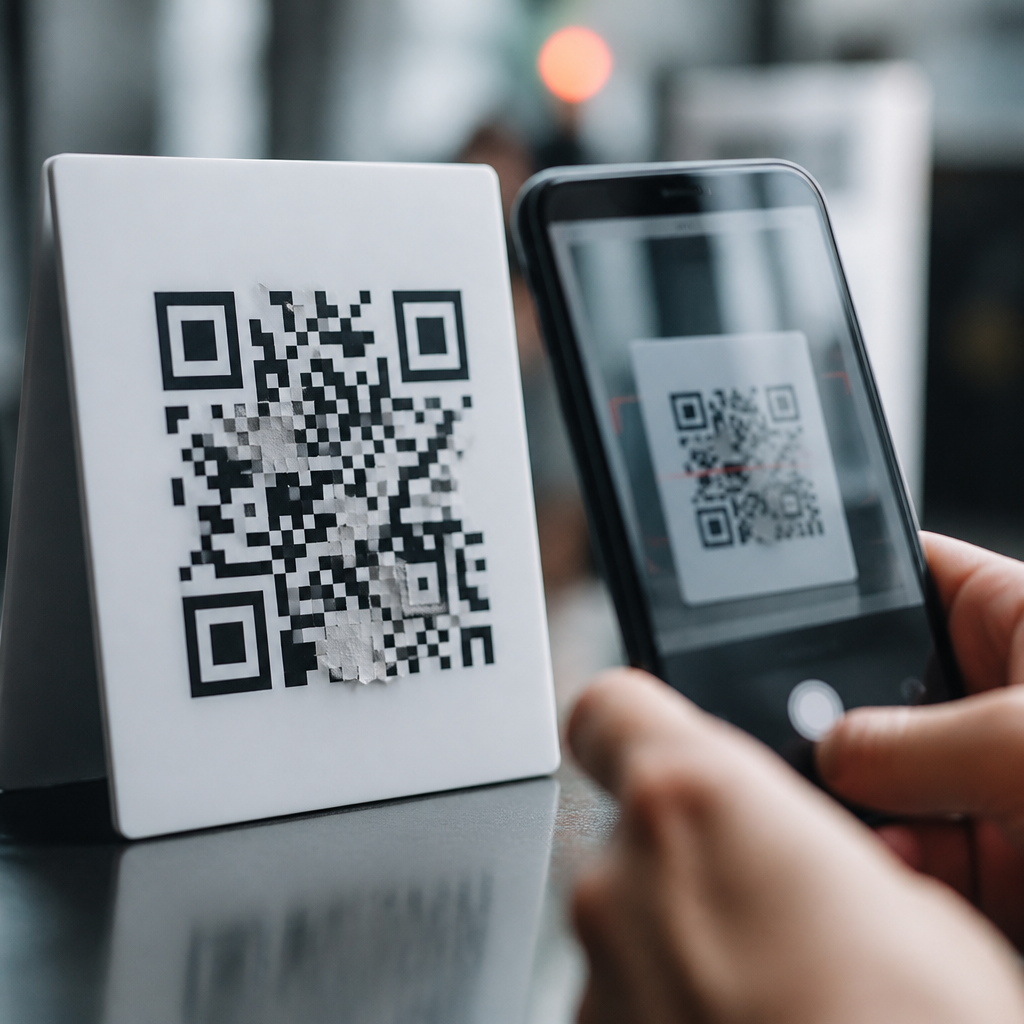
QR code tampering is the deliberate alteration, replacement, or digital redirection of a quick response code so that people scan a symbol they trust but land somewhere unsafe, misleading, or unauthorized. In security work, I have seen this happen in both physical and digital settings: a sticker placed over a restaurant payment code, a fraudulent parking meter label, or a copied code embedded in a fake invoice PDF. The risk matters because QR codes compress a web address, payment instruction, or app action into a pattern that users cannot read with their eyes. That convenience removes a basic safety check. Instead of judging a printed URL before visiting a site, the user often scans first and thinks later. As businesses place QR codes on packaging, signs, tickets, menus, invoices, and identity workflows, tampering turns a simple square into an attack surface. Preventing QR code fraud requires more than telling users to be careful. It requires secure design, controlled printing, monitoring, staff training, and incident response. This hub explains the major risks, the common attack methods, and the practical controls organizations use to reduce fraud without losing the speed and usability that made QR codes popular.
How QR Code Tampering Works in the Real World
QR code tampering happens when an attacker changes either the physical symbol or the destination behind it. The simplest version is physical substitution. A criminal prints a malicious code on a sticker and places it over the original code on a poster, parking kiosk, point of sale display, or parcel locker. When scanned, the replacement can send the victim to a phishing page, trigger a fraudulent payment request, or prompt an app download. I have seen incidents where the fake code looked harmless because it matched the size and color of the original, and busy users never noticed the extra layer.
A second method is digital tampering. If a company uses a dynamic QR code that points to a managed short link, an attacker who compromises the account controlling that redirect can silently change the destination. The visible code stays the same, but every future scan goes somewhere else. This is why QR security is not only a printing issue. It is also an access control, authentication, and change management issue. Dynamic codes are useful because they support analytics and destination updates, but they must be protected like any other web asset.
Attackers also exploit social trust. People are more likely to scan a code on a payment sign, package insert, event badge, utility bill, or official notice because the presence of the code implies legitimacy. Fraud succeeds when that trust is stronger than the user’s verification habits. The technical barrier is low. Free online generators, cheap labels, and basic graphic design tools are enough to mount many attacks.
Most Common Fraud Scenarios and Their Impact
Preventing QR code fraud starts with understanding the scenarios that produce actual losses. Payment diversion is one of the most damaging. A fake code can redirect a customer to a lookalike payment page or encode an alternate account, wallet address, or UPI destination. The victim believes they paid the merchant, but the funds go to the attacker. In hospitality and parking, this can happen at scale because users expect to pay quickly from a public sign.
Credential theft is another frequent outcome. The code leads to a fake login page for Microsoft 365, Google Workspace, a payroll system, or a bank. Because the scan began offline, users are often less suspicious than they would be with a suspicious email link. Security teams now track “quishing,” or QR phishing, as a distinct social engineering channel because it bypasses some traditional email filtering and user expectations.
Malware delivery is less common than phishing, but it remains a real concern, especially when the code prompts installation of an app outside an approved store or downloads a mobile configuration profile. On managed corporate devices, mobile device management controls reduce this risk. On personal devices, the user is often exposed. Privacy harm also matters. A tampered code can direct users to tracking pages that harvest location, device identifiers, or personal details without clear notice.
| Fraud scenario | How it works | Primary impact |
|---|---|---|
| Payment diversion | Fake code or altered redirect sends funds to attacker | Immediate financial loss and charge disputes |
| Credential phishing | Scan opens counterfeit login page | Account takeover and downstream compromise |
| Malware delivery | Code triggers unauthorized app or file download | Device infection and data exposure |
| Data harvesting | Landing page collects personal or device information | Privacy violations and targeted follow-on fraud |
| Brand impersonation | Counterfeit campaign mimics trusted organization | Reputational damage and customer distrust |
Warning Signs Users and Staff Should Recognize
Most tampered QR code incidents leave clues. Physical signs include a sticker placed over another sticker, edges that do not align, differences in print quality, inconsistent branding, or a code that appears newer than the surrounding material. On kiosks and public posters, bubbling, peeling, or mismatched lamination can indicate substitution. Staff who inspect high-traffic locations regularly often catch tampering before customers report losses.
Digital warning signs appear after scanning. A preview that shows a misspelled domain, an unrelated shortener, or a nonsecure site is a strong signal to stop. Users should also question pages that ask for urgent payment, credentials, multifactor codes, or excessive personal data. In assessments, I advise teams to treat QR destinations exactly like links in email: verify the domain, expect branded pages to use official certificates, and avoid entering passwords after following an unverified code from a public place.
That said, warning signs are not enough. Some malicious pages use valid HTTPS, polished branding, and domains that differ by only one character. User vigilance helps, but the burden cannot sit entirely with the scanner. Organizations must reduce opportunities for fraud upstream through design and controls.
Prevention Controls for Businesses Deploying QR Codes
The strongest defense is a layered control model. Start with source control. Generate QR codes only through approved systems, maintain an inventory of where each code is used, and document the intended destination, owner, print version, and installation date. If a business cannot answer where its active codes are located, it cannot inspect or revoke them effectively.
Use tamper-evident production methods for physical deployments. Security labels, destructible vinyl, serialized stickers, holographic overlays, and placement under clear protective covers all raise the cost of replacement. For permanent signs, print the human-readable domain next to the code so users can compare the preview before opening. When possible, place QR codes in locations monitored by staff or cameras rather than on unattended public surfaces.
Protect dynamic QR code platforms with the same rigor used for web administration. Require multifactor authentication, role-based access control, unique admin accounts, and audit logs for redirect changes. Review destination edits through a change approval process. If a marketing vendor manages the codes, define security requirements in the contract, including incident notification, log retention, and credential hygiene. Dynamic redirect accounts are high-value targets because one compromise can affect thousands of scans.
Landing pages should be simple, branded, and consistent. Redirect users to a clearly recognizable company domain, not a chain of opaque shorteners. If payments are involved, use secure payment service provider pages with strong customer authentication where required. If forms collect personal data, display clear privacy notice language and minimize requested fields. Safer user experience design reduces both fraud success and compliance risk.
Monitoring, Testing, and Incident Response
Prevention is incomplete without monitoring. Teams should inspect public QR placements on a schedule based on exposure and risk. A restaurant table code may need daily review; a warehouse label may need monthly review. Field staff can use a simple checklist: verify physical integrity, scan the code, confirm the previewed domain, and compare the live destination to the approved inventory record. For digital campaigns, monitor redirect logs, destination changes, and abnormal scan patterns such as sudden geography shifts or spikes outside business hours.
Testing matters too. During security reviews, I recommend scanning codes with multiple mobile platforms, validating redirects, checking certificate status, and confirming that disabled campaigns truly stop resolving. Broken retirement processes are a hidden issue. Old codes left in circulation can be hijacked if their domains expire or their redirect paths are reused carelessly.
When tampering is detected, respond fast. Remove or cover affected physical codes, disable redirects, alert customers if transactions or credentials may be at risk, and preserve evidence such as photos, labels, logs, and timestamps. Payment fraud may require coordination with banks, processors, or law enforcement. Credential theft may require password resets, token revocation, and suspicious login review. After containment, identify why the tampering succeeded: weak inspections, uncontrolled vendors, exposed admin accounts, or poor signage design. Corrective action should be specific and documented.
Building a Safer QR Code Program Across the Organization
Long-term risk reduction comes from governance, not one-time fixes. Assign ownership for QR code security across marketing, operations, IT, and compliance. Create a standard that defines approved generators, design rules, domain requirements, label materials, inspection frequency, retirement steps, and incident escalation paths. This is especially important in regulated environments such as healthcare, finance, and transportation, where a fraudulent code can lead to privacy breaches, payment disputes, or safety issues.
Training should be role-based. Designers need to know why branded domains and visible URLs matter. Operations staff need to inspect physical signs and report anomalies. Security administrators need to protect redirect platforms and review logs. Customer support teams need scripts for fraud reports so incidents are recognized quickly instead of being dismissed as isolated confusion. In practice, the organizations that prevent QR code fraud best are the ones that treat codes as part of the digital trust boundary, not as harmless graphics.
QR code tampering is preventable when organizations combine visible anti-tamper measures, secure redirect management, routine inspections, and fast response. The core lesson is simple: every QR code is a link, every link is a security decision, and every public code deserves lifecycle control. If you manage QR codes at scale, audit your current deployments, remove unknown or untracked codes, and implement a formal prevention program now. That single step will reduce fraud, protect users, and strengthen trust in every scan.
Frequently Asked Questions
What is QR code tampering, and why is it considered a serious security risk?
QR code tampering is the intentional modification, replacement, or redirection of a QR code so that a person scans something that appears legitimate but is actually controlled by an attacker or unauthorized third party. In practice, this can happen in physical environments, such as when someone places a fraudulent sticker over a restaurant payment code or parking meter label, and it can also happen in digital environments, such as when a copied or altered QR code is inserted into a fake invoice, email attachment, or promotional graphic. The core danger is that users often treat QR codes as trusted shortcuts without being able to visually inspect the underlying destination first.
This makes tampered QR codes especially effective for phishing, payment diversion, credential theft, malware delivery, and brand impersonation. A scan can send someone to a lookalike login page, trigger a payment to the wrong recipient, or direct a user to a malicious website designed to capture personal or financial information. Because QR codes are compact and opaque by design, many users do not realize they have been redirected until after damage is done. That combination of trust, speed, and lack of visibility is exactly why QR code tampering is a meaningful security issue for businesses, consumers, and public institutions.
Where does QR code tampering most commonly occur?
QR code tampering most commonly appears anywhere people are encouraged to scan quickly and act immediately. Physical locations are frequent targets because attackers can exploit convenience and habit. Common examples include restaurant tables, retail checkout counters, event signage, public transportation notices, parking meters, utility kiosks, building lobbies, and printed flyers. In these settings, a malicious actor may place a sticker over a legitimate code, swap out printed materials, or attach a fake code nearby in hopes that users will not notice the difference.
Digital channels are equally important. Tampering can occur in PDF invoices, emails, social media graphics, digital advertisements, online menus, and shared documents. For example, an attacker may impersonate a vendor and send an invoice containing a QR code that routes payment to a fraudulent account. In marketing or customer service contexts, a cloned code may lead users to a fake support portal or counterfeit login page. The common thread is not the format itself but the opportunity to exploit trust. If people expect the QR code to be legitimate and are unlikely to verify the destination, the environment becomes attractive for tampering.
How can someone tell whether a QR code has been tampered with before scanning it?
There is no perfect visual test, but there are several practical warning signs that can help reduce risk. In physical settings, inspect the code itself and the surrounding surface. Look for stickers placed on top of existing labels, uneven edges, mismatched branding, low-quality printing, or signs that a placard has been replaced or modified. If a payment code is posted in a business, compare it with other official materials and verify that the recipient name displayed in the payment app matches the merchant you expect. If anything feels inconsistent, stop and confirm with staff before proceeding.
Digitally, caution starts with context. Be suspicious of QR codes delivered through unexpected emails, invoices with urgent payment demands, attachments from unknown senders, or messages pressuring immediate action. Many modern phone cameras and scanning apps preview the destination URL before opening it. Use that preview. Check whether the domain name is spelled correctly, whether it matches the brand or organization you intended to reach, and whether the page uses a secure connection. A shortened link, random domain, or lookalike website is a strong reason not to continue. In general, if the scan leads somewhere unexpected, asks for sensitive information too quickly, or does not align with the original purpose of the code, treat it as suspicious.
What are the best ways for businesses and organizations to prevent QR code tampering?
Prevention starts with controlling where QR codes are published, how they are maintained, and how users are expected to interact with them. In physical locations, businesses should routinely inspect posted QR codes for signs of stickers, replacements, or unauthorized modifications. Codes should be placed in monitored areas, printed with tamper-evident materials when possible, and incorporated into signage that is difficult to alter without detection. Staff should know what legitimate codes look like, where they are located, and how to respond if a suspicious label or customer report is discovered.
In digital workflows, organizations should manage QR codes as security-sensitive assets. That means using approved design files, securing invoice and document templates, limiting editing permissions, and reviewing outbound communications for unauthorized changes. Dynamic QR codes can be helpful when managed properly because they allow destination updates without reprinting materials, but they should be protected with access controls, logging, and regular audits. It is also wise to educate customers and employees to verify payment recipient names, preview URLs, and report anything unusual. Strong prevention is not just about the code itself; it is about governance, monitoring, user awareness, and a clear process for detecting and responding to abuse.
What should you do if you scanned a suspicious QR code or think you interacted with a tampered one?
If you scanned a suspicious QR code, the first step is to stop interacting with the destination immediately. Do not enter passwords, payment details, or personal information if you have not already done so. If you did submit any credentials, change those passwords right away, especially if they were reused on other accounts, and enable multi-factor authentication where available. If you entered payment information or sent money, contact your bank, card issuer, or payment provider as quickly as possible to report the incident and ask about fraud protections, chargebacks, or account monitoring.
You should also document what happened. Take screenshots of the QR code, the destination page, the message or document where it appeared, and any transaction details. This information can help internal security teams, law enforcement, payment processors, or service providers investigate the incident. On your device, run a reputable security scan if you downloaded anything or were prompted to install an app. Finally, report the issue to the business, property owner, sender, or platform associated with the QR code so they can remove the tampered code and protect others. Quick reporting matters because QR code fraud often affects multiple victims before it is detected.





